Difference Between Primary and Secondary Memory in Computer
Published: 25 Jan 2025
Do you ever wonder where your computer keeps everything you use every day? Why does some data disappear when you turn off the device, while some stays forever? This confusion is common for students and beginners. Many people struggle to understand how primary and Secondary Memory actually work. This lack of clarity can make learning computers feel difficult and stressful. But don’t worry, you are not alone in this.
In simple terms, computer memory is like a human brain and storage system combined. Some memory is fast but temporary, while some is slow but permanent. Once you understand the difference, everything becomes much easier. In this guide, we will clearly explain Memory Primary vs Secondary Memory in very simple words.
You will learn how each type works, where it is used, and why both are important. We will also share real-life examples to make it easy to remember. After reading, you will never get confused between RAM, ROM, and storage again. This will help you improve your computer knowledge for exams and daily use. Let’s make memory concepts simple and easy to master today.
What are Primary Memory and Secondary Memory?
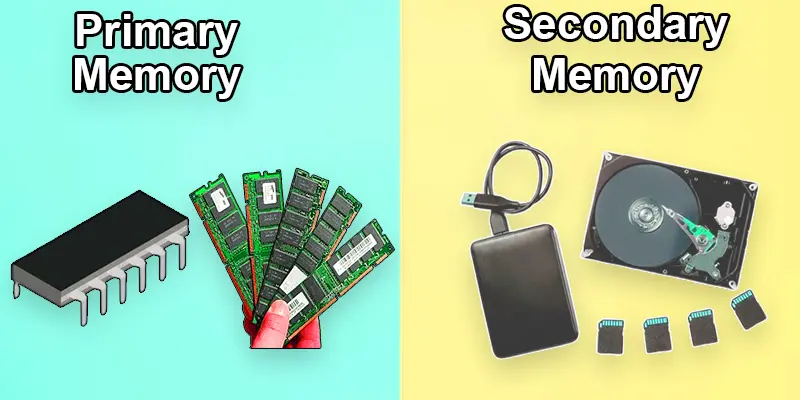
A computer’s primary and secondary memory are crucial parts of its storage system. Primary memory, like RAM and ROM, is fast and directly accessible by the CPU for immediate tasks but is typically temporary. HDDs and SSDs are examples of secondary memory that provide long-term file and data storage, guaranteeing that data is kept safe even when the computer is turned off.
What is the Difference Between Primary and Secondary Memory?
The primary difference between primary and secondary memory lies in their speed and purpose. Primary memory, like RAM, is fast and used for temporary storage to support active tasks, while secondary memory, such as HDDs and SSDs, is slower but provides long-term storage for files and data.
| Primary Mem | Secondary Mem |
|---|---|
| Temporarily stores data and instructions for active tasks. | Provides permanent storage for data and files. |
| RAM, Cache, Registers, ROM. | HDDs, SSDs, USB drives, and Memory cards. |
| RAM (Random Access Memory) and ROM (Read-Only Memory). | HDD (Hard Disk Drive), SSD (Solid-State Drive), etc. |
| When the power is turned off, the data is gone. | Non-volatile (information remains even in the absence of electricity). |
| Extremely quick access to data. | Less rapid than primary memory. |
| Limited storage capacity (measured in GB). | Larger capacity (measured in GB or TB). |
| Directly accessed by the CPU. | Indirectly accessed via input/output channels. |
| Supports active processes and running applications. | Stores data, programs, and operating systems long-term. |
| Expensive per GB. | Cheaper per GB. |
| Temporary storage. | Long-term storage. |
| Connected directly to the CPU. | Connected through external buses or storage controllers. |
| Content is frequently modified. | Content is relatively static and less frequently changed. |
| Handles active data and processes. | Handles archived or passive data. |
| Physically smaller and integrated with the motherboard. | Larger, separate components. |
| Depends on constant power to retain data. | Independent of power for data retention. |
| Data is lost when the computer shuts down. | Data is retained after power-off. |
| Requires continuous power to function. | Consumes less power in idle states. |
| Used for system operations and multitasking. | Used for backups, installations, and data archives. |
| Integrated onto the motherboard or CPU chip. | Installed as separate devices (internal or external). |
Final Thoughts
Understanding Memory Primary and Secondary Memory helps you know how computers store and use data. Primary memory, like RAM, works fast but is temporary, while secondary memory stores data permanently. This knowledge makes it easier to choose the right storage and improve computer skills. Keep practicing these concepts and explore more computer basics for better learning. Start your journey today and build a strong understanding of computers step by step.
FAQs
Can you give examples of both primary and secondary memory?
RAM and ROM are examples of primary memory, whereas USB drives, HDDs, and SSDs are examples of secondary memory.
What makes primary memory quicker than secondary memory?
While secondary memory requires additional steps to get data, primary memory is faster since it connects directly to the CPU, allowing for instant data access.
Is secondary memory more cost-effective than primary memory?
Yes, secondary memory is more cost-effective per gigabyte as it provides larger storage capacities at a lower price compared to primary memory.






- Be Respectful
- Stay Relevant
- Stay Positive
- True Feedback
- Encourage Discussion
- Avoid Spamming
- No Fake News
- Don't Copy-Paste
- No Personal Attacks
- Be Respectful
- Stay Relevant
- Stay Positive
- True Feedback
- Encourage Discussion
- Avoid Spamming
- No Fake News
- Don't Copy-Paste
- No Personal Attacks
