Difference Between Solid State Drive and Hard Disk Drive | Full Guide
Published: 14 Mar 2025
Are you confused about whether to choose SSD vs HDD for your computer? You are not alone. Many people face the same problem when buying or upgrading a laptop or PC. Your system feels slow, files take time to open, and programs lag during use. This can be frustrating, especially when you need speed for work, study, or gaming.
The truth is, the type of storage you choose can change your entire experience. A slow drive can waste your time, while a faster one can make your device feel brand new. But which one is right for you? That is where things get tricky. In this guide, we will clearly explain the difference between SSD and HDD in simple words.
You will learn how each one works, their pros and cons, and which option fits your needs best. No confusing terms. Just clear and useful information. By the end, you will feel confident in choosing the right storage. Let’s find the best option to make your system faster, smoother, and more reliable.
What is SSD and HDD?
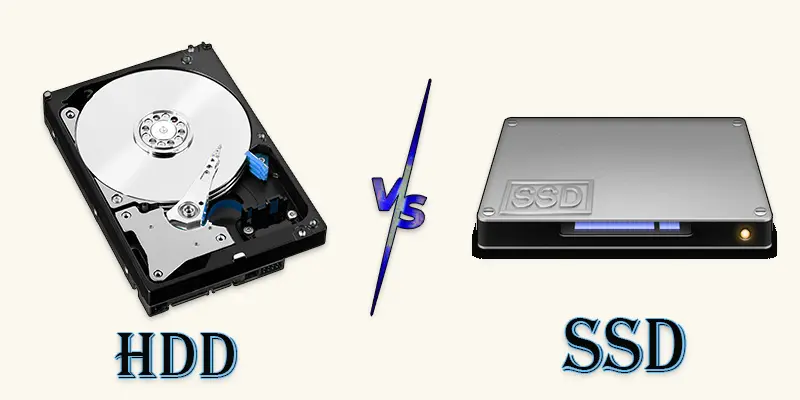
One kind of traditional storage device that uses spinning discs to read and write data is called a hard disc drive (HDD). Although it runs more slowly, it provides greater storage at a lesser cost. A solid-state drive (SSD), on the other hand, is a contemporary storage option devoid of moving components. It speeds up, shortens load times, and improves computer performance in general.
What is the Difference Between SSD and HDD Storage?
The main difference between SSD and HDD is speed SSDs are much faster, while HDDs offer more storage for a lower price.
| SSD | HDD |
|---|---|
| More durable and less likely to break if dropped. | Slower performance can lag. |
| Uses flash memory with no moving parts. | Uses spinning disks and moving read/write heads. |
| Slower, and takes more time to access data. | Fragile, moving parts can get damaged easily. |
| Uses less power, which is better for laptops. | Takes longer to start up. |
| Smooth, quick response time. | It can be replaced, but with slower improvement. |
| Silent operation. | Makes noise due to spinning disks. |
| Produces less heat. | Gets hotter due to moving parts. |
| Uses less power, better for laptops. | It can be replaced, but with slower improvement. |
| Lasts longer, wear depends on usage. | Mechanical parts wear out over time. |
| More expensive per GB. | Cheaper per GB. |
| Usually available up to 8TB for consumers. | Commonly available up to 16TB or more. |
| Faster file transfers. | Slower transfers take more time. |
| Reduces game load times significantly. | Slower game loading and texture loading. |
| Uses more power and drains the battery faster. | Budget storage, large file storage. |
| Harder to recover lost data. | Slower performance can lag. |
| Lighter, good for portable devices. | Heavier due to metal disks inside. |
| More common in newer laptops and PCs. | Still used in many desktop PCs. |
| Easy to install and upgrade. | Uses more power, and drains the battery faster. |
| Worth it for speed and performance. | Good for mass storage at a low price. |
Which One Should You Choose?
Choosing between SSD and HDD depends on your needs for speed, storage, and budget. Let’s see which one fits you best.
When to Choose an SSD (Solid State Drive)
- You want faster boot times and app loading.
- You work with large files like videos or photos (editors, designers).
- You play modern games and need quick level loading.
- You prefer quieter and cooler devices (no moving parts).
- Your laptop needs better battery life (SSDs use less power).
- You can pay a higher price per GB for better speed.
When to Choose an HDD (Hard Disk Drive)
- You need a large storage space (1TB, 2TB, or more) at a lower cost.
- You want a budget-friendly option for storing files.
- You don’t care about boot speed or app loading times.
- You use your PC mostly for basic tasks (web browsing, office work).
- You want to store movies, music, and backups without spending much.
- Your usage doesn’t involve frequent read/write cycles (HDDs are fine for cold storage).
Final Thoughts
The SSD vs HDD choice depends on your needs. SSDs offer fast speed, quick boot time, and better performance. HDDs give more storage at a lower cost. Both have their own benefits. If you want speed and better user experience, SSD is a smart choice. If you need large storage on a budget, HDD can still work well. Now it’s your turn. Think about your needs and upgrade wisely. Choose the storage that fits your goals and enjoy a faster, smoother system.
FAQs
Can SSDs fail over time?
Yes, SSDs can fail, but they last longer than HDDs in most cases. They wear out after many read/write cycles, but modern SSDs have a long lifespan.
Are SSDs more reliable than HDDs?
Yes, since SSDs don’t contain any moving parts, they are more dependable. As a result, they are less prone than HDDs to break from drops or wear out quickly.
Will upgrading to an SSD boost performance?
Yes, switching to an SSD will make your computer start faster and run smoother. Apps, games, and files will load much quicker than on an HDD.
How do external SSDs compare to external HDDs?
External SSDs are faster, lighter, and more durable than external HDDs. However, HDDs offer more storage for a lower price.
Which is better for long-term storage: SSD or HDD?
HDDs are better for long-term storage because they don’t wear out from inactivity. SSDs are great for speed, but can lose data if left unused for years.






- Be Respectful
- Stay Relevant
- Stay Positive
- True Feedback
- Encourage Discussion
- Avoid Spamming
- No Fake News
- Don't Copy-Paste
- No Personal Attacks
- Be Respectful
- Stay Relevant
- Stay Positive
- True Feedback
- Encourage Discussion
- Avoid Spamming
- No Fake News
- Don't Copy-Paste
- No Personal Attacks
