What is a Storage Devices? Examples, Purpose and its Characteristics
Published: 27 Jan 2025
Have you ever faced a situation where your computer says “storage full” right when you need it the most? Or maybe you lost important files because you didn’t understand where they were saved? This is a very common problem for many users. The reason behind it is a lack of understanding of Computer Storage Devices.
Storage is one of the most important parts of any computer system. It is where all your data, files, photos, videos, and software are saved. Without proper storage, your computer cannot keep or access anything. This can lead to confusion, slow performance, and even data loss, which can be frustrating.
Don’t worry—this guide will make everything simple for you. You will learn what computer storage devices are, how they work, and the different types available. We will explain everything in clear and easy words so you can understand it without any stress. By the end, you will clearly know how Computer Storage Devices help you save, manage, and access your data safely and efficiently.
What is a Storage Devices? (Simple Definition)
A storage device is a tool in a computer that saves data like files, photos, and programs. It lets you keep and access your information whenever you need it. Without a storage device, your computer wouldn’t be able to store anything for future use.
What are Some Examples of Storage Devices?
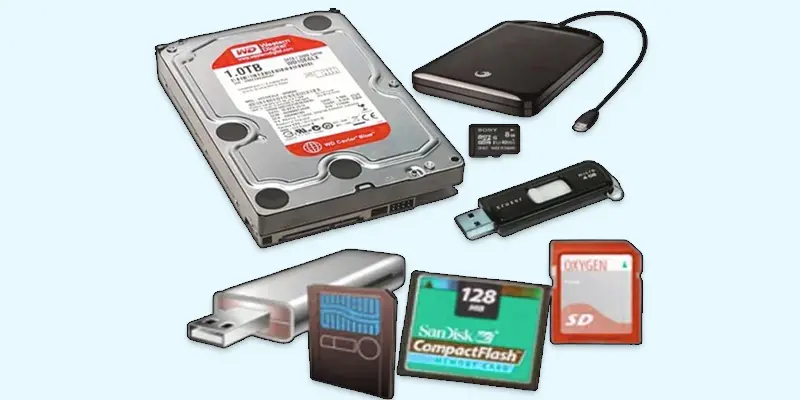
- Hard Disk Drive (HDD): The HDD is an older storage device that saves and accesses data through spinning disks.
- Solid State Drive (SSD): A flash memory-based, speedier storage device without any moving parts.
- USB Flash Drive: A small, portable device for transferring and storing data.
- External Hard Drive: A portable HDD or SSD for backing up or expanding storage.
- Memory Card: A little storage component found in phones, cameras, and other portable electronics.
- Network Attached Storage (NAS): NAS is a network-connected storage solution that allows data to be stored and accessed remotely by numerous devices.
- Cloud Storage: Online storage that lets you save and access files over the internet from any device.
What are the Characteristics of Storage Devices?
- Capacity: The amount of data a storage device can hold.
- Speed: How fast data can be read from or written to the device.
- Durability: How long the storage device lasts without failing.
- Size: The physical space the storage device occupies.
- Cost: The price of the storage device.
- Portability: How easy it is to carry the storage device around.
- Power Consumption: How much energy the device uses to operate.
- Security: Features that protect data from unauthorized access.
- Compatibility: Whether the device works with different computer systems.
- Reliability: How often the device experiences errors or failures.
What is the Purpose of Storage Devices in a Computer?
Storage devices are used to save and keep data, like documents, pictures, and videos. They help us access our files whenever needed, making them essential for everyday use. Here are some common purposes:
- Data Storage
- Data Access
- Data Backup
- Data Transfer
- Data Recovery
Data Storage
Data storage refers to the act of storing information on a device for future access. It allows you to keep files, pictures, and programs safe on your computer or other devices for future use.
Data Access
The process of getting stored information out of a storage device or opening it is known as data access. It allows you to find and use your files, programs, or data whenever you need them.
Data Backup
The process of creating copies of your most important files or information is known as data backup. This helps protect your data in case something goes wrong with your computer or storage device.
Data Transfer
Data transfer is the process of moving files or information from one device to another. This can happen through cables, wireless connections, or cloud services to share or back up your data.
Data Recovery
Data recovery refers to the process of retrieving deleted or lost files from a storage device. It helps recover important information if something goes wrong, like a device crash or accidental deletion.
Final Thoughts
Computer Storage Devices play a key role in saving and managing your data. From HDDs to SSDs and external drives, each type helps you store files safely and access them when needed. Now you understand how important storage is for computer performance and data safety. Choosing the right storage device improves speed, space, and reliability. Keep exploring more topics like memory types and computer hardware basics. Start learning step by step and build your tech skills with confidence.
FAQs
What is a network storage device?
A system that enables data access and storage across a network for numerous computers is known as a network storage device. It acts as a shared storage space for files, making it easier to access from different devices.
What is a storage unit?
A storage unit is a physical space or container used to store items or data. In the context of computers, it often refers to a device like a hard drive or SSD used to save and manage data.
What are secondary storage devices in computers?
Computers employ secondary storage devices to retain data indefinitely, even when the machine is not in use. They consist of components that store information, files, and applications for later use, such as solid-state drives (SSDs) and hard drives.
Why do we need storage devices?
We need storage devices to save and keep our data safe, like files, photos, and programs. Without them, we wouldn’t be able to access our information later or keep it for the long term. Storage devices make it easy to store, organize, and protect important data.
Where does a computer store data?
A computer stores data in storage devices like the hard drive, solid-state drive (SSD), or cloud storage. These devices keep your files, programs, and information safe so you can access them whenever needed.
Which device is used to store data in computer?
The device used to store data in a computer is called a storage device. Typical examples include hard drives (HDD), solid-state drives (SSD), and external drives. These devices hold files, programs, and other important data for long-term use.






- Be Respectful
- Stay Relevant
- Stay Positive
- True Feedback
- Encourage Discussion
- Avoid Spamming
- No Fake News
- Don't Copy-Paste
- No Personal Attacks
- Be Respectful
- Stay Relevant
- Stay Positive
- True Feedback
- Encourage Discussion
- Avoid Spamming
- No Fake News
- Don't Copy-Paste
- No Personal Attacks
