Worm vs Virus | Compare Malware Threats Easily
Published: 19 Jun 2026
Have you ever noticed your computer becoming slow, crashing often, or showing strange pop-ups? Many people face these problems without knowing the real cause. In many cases, a virus or worm may be responsible. These two types of malware can harm your device, steal important information, and create serious security risks.
The challenge is that many users think a virus and a worm are the same thing. They may sound similar, but they work in different ways. A virus usually needs a file or program to spread, while a worm can move from one device to another on its own. Knowing the difference can help you identify security risks and keep your information safer.
The good news is that you do not need to be a cybersecurity expert to stay safe. With the right knowledge, you can spot warning signs, avoid common mistakes, and reduce the risk of infection. In this guide, you will learn what a virus vs worm are, how they spread, their key differences, and the simple steps you can take to keep your devices secure.
What is a Computer Virus?
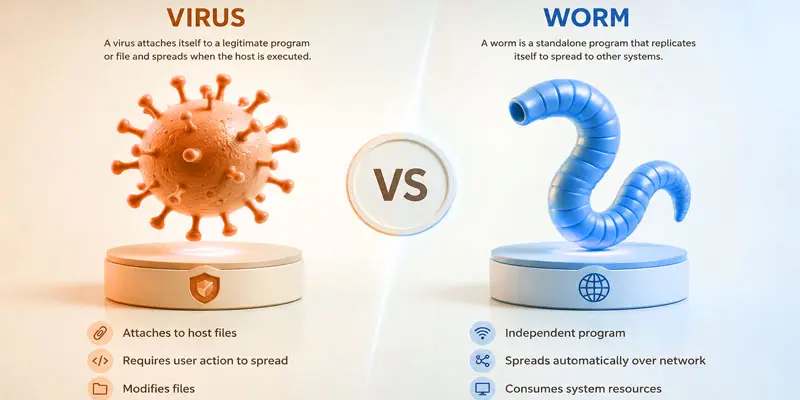
A virus is a form of malware that spreads to a computer and can damage files, programs, or system settings. It attaches itself to a file, program, or document and spreads when that infected item is opened or shared. A virus can reduce your computer’s speed, corrupt files, and harm overall system performance. For example, downloading software from an untrusted website may install a virus without your knowledge. Like a biological virus, it spreads from one host to another. Understanding computer viruses is the first step toward better cybersecurity and online safety.
What is a Computer Worm?
A computer worm is a type of malware that can spread from one device to another without needing a file or program to attach to. It uses network connections and security weaknesses to copy itself automatically. A worm spreads on its own and does not need any user interaction to move between systems. This allows it to infect many devices very quickly. For example, a worm can move through a company network and affect multiple computers in a short time. Computer worms can slow down systems, use network resources, and create serious cybersecurity problems if left unchecked.
What is the Difference Between Virus and Worm?
Knowing how viruses and worms differ is important since both are malware, but spread and impact systems in different ways.
| Virus | Worm |
|---|---|
| A form of malware that links itself to a file or program and spreads once the infected file is opened. | A type of malware that spreads on its own across networks without attaching to a file. |
| Michelangelo Virus. | Morris Worm. |
| Infected files, programs, or documents. | Networks and security vulnerabilities. |
| Usually slower. | Usually faster. |
| Individual files and programs. | Entire networks and connected devices. |
| Not always. | Often depends on networks. |
| Can slow down the device. | Can heavily slow down devices and networks. |
| Common. | Less common. |
| Network Bandwidth. | Rarely Frequently. |
| Sometimes. | Commonly. |
| Limited. | High. |
| Moderate. | Can be difficult in large networks. |
| Damage files or systems. | Spread rapidly and consume resources. |
| Data loss and downtime. | Network outages and service disruptions. |
| Antivirus scan and file cleanup. | Antivirus tools and network isolation. |
| Avoid unsafe downloads and attachments. | Keep systems updated and secure networks. |
| Files and applications. | Networks and connected devices. |
| Still a threat today. | Still a major cybersecurity threat today. |
How Viruses and Worms Spread?
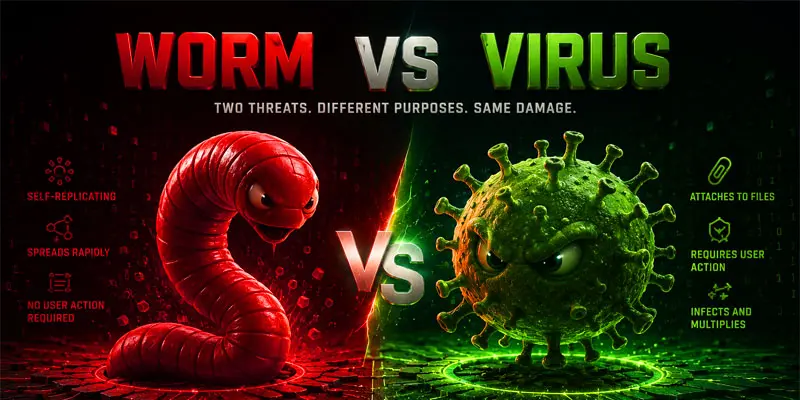
Both viruses and worms can infect devices, but they spread in different ways. Knowing how they move from one system to another can help you avoid malware infections and improve online security.
How Viruses Spread
- Open infected email attachments from unknown senders.
- Download software, games, or files from untrusted websites.
- Share infected files through USB drives or external storage devices.
- Click harmful links in emails, messages, or pop-up ads.
- Install pirated or modified software that contains malicious code.
How Worms Spread
- Exploit security weaknesses in operating systems or applications.
- Move automatically through unsecured networks.
- Spread between connected devices without user action.
- Use internet connections to find and infect vulnerable systems.
- Travel across large business or school networks very quickly.
Simple Prevention Tips
- Keep your software and operating system updated.
- Use trusted antivirus protection.
- Avoid suspicious downloads and links.
- Scan USB drives before opening files.
- Use secure and protected network connections.
What are the Effects of Viruses and Worms?
Viruses and worms can cause many problems for computers, mobile devices, and networks. One common effect is slower system performance. Infected devices may take longer to start, open programs, or complete basic tasks. These types of malware can also damage files, delete important data, or make documents unusable.
Some viruses steal personal information such as passwords, banking details, or login credentials. Worms often spread quickly across networks and use large amounts of bandwidth, which can slow down internet connections and disrupt normal operations. In business environments, a single infection can affect multiple devices and lead to downtime.
For example, a worm that enters one computer on an office network may spread to other connected systems within minutes. This can create security risks and costly disruptions. Understanding the effects of viruses and worms helps users take steps to improve cybersecurity and protect valuable data.
How to Protect Yourself from Viruses and Worms?
Protecting your devices from viruses and worms is easier when you follow a few simple cybersecurity habits.
- Install trusted antivirus software and keep it active at all times.
- Update your operating system and applications regularly. Updates often fix security weaknesses that malware can exploit.
- Avoid clicking suspicious links in emails, text messages, or social media posts.
- Download software only from trusted websites and official app stores.
- Scan USB drives and external storage devices before opening files.
- Create strong and unique passwords for each of your online accounts.
- Turn on your firewall to help block unauthorized access.
- Back up important files regularly to protect your data from loss or damage.
- Avoid opening email attachments from unfamiliar senders to reduce security risks.
- Use secure Wi-Fi networks and avoid sharing sensitive information on public networks.
Final Thoughts
Understanding the difference between a virus and a worm is an important step toward better cybersecurity. While both types of malware can damage systems and put data at risk, knowing how they spread helps you stay protected. Keep your software updated, use trusted security tools, and browse carefully online. Want stronger digital safety? Start applying these tips today and build safer habits for a more secure future.
FAQs
Which Is More Harmful, Worm or Virus?
A worm is often more harmful than a virus because it can spread automatically across networks without user action. This rapid spread can infect many devices quickly, causing network slowdowns, security issues, and widespread damage.
What Makes a Virus a Worm?
A virus does not become a worm because they are different types of malware. A virus needs an infected file or program to spread, while a worm spreads on its own through networks and security vulnerabilities.
Is Trojan a Virus or Worm?
A Trojan is not a virus or a worm. It is malware that hides as real software and tricks users into installing it, which can lead to data theft or system access.
Which Is the Strongest Virus?
There is no single strongest virus, but the ILOVEYOU Virus is often considered one of the most damaging malware attacks due to its rapid spread and massive global impact on computers and businesses.
What Are the 7 Classes of Viruses?
The seven common classes of computer viruses are:
Boot Sector Virus
File Infector Virus
Macro Virus
Multipartite Virus
Polymorphic Virus
Resident Virus
Direct Action Virus






- Be Respectful
- Stay Relevant
- Stay Positive
- True Feedback
- Encourage Discussion
- Avoid Spamming
- No Fake News
- Don't Copy-Paste
- No Personal Attacks
- Be Respectful
- Stay Relevant
- Stay Positive
- True Feedback
- Encourage Discussion
- Avoid Spamming
- No Fake News
- Don't Copy-Paste
- No Personal Attacks
