Worm in Computer | Simple Steps to Stay Safe Online
Published: 24 Jul 2026
Have you ever noticed your computer becoming slow, showing strange messages, or using too much internet data without any reason? A hidden threat may be the cause. A computer worm is a type of malware that can copy itself and spread from one device to another without needing much user action. It can affect system performance, steal information, and create serious security problems.
Many users think only clicking harmful links causes infections, but computer worms can also spread through weak security, outdated software, and unsafe networks. This makes them a common concern for both personal and business computers. In this guide, you will learn how a computer worm works, how it spreads, the warning signs to watch for, and the best ways to protect your device.
Understanding these threats helps you make safer choices online and keep your important data secure. Let’s explore simple steps to identify, prevent, and remove computer worms before they cause damage.
What is a Worm in Computer?
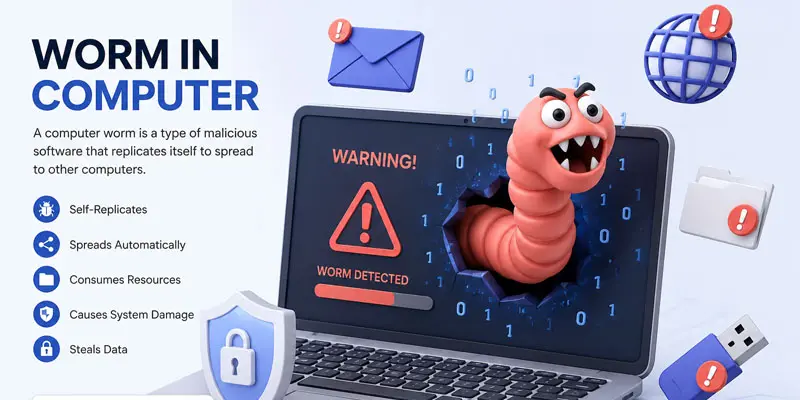
A computer worm is a harmful type of software that can copy itself and move from one system to another without needing any user to install it. It can enter through unsafe links, infected files, or weak network security. Unlike a virus, a computer worm does not need to attach itself to another file to spread. For example, a worm can infect one office computer and quickly move to other connected systems. It may slow down devices, steal data, or create security risks. Understanding computer worms helps users protect their devices from malware attacks.
How Do Computer Worms Spread?
A computer worm spreads by creating copies of itself and moving from one device to another. It does not always need user action to spread. Worms often use security weaknesses, unsafe activities, or connected networks to reach more systems. Common ways computer worms spread include:
- Email attachments and harmful links: Attackers may send emails with infected files or links. When a user opens the file, the worm can enter the computer and start spreading. For example, an email attachment that looks like a normal document may contain a hidden worm.
- Weak network security: Worms can move through connected devices on the same network. In an office, one infected computer may spread the worm to other computers that share the same network.
- Outdated software and security gaps: Old operating systems and applications may have weaknesses. Cybercriminals use these weaknesses to install malware like worms and gain access to devices.
- File sharing and infected downloads: Downloading files from unsafe websites or unknown sources can introduce a computer worm. A user may think they are downloading a useful program, but the file may contain malware.
- External devices: USB drives and other storage devices can also carry worms. Connecting an infected device to a computer may allow the worm to spread.
- Messaging apps and social platforms: Some worms spread through fake messages or links shared through chat apps. Users may click these links because they come from a familiar account.
How Does a Computer Worm Work?
Once it gets into a device, a worm starts making duplicates of itself and spreads those copies to other connected computers automatically, with no user involvement. It usually uses security weaknesses, unsafe downloads, or infected networks to move from one computer to another. Unlike a computer virus, a worm does not attach itself to files or depend on someone opening a program. It is able to spread freely through networks on its own.
After entering a system, the worm may use computer resources, damage files, collect information, or create a way for attackers to access the device. For example, a worm can infect one computer in an office and quickly spread to other connected computers.
Understanding how a worm works helps users detect malware threats early and take steps to improve computer security. Regular updates and safe online habits can reduce the risk of infection.
How Can You Tell If Your Computer Has a Worm?
A computer worm can hide inside your system and run in the background. It often slows down your device and causes unusual activity. Knowing the warning signs helps you detect malware early and protect your data. Here are common signs your computer may have a worm:
- Slow performance: Your computer becomes very slow without any clear reason. Even simple tasks take longer than usual.
- High internet usage: You may notice extra data usage even when you are not browsing. Worms often use the internet to spread.
- Unknown programs or files: Strange files or apps appear on your system that you did not install.
- Frequent crashes: Your computer may freeze, restart, or crash suddenly.
- Unusual emails or messages: Your accounts may send messages without your permission.
What are the Types of Computer Worms?
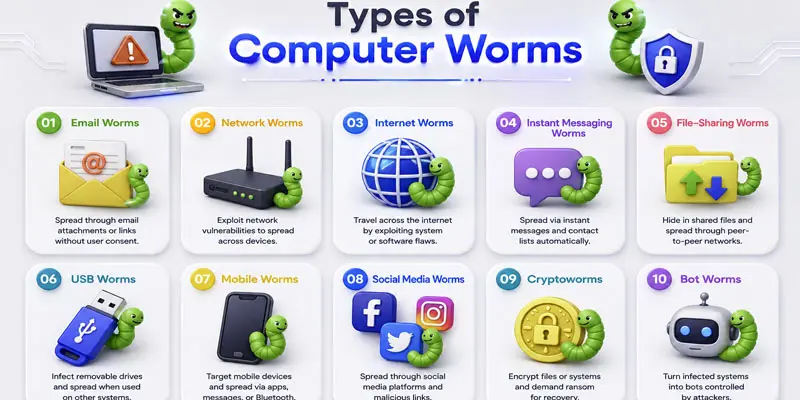
Computer worms come in different types, and each type uses a different method to spread, infect devices, and create security risks. Understanding these types helps users identify threats and protect their systems.
- Email Worms
- Network Worms
- Internet Worms
- Instant Messaging Worms
- File-Sharing Worms
- USB Worms
- Mobile Worms
- Social Media Worms
- Cryptoworms
- Bot Worms
Email Worms
Email worms are a type of computer worm that spreads through email messages. They usually enter a device through infected attachments or harmful links. When opened, the worm can copy itself and send emails to other users. Avoiding unknown emails and attachments helps protect your computer from email worms.
Network Worms
Network worms spread through connected computers and networks. They find weak security points to enter other devices without much user action. For example, a worm can infect one computer in an office and spread to other connected systems. Keeping networks secure and software updated helps prevent network worms.
Internet Worms
Internet worms spread through the internet and search for vulnerable computers to infect. They can move quickly between devices by using security weaknesses. These worms may slow down systems, steal data, or create security problems. Using updated software and security tools helps protect against Internet worms.
Instant Messaging Worms
Instant messaging worms spread through chat apps and online messaging platforms. They often send harmful links or files to a user’s contacts. When someone clicks the infected link, the worm can enter their device and spread further. Avoiding unknown messages helps protect against these worms.
File-Sharing Worms
File-sharing worms spread through shared files on computers and networks. They often hide inside downloaded files, games, or software from unsafe sources. If a user opens a file that is infected, the worm can enter the system and begin reproducing itself, which helps it move deeper into the device and beyond. Downloading files from trusted sources helps prevent these worms.
USB Worms
USB worms spread through infected USB drives and other external storage devices. When a user connects an infected USB to a computer, the worm can enter the system. It may copy itself and spread to other devices. Scanning USB drives before use helps keep computers safe.
Mobile Worms
Mobile worms are computer worms that target smartphones and mobile devices. They can spread through harmful apps, messages, or infected files. These worms may steal data, slow down the phone, or affect device security. Installing apps from trusted sources helps prevent mobile worms.
Social Media Worms
Social media worms spread through platforms like social networks and messaging features. They often use fake links, posts, or messages to trick users. When someone clicks the harmful content, the worm can spread to other accounts. Avoiding unknown links helps protect against social media worms.
Cryptoworms
Cryptoworms are a type of computer worm that can spread through networks and devices. They may encrypt files or lock access to important data. These worms can cause data loss and security problems. Regular backups and strong security tools help protect against cryptoworms.
Bot Worms
Some worms, called bot worms, can infect devices and convert them into part of a botnet. A botnet is a group of hacked computers that are controlled remotely by attackers. These worms may use devices for harmful activities without the user’s knowledge. Keeping software updated and using security tools helps prevent bot worms.
How Can You Prevent Computer Worm Attacks?
Computer worms can spread fast and damage your system. But you can stop them with simple safety steps. Good habits and basic security tools can protect your device from malware and cyber threats. Here are easy ways to prevent computer worm attacks:
- Use antivirus software: Install a trusted antivirus program. It helps detect and block worms before they enter your system. Run regular scans for better protection.
- Keep software updated: To stay safe, it is important to keep your operating system and apps updated. Updates help fix security problems and protect your device from new threats. Updates fix security gaps that worms use to enter devices. For example, an old Windows system is more at risk than an updated one.
- Avoid unknown links and emails: Do not click on strange links or open files from unknown senders. For example, a fake email may look real but contain a worm.
- Use strong network security: Secure your Wi-Fi with a strong password. This helps stop worms from spreading through connected devices in homes or offices.
- Download from trusted sources only: Also, always install software from safe and official sources like trusted websites or verified app stores. This reduces the chance of getting infected by malware. Unsafe downloads often carry hidden worms.
- Use a firewall: A firewall blocks harmful traffic and protects your system from outside attacks.
- Back up your data: Keep copies of your important files. If a worm attacks, you will not lose your data.
- Be careful with USB devices: Scan external drives before using them. Infected USBs can spread worms quickly.
Final Thoughts
A worm in a computer can spread quickly and harm your system, but smart security habits can reduce the risk. Keep your software updated, use trusted antivirus tools, and avoid unsafe links or files. Learning about malware, computer security, and online safety helps protect your data and devices. Start using these safety tips today and keep your computer secure with confidence.
FAQs
A worm is not a virus, but both are types of malware. A computer worm spreads on its own without attaching to files, while a virus needs a file or program to spread and activate.
WORM has no official full form in computer security. It is simply called a “worm” because it behaves like a real worm, moving through systems and networks by copying itself automatically.
In computers, worm does not stand for a full phrase. It refers to malware that self-replicates and spreads across devices, often using network security gaps, emails, or software vulnerabilities to infect systems quickly.
A computer worm is a type of malware that copies itself and spreads to other devices without user action. It can slow systems, steal data, and cause network problems, making cybersecurity protection very important.
Five examples of computer worms include ILOVEYOU, WannaCry, Conficker, Blaster, and Mydoom. These worms spread through emails, networks, and software flaws, causing major global cyber damage and system infections.






- Be Respectful
- Stay Relevant
- Stay Positive
- True Feedback
- Encourage Discussion
- Avoid Spamming
- No Fake News
- Don't Copy-Paste
- No Personal Attacks
- Be Respectful
- Stay Relevant
- Stay Positive
- True Feedback
- Encourage Discussion
- Avoid Spamming
- No Fake News
- Don't Copy-Paste
- No Personal Attacks
