Preventions of Computer Virus for Beginners Guide
Published: 22 Jun 2026
Have you ever turned on your computer and noticed it suddenly slowing down for no clear reason? Or seen strange pop-ups, missing files, or apps you never installed? If yes, your system may be at risk of a computer virus. Today, many people use computers for study, work, banking, and personal files. But most users do not think about safety until something goes wrong.
This is where computer virus prevention becomes very important. A computer virus is like a hidden problem that spreads inside your system and damages your files. It can steal data, break software, and even lock your important documents. The worst part is that it often enters silently through emails, downloads, or unsafe websites. But here is the good news. You can protect your computer with simple and smart steps.
You do not need to be a tech expert. Just a few safety habits can save your device from big problems. In this guide, you will explore simple and effective ways to protect your computer from virus threats. These steps will help you keep your data safe, your system fast, and your digital life stress-free. Let’s explore how you can stay protected every day.
What is a Computer Virus?
A computer virus is a type of harmful program that spreads inside your computer and damages files or slows down the system. It can enter your device without your knowledge and start affecting your data. This is why computer virus prevention is very important for every user.
A virus can hide in emails, downloads, or unsafe websites. For example, if you download a free game from an unknown site, it may carry a hidden virus that harms your computer. Once active, it can delete files, show pop-ups, or steal personal information. Unlike normal software, a virus works silently and spreads quickly from one file to another.
What are the Most Effective Computer Virus Prevention Tips?
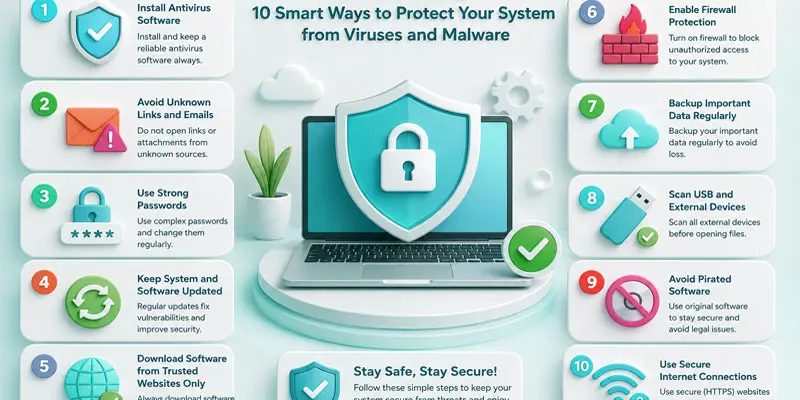
Keeping your computer safe is easy when you follow simple habits and learn the best ways to prevent computer viruses.
- Install Antivirus Software
- Avoid Unknown Links and Emails
- Use Strong Passwords
- Keep System and Software Updated
- Download Software from Trusted Websites Only
- Enable Firewall Protection
- Backup Important Data Regularly
- Scan USB and External Devices
- Avoid Pirated Software
- Use Secure Internet Connections
Install Antivirus Software
Use trusted antivirus software to keep your computer safe from viruses and dangerous files. It helps detect and remove threats before they can damage your system. Keep the antivirus updated so it can fight new viruses. This is one of the easiest ways to keep your computer safe.
Avoid Unknown Links and Emails
Avoid clicking on unknown links and emails because they may contain viruses or fake websites. These links can harm your computer or steal your personal data. Make sure to verify the sender’s identity before you open any email or attached file. Staying careful online helps keep your system safe and secure.
Use Strong Passwords
Use strong passwords to protect your computer and online accounts. A strong password should include letters, numbers, and special symbols. Do not use easy words like your name or birthday. Strong passwords make it hard for hackers to access your data.
Keep System and Software Updated
Keep your system and software updated to stay protected from viruses. Updates fix security problems and improve performance. They also block new threats that can harm your computer. Always install updates when they are available.
Download Software from Trusted Websites Only
Download software only from trusted and official websites. Unsafe sites may contain hidden viruses or harmful files. These files can damage your computer or steal your data. Always check the website before downloading anything.
Enable Firewall Protection
Enable firewall protection to keep your computer safe from unwanted access. A firewall acts like a security wall between your device and the internet. It blocks harmful traffic and suspicious connections. This helps protect your data and system from cyber threats.
Backup Important Data Regularly
Back up your important data regularly to stay safe from data loss. Regularly save backups of your files on cloud storage or an external drive to ensure your data stays protected and secure. If a virus attacks your computer, you can easily recover your data. This simple habit keeps your information secure and protected.
Scan USB and External Devices
Always scan USB drives and external devices before using them on your computer. These devices can carry hidden viruses or harmful files. A quick scan helps detect and remove threats early. This simple step keeps your system safe from infection.
Avoid Pirated Software
Avoid using pirated software because it often contains hidden viruses and malware. These harmful files can damage your computer or steal your data. Pirated programs also do not get security updates. Always use genuine software to keep your system safe and secure.
Use Secure Internet Connections
Use secure internet connections to protect your computer from cyber threats. Public or open Wi-Fi can be unsafe and may expose your data to hackers. Always prefer trusted and password-protected networks. This helps keep your information safe while browsing online.
How Do Computer Viruses Spread?
Computer viruses spread in many simple but dangerous ways. They often enter your system when you are not careful online. Understanding these methods helps you improve computer virus prevention and keep your data safe.
- Email attachments from unknown senders: Viruses often hide in email files. When you open or download these attachments, the virus can enter your computer. For example, a fake job offer email may contain a harmful file.
- Unsafe websites and fake download buttons: Some websites look real but are designed to spread malware. Clicking on fake “Download” or “Play” buttons can install a virus without warning.
- USB drives and external devices: A virus can move from one computer to another through infected USB drives. For example, using a friend’s pen drive without scanning it can risk your system.
- Pirated or cracked software: Free cracked software often carries hidden malware. Once installed, it can damage files or steal personal information from your computer.
- Phishing links on social media or messages: Hackers send fake links through WhatsApp, Facebook, or SMS. Clicking these links can lead to virus infection or data theft.
- Outdated software and systems: Old software has security gaps. Hackers use these weak points to inject viruses into your device.
- Public Wi-Fi networks: Unsecured Wi-Fi connections can allow attackers to send harmful data to your computer while you browse online.
Why is Computer Virus Prevention Important?
Computer virus prevention is important because it protects your data, device, and personal information from harm. A computer virus can make your system slow, remove important files, and even expose private information such as passwords and banking details. This can create serious problems in daily life.
For example, imagine you are working on a school project or office report, and suddenly your files get corrupted by a virus. You may lose all your hard work in seconds. This is why taking simple safety steps is very important. Good virus prevention also keeps your system fast and smooth. It helps you avoid unwanted pop-ups, crashes, and software errors. With strong protection, your computer works better and lasts longer.
- Protects personal and financial data.
- Prevents loss of important files.
- Keeps your computer fast and stable.
- Helps lower the chances of hacking attempts and malware infections.
By using antivirus software, safe browsing habits, and regular updates, you can avoid most cyber threats. Staying careful online is the easiest way to protect your digital life.
Final Thoughts
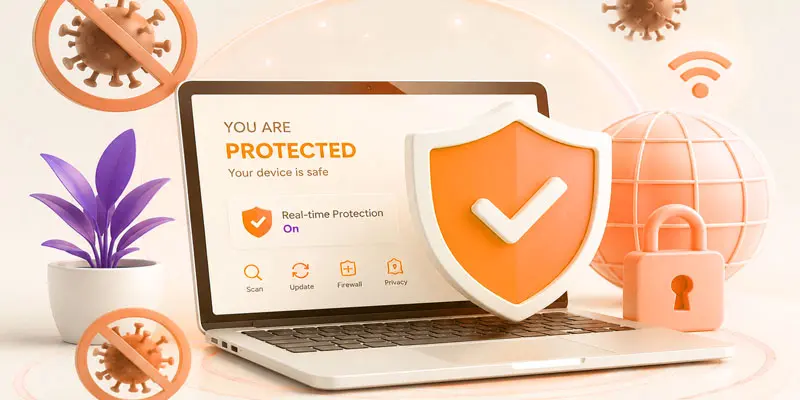
Computer viruses can cause slow performance, data loss, and serious security risks. But with the right habits, you can stay fully protected. Simple steps like using antivirus software, avoiding unknown links, and updating your system regularly make a big difference in computer virus prevention. Stay alert, stay updated, and always download files from trusted sources. Protecting your device today means saving your data for tomorrow. Start using these tips now and keep your computer safe, fast, and secure every day.
FAQs
What are the 5 popular computer anti-viruses?
The 5 popular computer antivirus programs are Avast, AVG, Norton, McAfee, and Kaspersky. These tools help protect your device from viruses, malware, and online threats. They scan files, block harmful websites, and keep your system safe and secure.
How can you prevent viruses?
You can prevent viruses by using antivirus software, avoiding unknown links, and downloading files from trusted websites. Always update your system regularly and scan USB devices before use. These simple steps keep your computer safe and running smoothly.
How do I choose virus protection?
You should choose virus protection based on real-time scanning, regular updates, and strong malware detection. Pick trusted brands like Norton or Avast. Also, check user reviews and ensure it works well with your device for complete protection.
How can we control viruses?
We can control viruses by installing antivirus programs, keeping software updated, and avoiding suspicious emails. Regular system scans and safe browsing habits also reduce risks. These actions help stop viruses from spreading and protect your important data.
Is Virus protection necessary?
Yes, virus protection is necessary because it keeps your computer safe from malware, hacking, and data loss. Without it, your personal files and passwords are at risk. It provides strong security and peace of mind for everyday use.





- Be Respectful
- Stay Relevant
- Stay Positive
- True Feedback
- Encourage Discussion
- Avoid Spamming
- No Fake News
- Don't Copy-Paste
- No Personal Attacks
- Be Respectful
- Stay Relevant
- Stay Positive
- True Feedback
- Encourage Discussion
- Avoid Spamming
- No Fake News
- Don't Copy-Paste
- No Personal Attacks
