Malware Types Explained for Beginners Guide
Published: 26 Apr 2026
Have you ever clicked a link or downloaded an app and later wondered if your phone or computer is still safe? Many people face this worry every day because online threats are growing fast. The biggest reason is not knowing about different malware types that silently attack devices and steal personal data. Malware exists in different forms, such as viruses, ransomware, spyware, and trojans, and each type works in its own way with different harmful actions.
The scary part is that most users do not even realize when their system is already infected. But the good news is that once you understand malware types, you can easily protect your devices and personal information. In this guide, you will learn the different malware types, how they spread, and simple ways to stay safe online.
We will break everything into simple explanations so even beginners can understand without any technical background. By the end, you will feel more confident about spotting threats and keeping your digital life secure. If you want to avoid data loss, hacked accounts, and slow devices, understanding malware types is your first step toward safety.
What are the Different Types of Malware?
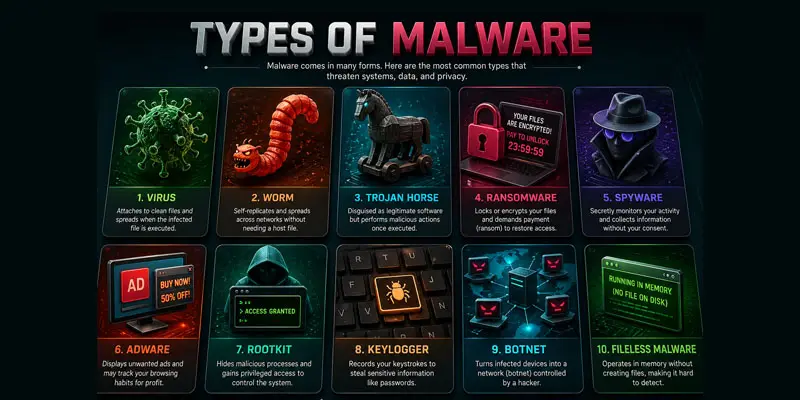
Malware is harmful software that attacks your device, steals data, or causes system damage. It can enter your phone, laptop, or computer without warning. Many users face security issues because they do not understand malware types and how they work. Once you learn the basics, it becomes much easier to protect your data and stay safe online. Below are the most common types of malware explained in simple words with real-life examples.
- Virus
- Worm
- Trojan Horse
- Ransomware
- Spyware
- Adware
- Rootkit
- Keylogger
- Botnet
- Fileless Malware
Worm
A worm spreads on its own without any user action. It moves from one device to another very quickly.
- It does not need a file or program to attach itself.
- It can slow down networks and overload systems.
Example: A worm spreads through a company’s network and slows down all office computers at the same time.
Trojan Horse
A Trojan Horse looks like a safe program but hides harmful code inside. This is one of the most dangerous malware types because it tricks users.
- It often appears as games, apps, or software updates.
- It can steal passwords and personal data.
Example: You install a free mobile game, but it secretly sends your banking details to hackers.
Adware
Adware shows unwanted ads on your screen. It is less dangerous but still annoying and risky.
- It slows down your device.
- It may redirect you to unsafe websites.
Example: You install a free app, and suddenly your phone shows nonstop pop-up ads.
Rootkit
A rootkit hides deep inside your system and gives hackers control over your device. It is very hard to detect.
- It stays hidden from antivirus tools.
- It allows attackers full access to your system.
Example: A hacker secretly controls your computer without you noticing any changes.
Virus
A virus is one of the most well-known malware types. It attaches itself to files or programs and spreads when you share or open them.
- It can delete files or damage your system.
- It spreads through email attachments or infected downloads.
Example: You download a free software file. Later, your computer starts deleting important documents automatically.

Keylogger
A keylogger records everything you type on your keyboard. It is often used to steal login credentials.
- It captures usernames, passwords, and messages.
- It runs in the background silently.
Example: You type your bank password, and the keylogger sends it to a hacker.
Botnet Malware
A botnet turns your device into a “zombie” controlled by hackers. Many infected devices are used together for attacks.
- It uses your device without permission.
- It can send spam or attack websites.
Example: Your computer becomes part of a large network used to send fake emails worldwide.
Fileless Malware
Fileless malware does not install files on your system. Instead, it runs directly in memory, making it harder to detect.
- It avoids traditional antivirus detection.
- It uses trusted system tools to attack.
Example: A hacker runs malicious code through your browser without downloading any file.
Spyware
Spyware secretly watches your online activity without your permission. It collects sensitive information in the background.
- It tracks passwords, browsing history, and messages.
- It runs silently without showing alerts.
Example: A spyware program records your login details when you enter your email or social media account.
Ransomware
Ransomware locks your files or system and demands money to unlock them. It is a major cyber threat today.
- It blocks access to important files.
- Attackers ask for payment (often in cryptocurrency).
Example: Your photos and documents get locked, and a message appears asking for $300 to restore access.

How Malware Enters Devices?
Malware can enter your phone, laptop, or computer in many simple but dangerous ways. Most users get infected without even realizing it. Hackers use tricks that look normal, so people click or download something unsafe. Understanding these methods helps you avoid common cyber threats and protect your personal data. Here are the most common ways malware enters devices:
- Phishing emails and fake messages: You may receive an email that looks real, like one from your bank or a delivery company. It may ask you to click a link or download a file. Once you click it, malware can enter your device. Example: You get an email saying, “Your parcel is delayed. Click here to track.” The link installs malware instead of showing tracking details.
- Unsafe downloads and cracked software: Downloading apps or software from unknown websites is risky. These files often carry hidden malware types like trojans or spyware. Example: You install a free “premium movie app,” but it secretly steals your phone data.
- Malicious websites and pop-ups: Some websites are designed to trick users. They show fake warnings like “Your device is infected, click here to fix it.” Clicking these links can install malware.
- USB drives and external devices: Malware can spread through infected USB drives or memory cards. Once you connect them, your device can also get infected.
- Fake apps on app stores or third-party sites: Some apps look real but contain harmful code. These apps may collect your personal information in the background.
- Public Wi-Fi networks: Hackers sometimes use open Wi-Fi to spread malware or steal data from connected devices.
Final Thoughts
Malware types like viruses, worms, trojans, spyware, and ransomware can seriously harm your devices and personal data if ignored. Understanding how they work helps you stay alert and avoid common online risks. By learning simple safety habits, you can protect your system, prevent malware attacks, and keep your information secure. Stay cautious, use strong protection tools, and always think before clicking anything online. Start applying these steps today to reduce malware risks and enjoy safer browsing every day.
FAQs
What is a common form of malware?
A common form of malware is a virus, which spreads through infected files or downloads and damages systems, and other frequent malware types include spyware, ransomware, and trojans that steal data or block device access.
How to identify malware?
You can identify malware by noticing slow device performance, unexpected pop-ups, unknown apps, or strange system behavior, and using antivirus scans helps detect spyware, ransomware, or other hidden malware infections early.
What is the most common method of malware?
The most common method of malware delivery is phishing emails or fake links that trick users into clicking, downloading infected files, or entering personal data, allowing cybercriminals to install malware on devices easily.
How to prevent malware?
You can prevent malware by avoiding suspicious links, using updated antivirus software, downloading apps from trusted sources, and practicing strong cybersecurity habits like safe browsing and regular system updates.
What are the components of malware?
The main components of malware include the infection mechanism, payload, and activation method, which together allow spyware, ransomware, or viruses to enter systems, perform harmful actions, and hide from detection tools.
What are signs of a malware infection?
A malware infection often shows warning signs like your device running very slowly, apps closing on their own, strange pop-ups, unknown software appearing, or files getting changed or missing. Using antivirus scans helps confirm and remove hidden malware or spyware threats quickly.






- Be Respectful
- Stay Relevant
- Stay Positive
- True Feedback
- Encourage Discussion
- Avoid Spamming
- No Fake News
- Don't Copy-Paste
- No Personal Attacks
- Be Respectful
- Stay Relevant
- Stay Positive
- True Feedback
- Encourage Discussion
- Avoid Spamming
- No Fake News
- Don't Copy-Paste
- No Personal Attacks
