Components of DBMS | Simple Guide for Beginners
Published: 22 Sep 2024
Have you ever wondered how websites, apps, and banking systems manage huge amounts of data without getting confused or slow? Behind the scenes, there is a powerful system working quietly to keep everything organized. That system is called a DBMS, and its internal parts are known as the components of DBMS.
Many beginners feel confused when they hear terms like query processor, storage manager, or transaction manager. It can feel complex and hard to understand. But don’t worry. You are not alone in this struggle.
In this guide, we will break down the components of DBMS in a simple and clear way. You will learn how each component works and why it is important in real life. We will also use easy examples to make things more understandable. By the end, you will feel confident and clear about how a DBMS actually works. Let’s make learning simple and stress-free.
What are the Components of DBMS (System View)?
The system view of a Database Management System (DBMS) shows how all parts work together to manage data. It focuses on the main building blocks that help store, process, and use data in real life. Let’s break it down in a simple way.
- Hardware
- Software
- Data
- Procedure
- Data Access Language
- DBMS Engine
- Reporting Tools
- People
- Query Processor
- Users
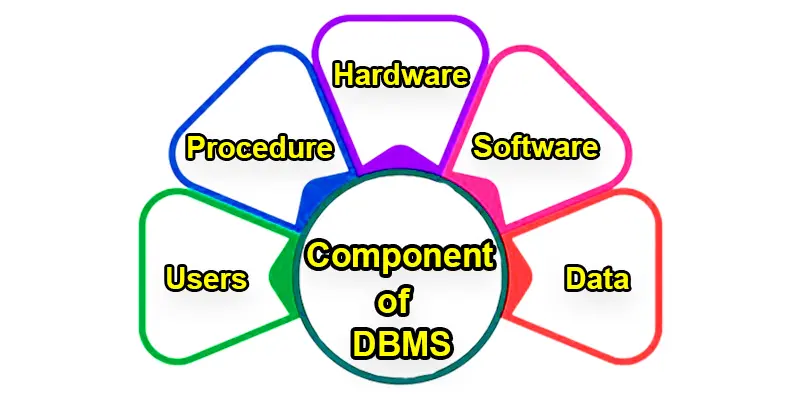
Hardware
Hardware in a DBMS refers to the physical devices like computers, servers, and storage systems where the data is stored and processed. It provides the foundation for the DBMS to run and store large amounts of information. Without hardware, the database wouldn’t have a place to keep or manage the data effectively.
Software
Software in a DBMS is the actual program that controls how data is stored, managed, and accessed. It acts like a manager, making sure everything runs smoothly by processing user requests and organizing the data. The software ensures the data is secure, easy to retrieve, and updated when needed.
Data
Data in a DBMS is the actual information stored, like names, numbers, addresses, or anything else you need to keep track of. It can be organized into tables for easy access and management. This data is the most important part of the system because it’s what you work with, retrieve, and update when needed.
Procedure
A procedure in a DBMS is a set of instructions or steps that help the system perform specific tasks, like adding or retrieving data. It guides the software on how to handle certain actions, ensuring everything is done in an organized way. Procedures help make sure tasks are completed efficiently and correctly every time.
Data Access Languages
Data Access Language is a special type of language, like SQL, that lets you communicate with the database to get or change information. It allows you to ask the database questions, such as “Show me all customers,” or make updates, like “Add a new product.” This language makes it easy to interact with the data stored in the database.
DBMS Engine
The DBMS Engine is the core part of the database system that handles how data is stored, retrieved, and managed. It’s like the engine of a car, making everything run smoothly behind the scenes. The DBMS Engine processes requests and ensures the data is organized and accessible whenever needed.
Reporting Tools
Reporting tools in a DBMS help you create and view reports based on the data in the database. They organize the information into summaries, charts, or tables, making it easy to understand trends and patterns. These tools give you clear insights from your data, helping you make informed decisions.
People
In a DBMS, “People” refers to the users who interact with the system, such as end users, database administrators, and developers. End users access and use the data, administrators manage the database and ensure it runs smoothly, and developers create applications that work with the database. Each person plays a role in keeping the database system functional and useful.
Query Processor
The query processor is a part of the DBMS that translates your requests (queries) into instructions the system can understand. It acts like a middleman between you and the database, making sure your questions, like “Show me all orders,” are processed correctly. This helps retrieve the exact information you need from the database quickly and efficiently.
Users
Users are the people who interact with the DBMS to access and manage data. They can include end-users who use the database to find information, database administrators who maintain and manage the system, and developers who create applications that use the database. Each user has specific roles and tasks to ensure the database runs smoothly and efficiently.

What are the Components of DBMS (Technical View)?
The technical view of a DBMS focuses on how the system works internally. It shows the key parts that manage data, process queries, and keep everything running smoothly. Let’s understand each component in simple words.
- Storage Manager
- Query Processor
- Transaction Manager
- Buffer Manager
- Authorization & Integrity Manager
- Data Dictionary
- Database Engine
Storage Manager
The storage manager handles how data is stored and retrieved from the database. It works like a file manager on a computer. It decides where data is saved on the disk and how it is organized. For example, when you save a student record, the storage manager places it in the correct location and makes it easy to access later.
Query Processor
The query processor helps users communicate with the database. It takes user queries and converts them into a format the system understands. Then it finds the required data and returns results. For example, when you search for a product online, the query processor finds matching data and shows it to you quickly.
Transaction Manager
The transaction manager controls all database transactions. It makes sure each transaction is completed fully or not at all. This keeps data safe and accurate. For example, in banking, when you transfer money, the transaction manager ensures the amount is deducted and added properly without errors.
Buffer Manager
The buffer manager controls temporary memory (cache) used to speed up data access. It stores frequently used data in memory so the system can access it faster. For example, if you open the same web page again, the system loads it quickly because of cached data managed by the buffer manager.
Authorization & Integrity Manager
This component controls who can access the database and ensures data is correct. It checks user permissions and protects sensitive information. For example, only authorized bank employees can view customer details, while others are blocked for security and data integrity.
Data Dictionary
The data dictionary stores information about the database itself. It contains details like table names, columns, and data types. It acts like a guide for the DBMS. For example, it tells the system what kind of data is stored in each table, helping maintain structure and consistency.
Database Engine
The database engine is the core part of the DBMS. It manages all operations like storing data, processing queries, and handling transactions. It works like the brain of the system. For example, when multiple users access data at the same time, the database engine ensures everything runs smoothly without errors.
What Role Does Database Management Systems Play in a Business?
- Organizes Information: It helps keep all the business data, like customer details and inventory, neatly arranged and easy to find.
- Improves Efficiency: It speeds up processes by automating tasks and making data handling smoother.
- Supports Decisions: It provides important insights from data to help make better business decisions.
- Ensures Security: It keeps data safe by controlling who can access or change it.
- Facilitates Sharing: It allows different parts of the business to access and use the same data, improving teamwork.
Final Thought
The components of DBMS work together to store, manage, and protect data in an efficient way. From the storage manager to the query processor and transaction manager, each part plays an important role in keeping data organized and secure. We also learned how users, tools, and system parts connect to make the database system work smoothly. Understanding these components helps you see how real systems like banking apps and websites handle data every day. Now you can explore more and build your knowledge with confidence. Start practicing and learning more about database management systems. Keep going, and you will master it step by step.
FAQs
What are the 10 DBMS names?
Popular DBMS examples are: MySQL, Oracle, SQL Server, PostgreSQL, SQLite, IBM DB2, MongoDB, MariaDB, Amazon RDS, and Firebase. These are used in real-world applications.
What are the 12 keys in DBMS?
In some advanced DBMS guides, the 12 keys include all basic and special keys like Primary, Super, Foreign, Alternate, Composite, and others. These help define rules and relationships between data.
What are the 4 objects of DBMS?
They are: Tables, Queries, Forms, and Reports. These objects help users interact with and analyze the data.
What is classification of DBMS?
DBMS can be classified based on data structure (like hierarchical, network, relational, etc.) or usage (like centralized or distributed). This helps in choosing the right DBMS for different needs.
What is SQL in DBMS?
SQL (Structured Query Language) is the language used to talk to a database. It helps you create, read, update, and delete data.
What are queries?
Queries are commands used to get or change data in a database. They help users ask questions and get answers from the data.




- Be Respectful
- Stay Relevant
- Stay Positive
- True Feedback
- Encourage Discussion
- Avoid Spamming
- No Fake News
- Don't Copy-Paste
- No Personal Attacks
- Be Respectful
- Stay Relevant
- Stay Positive
- True Feedback
- Encourage Discussion
- Avoid Spamming
- No Fake News
- Don't Copy-Paste
- No Personal Attacks
