What is Firewall Network | Purpose, Function, Examples and its Types
Published: 15 Feb 2025
Have you ever worried that someone might steal your data while you browse the internet? Or maybe you’ve heard about hackers breaking into systems and felt unsure how to stay safe. In today’s digital world, online threats are real, and they can happen anytime. This is where a firewall becomes your first line of defense.
So, what is a firewall, and why does it matter so much? A firewall acts as a protective shield for your computer or network. It checks incoming and outgoing traffic. It blocks harmful data and allows safe connections. Without it, your system stays open to cyber attacks, viruses, and hackers.
Many people use the internet daily, but don’t understand how to protect their devices. That’s a big risk. The good news is that learning about firewalls is simple. Once you understand how they work, you can take better control of your online safety. In this guide, you will learn what a firewall is, how it works, and why it is important. Let’s make your digital life safer and stress-free.
What is the Firewall? (Clear Definition)
A firewall is a tool that keeps your computer or network safe from dangerous internet traffic. It monitors data that comes in and goes out, and blocks anything unsafe. Think of it like a filter that only allows trusted data to pass. For example, when you browse a website, the firewall checks if it is safe before allowing access. This helps improve network security and keeps your data protected from hackers and viruses.

What are the Examples of Firewalls?
By limiting what data can enter and exit your network, a firewall is a security tool that helps keep it safe
- Windows Firewall: Built into Windows computers, it blocks unwanted traffic to keep your system safe.
- Router Firewall: Protects your home network by filtering out harmful internet traffic.
- Cisco ASA: A hardware firewall used by businesses to secure their networks from external threats.
- pfSense: A free, open-source firewall software that provides advanced security features.
- Cloudflare Firewall: A cloud-based firewall that protects websites and online services from attacks.
What is the Purpose of a Firewall?
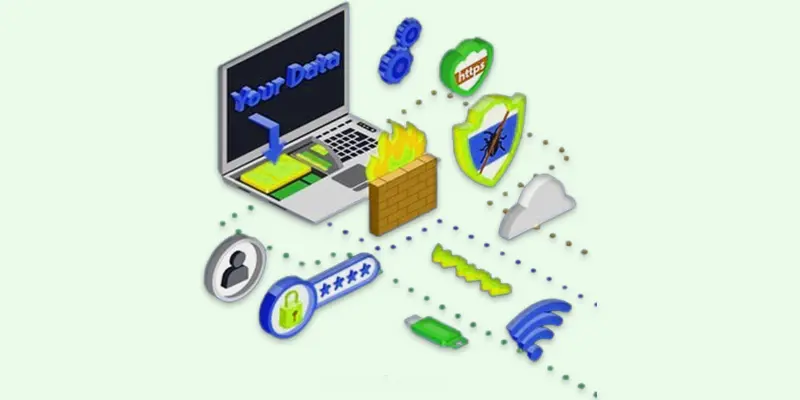
A firewall’s purpose is to protect networks by blocking harmful traffic and allowing safe connections.
- Network security
- Traffic filtering
- Preventing cyber attacks
- Blocking unauthorized access
- Protecting sensitive data
Network Security
Network security is the protection of computers and data from hackers, viruses, and cyber threats. It uses tools like firewalls, antivirus software, and encryption to keep networks safe. This helps prevent data theft, malware attacks, and unauthorized access.
Traffic Filtering
Traffic filtering is a security process that controls which data can enter or leave a network. Firewalls check internet traffic and block harmful or unwanted connections. This helps protect devices from hackers, viruses, and cyber threats.
Preventing Cyber Attacks
Preventing cyber attacks means stopping hackers, viruses, and malware from harming your devices or stealing data. Firewalls, antivirus software, and strong passwords help keep networks safe. Regular updates and security checks also protect against new threats.
Blocking Unauthorized Access
Blocking unauthorized access means stopping unknown users from entering your network or system. Firewalls and passwords help keep hackers and unwanted connections out. This protects personal and business data from theft or damage.
Protecting Sensitive Data
Protecting sensitive data means keeping important information safe from hackers and cyber threats. Firewalls, encryption, and strong passwords help prevent unauthorized access. This keeps personal, financial, and business data secure.
What Should Beginners Know About Firewalls in Computers?
A firewall in a computer is a security tool that helps protect it from harmful internet traffic. It acts like a barrier, blocking unwanted access and allowing safe connections. Firewalls prevent hackers, viruses, and other threats from reaching your computer.
By monitoring and controlling network traffic, a firewall helps keep your data and personal information secure. It can be software installed on the computer or a physical device connected to the network.
What is a Firewall and How Does it Work?
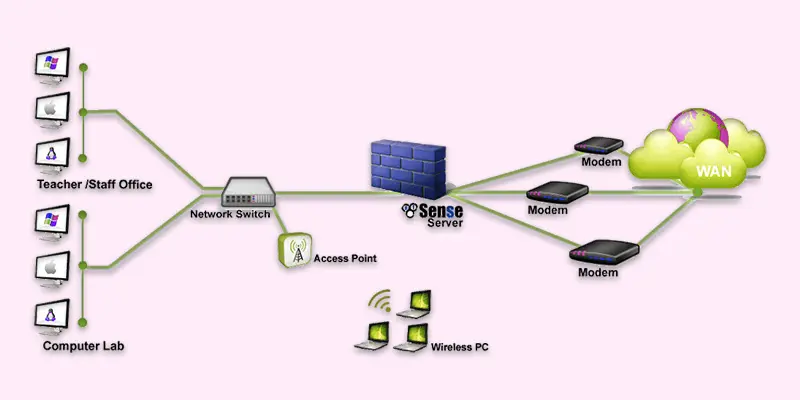
A firewall protects networks by controlling internet traffic and blocking threats.
- Traffic Monitoring: Checks incoming and outgoing data.
- Blocking Cyber Threats: Stops hackers, malware, and viruses.
- Access Control: Allows or denies network connections.
- Network Segmentation: Separates different parts of a network for better security.
- Logging and Monitoring: Keeps records of network activity to detect suspicious behavior.
What are the Types of Firewall?
Firewalls come in several varieties, and each one is designed to provide a certain level of network protection. Here is a brief summary of the primary firewall types:
- Hardware Firewall
- Firewall of the Next-Generation Firewall (NGFW)
- Packet-Filtering Firewall
- Software Firewall
- Stateful Inspection Firewall
- Proxy Firewall
Packet-Filtering Firewall
A packet filtering firewall checks each piece of data (packet) that enters or leaves your network. It allows or blocks the data based on set rules, like IP addresses or ports. Example: A home router often uses a packet-filtering firewall to protect your devices from unwanted internet traffic.
Stateful Inspection Firewall
A stateful inspection firewall verifies that incoming data is a part of a legitimate session by monitoring the status of open connections. It’s smarter than basic packet filters, offering more security. Example: A business network may use a stateful inspection firewall to allow only legitimate data from trusted connections.
Proxy Firewall
A proxy firewall retrieves data on your behalf by acting as a go-between for your network and the internet. It hides your network’s real identity for better security. Example: A school uses a proxy firewall to block access to certain websites while allowing students to browse safely.
Firewall of the Next Generation
Advanced security techniques like application control and intrusion prevention are combined with conventional firewall characteristics in a next-generation firewall. It provides deeper and smarter protection. Example: A company uses an NGFW to block harmful traffic and prevent attacks while controlling which apps employees can use.
Software Firewall
A software firewall is placed directly on a computer to keep an eye on and manage network traffic, both inbound and outbound. It shields the gadget from online dangers and illegal access. Example: A personal laptop may use a software firewall, like Windows Defender, to block harmful connections from the internet.
Hardware Firewall
A hardware firewall acts as a physical barrier between your network and the internet, shielding all devices from potential online risks. Before it reaches your network, it filters out malicious traffic. Example: A small business might use a hardware firewall to secure its entire network and prevent external threats from affecting all computers.
Final Thoughts
A firewall is a key tool for protecting your computer and network from cyber threats. It filters traffic, blocks harmful access, and keeps your data safe. By using a firewall, you improve your network security and reduce online risks. Now is the time to act. Check your firewall settings, keep it updated, and stay aware of online safety. Take control today and protect your digital world with confidence.
FAQs
How does the Great Firewall work?
The Great Firewall of China blocks certain websites and online content by monitoring internet traffic. It filters and restricts access to foreign sites that the government deems inappropriate.
What does a firewall do?
A firewall helps protect your computer or network by blocking unwanted traffic. It controls which data can come in or go out to keep your system safe from threats.
What firewall should I use?
The firewall you choose depends on your needs. For home use, Windows or Mac’s built-in firewall is fine. For businesses, a hardware firewall like Cisco or a software firewall like Zone Alarm could be better.
What are firewalls used to protect against?
Firewalls protect against cyber attacks, viruses, hackers, and unauthorized access. They help keep your personal information and network secure.
Which firewall is best?
The best firewall depends on your needs. For personal use, software like Norton or Bitdefender is good. For businesses, hardware firewalls like SonicWall or Fortinet offer strong protection.
Can a firewall prevent DDoS attacks?
Firewalls can help reduce the impact of DDoS attacks, but are not always enough to fully stop them. Specialized DDoS protection services are needed for complete defense.





- Be Respectful
- Stay Relevant
- Stay Positive
- True Feedback
- Encourage Discussion
- Avoid Spamming
- No Fake News
- Don't Copy-Paste
- No Personal Attacks
- Be Respectful
- Stay Relevant
- Stay Positive
- True Feedback
- Encourage Discussion
- Avoid Spamming
- No Fake News
- Don't Copy-Paste
- No Personal Attacks
