Difference Between Virus and Malware in Simple Words
Published: 28 Apr 2026
Have you ever seen your computer slow down or act strangely without any clear reason? You may wonder, “Is this a virus or something else?” This confusion is common. Many people think all threats are the same, but the truth is different. The topic of malware vs virus can feel confusing, especially if you are not from a tech background.
Here’s the problem. If you don’t know the difference, you may choose the wrong fix. That can cost you time, money, and even your personal data. Cyber threats are growing fast. A tiny error can cause serious damage. Don’t worry. You are in the right place. In this guide, you will clearly understand what malware and viruses are.
You will learn how they work and how they are different. We will also share simple tips to protect your device. By the end, you will feel confident. You will know exactly what to do when your system is at risk. Let’s break it down in a simple way.
What is Malware?
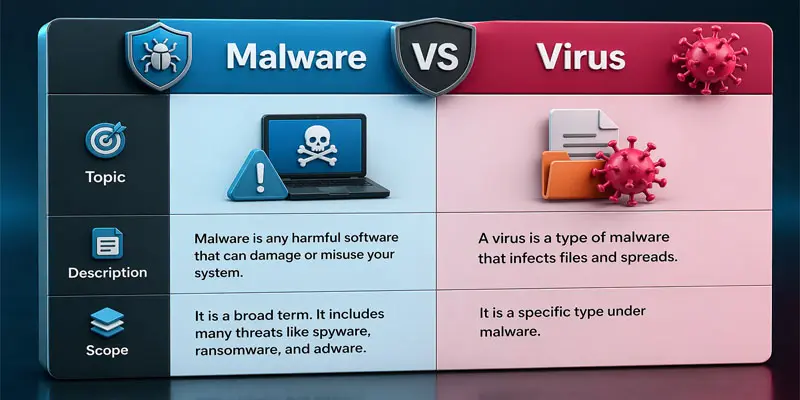
Malware is harmful software that can damage your computer or steal your personal information. The word comes from “malicious software.” It includes viruses, spyware, ransomware, and other threats. Malware can enter your device through unsafe downloads, email attachments, or fake websites. For example, clicking a suspicious link may install malware without you knowing. It can slow your system, show unwanted ads, or even lock your files until you pay money.
What is a Virus?
A computer virus is a kind of malware that spreads by linking itself to files or programs. It needs user action, like opening a file or clicking a link, to start. Once active, it can damage data, slow your system, or spread to other devices. For example, downloading a cracked software file may infect your computer. Viruses often hide inside email attachments or unsafe websites.
What is the Difference Between Malware and a Virus?
Keeping your device protected from malware and viruses is essential for safe browsing and securing your personal data. Many people think they are the same, but they are not. Knowing this helps you protect your computer from cyber threats and data theft. Below is a simple comparison to make it easy for beginners.
| Malware | Virus |
|---|---|
| Malware is harmful software that damages systems or steals data. | A Virus is a type of malware that infects files and spreads between programs. |
| Malware is a broad category that includes all types of harmful software. | Virus is only one specific category that targets file infection only. |
| It includes ransomware, spyware, adware, trojans, worms, and other threats. | Virus is only focused on self-replicating programs that infect files. |
| Malware can work independently and does not always need a host file. | Virus always needs a host file or program to activate and spread. |
| Malware spreads through downloads, email links, websites, and mobile apps. | Virus spreads when infected files are opened or shared by users. |
| It enters devices through unsafe downloads, fake websites, or phishing emails. | Virus enters mainly through infected files, attachments, or shared programs. |
| Some malware types do not replicate themselves and only perform actions. | Virus always replicates itself by copying into other files or programs. |
| Malware may run silently without user knowledge or permission. | Virus often needs user action like opening a file or program. |
| Malware can steal data, show ads, lock systems, or track activity. | Virus mainly damages or corrupts files and system programs. |
| Malware is often designed to steal passwords, banking details, and personal data. | Virus rarely focuses on stealing data from users or systems. |
| Malware is harder to detect because it uses advanced hiding techniques. | Virus is easier to detect using standard antivirus software tools. |
| Examples include ransomware, spyware, adware, trojans, and worms. | Examples include file infecting viruses and boot sector viruses. |
| Malware can be controlled remotely by cybercriminals or hackers. | Virus does not need remote control and spreads automatically. |
| Malware removal often requires advanced antivirus or anti-malware tools. | A Virus can often be removed using basic antivirus software. |
| Fake downloads, cracked software, and unsafe apps often contain malware. | Infected USB drives or files can spread viruses between computers. |
| Malware needs strong cybersecurity protection and monitoring strategies. | A Virus needs antivirus protection and safe file handling practices. |
| It is part of the overall cybersecurity threats that affect devices, networks, and users. | A Virus is a specific cybersecurity threat focused mainly on file infection and spread. |
How to Protect Against Malware and Viruses?
Keeping your device safe from malware and viruses is essential for secure browsing and protecting your data.
- Use a strong antivirus program: Install trusted antivirus software on your device. It helps find and remove threats like malware, spyware, and viruses before they can harm your system. For example, it can block a harmful file download automatically.
- Keep your system updated: Always update your operating system, browser, and apps. Updates fix security bugs that hackers use to spread malware and computer viruses.
- Avoid clicking unknown links: Do not click on suspicious emails, ads, or messages. Many cyber attacks start from phishing links that install malicious software on your device.
- Download from trusted sources only: Always download apps and software from official websites or app stores. Fake websites often hide malware inside free downloads or cracked software.
- Use strong passwords: by making each account password unique and hard to guess. This helps protect your personal data from hackers and malware attacks.
- Enable firewall protection: A firewall acts like a security wall between your device and the internet. It blocks unwanted access and helps stop viruses and malware infections.
- Avoid using unknown USB devices: Do not plug in random USB drives. They may carry viruses that can spread to your computer instantly.
- Back up your data regularly: Save copies of your important files on cloud storage or external drives. If ransomware or malware attacks, you will not lose your data.
- Be careful with email attachments: Open attachments only from trusted senders. Many viruses spread through fake invoices, resumes, or documents.
- Use safe browsing habits: Visit secure websites that start with “https”. Avoid unsafe or unknown websites that may contain hidden malware scripts.
How Malware and Viruses are Similar?
Malware and viruses are similar because both are harmful software designed to damage or control your computer. They are part of cyber threats that target users, steal data, or slow down devices. Both can enter your system without your permission and create security problems.
For example, you may download a free app from an unsafe website. That file can contain either malware or a virus. Once it runs, it can affect your system performance and security. Here are their main similarities:
- Both are dangerous for computers, mobile phones, and networks.
- Both can spread through email attachments, downloads, or infected files.
- Both can steal personal data like passwords and banking details.
- Both can slow down your device or cause system errors.
- Both require antivirus or security tools for protection.
How Malware and Viruses Infect Devices?
Malware and viruses infect devices when users unknowingly allow them inside. They often hide in unsafe files, websites, or downloads. Once they enter, they can damage your system, steal data, or slow down performance.
One common way is through email attachments. For example, a fake invoice file may look real but contain a virus. When you open it, the infection starts. Here are common infection methods:
- Downloading apps or software from unsafe websites.
- Opening unknown or suspicious links in emails or messages can be risky.
- Using USB drives or external storage devices that are infected can spread malware.
- Visiting fake or harmful websites.
- Installing cracked or pirated software.
Which is More Dangerous, Malware or a Virus?
Malware is more dangerous than a virus because it is a broad category that includes many types of cyber threats. It can steal data, lock files, spy on users, and even control a device without permission. A virus is only one type of malware, and it mainly spreads by infecting files and programs.
For example, ransomware (a type of malware) can lock your entire computer and demand money to unlock it. On the other hand, a virus may mainly damage or corrupt your files. Here is a simple comparison:
- Malware has many harmful types, like spyware, trojans, and ransomware.
- A virus is limited to file infection and spreading.
- Malware can work silently in the background.
- A virus usually needs user action to activate.
- Malware can cause financial loss and data theft.
- The virus mainly affects system files and performance.
Final Thoughts
Now you understand the key difference in malware vs virus. Malware is a broad threat, while a virus is just one type of it. Understanding this helps you pick the right security protection. Use strong antivirus tools, stay alert online, and follow basic cybersecurity tips. Want better device safety? Start applying these steps today and keep your data secure with confidence.
FAQs
What is the difference between anti-virus and malware?
Anti-virus is a security tool that protects your device, while malware is harmful software that damages systems or steals data. Antivirus removes threats, but malware includes viruses, spyware, ransomware, and trojans.
Can antivirus stop malware?
Yes, antivirus can stop many types of malware by detecting and removing them. However, advanced threats like ransomware may need extra anti-malware tools for full protection and stronger cybersecurity safety.
What kills a computer virus?
A trusted antivirus program kills a computer virus by scanning, isolating, and removing infected files. Regular updates and full system scans help ensure complete virus removal and better device protection.
How to protect yourself from malware?
You can protect yourself from malware by using antivirus software, avoiding unsafe downloads, and not clicking on unknown links. Regular updates and safe browsing also help reduce cyber attack risks.
How to check if your phone has malware?
You can check if your phone has malware by looking for slow performance, pop-up ads, or unknown apps. Install a mobile security app to quickly detect and remove hidden threats.





- Be Respectful
- Stay Relevant
- Stay Positive
- True Feedback
- Encourage Discussion
- Avoid Spamming
- No Fake News
- Don't Copy-Paste
- No Personal Attacks
- Be Respectful
- Stay Relevant
- Stay Positive
- True Feedback
- Encourage Discussion
- Avoid Spamming
- No Fake News
- Don't Copy-Paste
- No Personal Attacks
