Disadvantages of Database Management System
Published: 9 Oct 2024
Have you ever wondered why some businesses struggle even after using a database system? You may think a database makes everything fast and easy. But that is not always true. Many users face hidden issues that slow down their work. This is where understanding the disadvantages of DBMS becomes very important.
A Database Management System (DBMS) helps store and manage data. It looks powerful and smart. But it also comes with problems like high cost, complex setup, and security risks. Small businesses and beginners often feel confused and frustrated when they face these issues. Imagine spending money on a system that is hard to use or crashes at the wrong time. Sounds stressful, right?
Don’t worry. In this guide, you will learn the real drawbacks of DBMS in simple words. You will also understand when to use it and when to avoid it. By the end, you will have clear ideas to make better decisions for your data needs.
What are the Disadvantages of DBMS?
A Database Management System (DBMS) helps manage data easily. But it also has some drawbacks. Let’s understand each disadvantage in simple words.
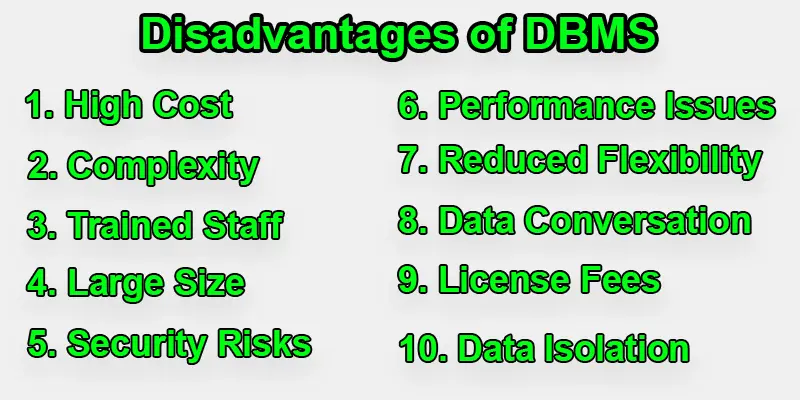
- High Cost
- Complexity
- Performance Issues
- Security Risks
- System Failure Risk
- High Maintenance
- Data Conversion Cost
- Skilled Staff Requirement
- Backup and Recovery Challenges
- Hardware Dependency
High Cost
DBMS systems can be expensive. You need to buy software, hardware, and licenses. You also need to pay skilled people to manage it. For example, a small shop may not afford a full database system. This makes DBMS less suitable for small businesses with limited budgets.
Complexity
A DBMS can be hard to understand for beginners. It has many features and tools. Users need training to use it properly. If someone uses it without knowledge, they may make mistakes. For example, a wrong command can delete important data.
Performance Issues
Sometimes, the DBMS can slow down. This happens when many users access the system at the same time. Heavy data processing can also reduce speed. For example, a busy online store may face delays during peak hours, which affects user experience.
Security Risks
DBMS stores large amounts of data in one place. This makes it a target for hackers. If security is weak, data can be stolen. For example, customer details or passwords can be leaked. Strong security measures are needed to protect data.
System Failure Risk
If the database system crashes, all operations stop. Users cannot access data until the system is fixed. This can cause delays and losses. For example, a bank system failure can stop transactions and create serious problems.
High Maintenance
A DBMS needs regular care. You must update software, check performance, and fix issues. This takes time and effort. For example, IT teams must monitor the system daily to keep it running smoothly.
Data Conversion Cost
Moving data from old systems to a DBMS can be costly. It needs tools and expert help. There is also a risk of data loss during conversion. For example, a company shifting from manual records to digital ones may face extra costs.
Skilled Staff Requirement
DBMS needs trained professionals like database administrators. They manage, secure, and maintain the system. Hiring skilled staff can be expensive. Without experts, the system may not work properly or safely.
Backup and Recovery Challenges
Backing up data is important, but not always easy. Large databases take time to back up. Recovery can also be slow after a failure. For example, restoring lost data after a crash may take hours or even days.
Hardware Dependency
A DBMS depends on strong hardware. It needs powerful servers and storage devices. If hardware fails, the system may stop working. For example, a server crash can make the entire database unavailable until fixed.

Conclusion
In short, the disadvantages of DBMS include high cost, complex design, and possible security issues. These problems can affect performance and increase workload if not handled well. But understanding these drawbacks helps you make smarter choices. You can plan better and avoid common mistakes in database management systems. Want to choose the right system for your needs? Take time to study both the pros and cons of DBMS before you decide. With the right approach, you can manage your data smoothly and confidently.
FAQs
What are some disadvantages of DBMS over file-based systems?
The following are some drawbacks of the database system:
Higher costs: DBMS is more expensive to buy and maintain.
More complexity: DBMS is harder to set up and manage.
Need for skilled staff: Requires trained professionals to operate.
Slower performance: May run slower with many users accessing data.
Longer setup time: Takes more time to install and configure.
Complex backups: Backing up data is more complicated.
Extra processing: This may add unnecessary processing overhead.
What are 10 disadvantages of database PDF?
Common disadvantages include high cost, complexity, slow setup, need for training, performance issues, backup problems, security risks, license fees, limited flexibility, and vendor lock-in. You can download a PDF for a detailed explanation of each point.
What are the disadvantages of RDBMS?
RDBMS can be complex and not suitable for very large or unstructured data. They also need more processing power and trained staff.
What are the disadvantages of data model in DBMS?
Some data models are hard to design and update. They may also lack flexibility when the data structure changes.
What are the disadvantages of data?
Too much data can slow down the system and cause confusion. Storing and managing it also costs money and effort.
What are the disadvantages of database transactions?
Database transactions can slow down performance if not handled properly. They also need strong control to avoid data errors.





- Be Respectful
- Stay Relevant
- Stay Positive
- True Feedback
- Encourage Discussion
- Avoid Spamming
- No Fake News
- Don't Copy-Paste
- No Personal Attacks
- Be Respectful
- Stay Relevant
- Stay Positive
- True Feedback
- Encourage Discussion
- Avoid Spamming
- No Fake News
- Don't Copy-Paste
- No Personal Attacks
