Difference Between 3D Printer and Laser Printer | Which Is Better for You?
Published: 8 Nov 2025
Did you know that 3D printing has grown over 20% each year, while laser printers remain a top choice for offices worldwide? The debate between a 3D printer vs a laser printer isn’t just about technology, it’s about purpose. Both serve different needs, from creating objects to printing sharp text.
Ever wondered why choosing between a 3D printer and a laser printer feels confusing? Many people struggle to decide which one fits their work or study needs. Should you print 3D models or stick to paper documents? Let’s make this simple and clear.
If you’re tired of wasting money on printers that don’t match your goals, you’re not alone. The 3D printer vs laser printer comparison helps you pick smartly. Whether you want creativity or speed, this guide will help you choose the right tool for your tasks.
3D Printer
A 3D printer is a device that uses digital designs to produce tangible objects. It uses materials like metal, plastic, or resin to construct objects layer by layer. You can print things such as toys, tools, or models. It’s popular in schools, design labs, and engineering fields. Simply put, a 3D printer turns your ideas into real-life shapes.
Laser Printer
A laser printer is a machine that prints text or images on paper using a laser beam and toner powder. It’s fast, clear, and great for both home and office use. The laser draws the image, and the heat sticks the toner to the paper. It’s perfect for reports, photos, and everyday documents.
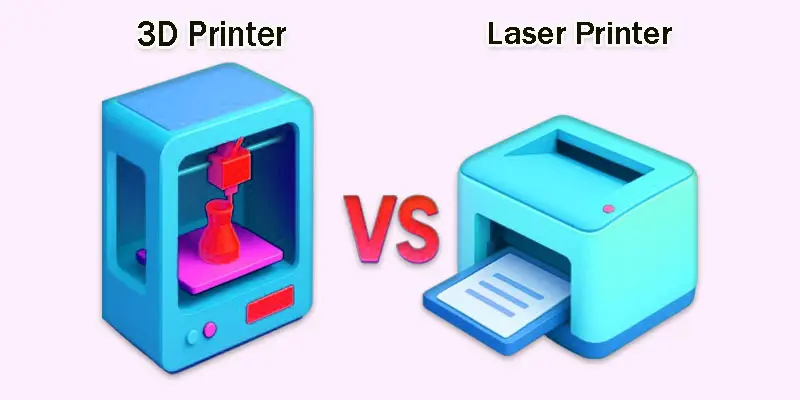
What Are the Key Differences Between 3D and Laser Printers?
Both printers have distinct functions and operate in different ways. To determine which printer best meets your needs, let’s examine the key distinctions between a laser printer and a 3D printer.
| 3D Printer | Laser Printer |
|---|---|
| Using materials like plastic or resin, a 3D printer turns digital drawings into tangible, actual items. | A laser printer prints text or images on paper using a laser beam and toner powder. |
| Makes 3D objects for design, art, and prototypes. | Prints documents, photos, and reports on paper. |
| Produces 3D (solid) objects. | Produces 2D (flat) prints. |
| Uses filament, resin, or metal. | Uses toner and paper. |
| Builds on a flat bed layer by layer. | Prints directly on paper sheets. |
| Slower because it builds each layer. | Very fast and prints many pages quickly. |
| Depends on layer height and design accuracy. | Offers sharp and clean text or images. |
| Usually more expensive to buy. | Generally cheaper and more common. |
| Needs regular cleaning and calibration. | Easy maintenance with toner replacement. |
| Larger and bulkier in design. | Compact and fits easily on a desk. |
| Can be noisy while printing layers. | Quieter during operation. |
| Needs 3D modeling software. | Works with simple print commands. |
| Consumes more electricity. | Uses less power overall. |
| Takes hours for one model. | Takes seconds for one page. |
| Needs practice and design knowledge. | Very easy to use for anyone. |
| Designers, engineers, students. | Offices, schools, and homes. |
| Measured in microns (layer detail). | Measured in DPI (dots per inch). |
| Can use multiple filaments for color. | Uses toner for black-and-white or color prints. |
| Prints strong and long-lasting objects. | Prints may fade over time. |
| Toys, tools, prototypes, and art. | Documents, flyers, labels, and pictures. |
| USB, SD card, or Wi-Fi. | USB, Wi-Fi, or network connection. |
| Creativity, design, and innovation. | Everyday office or school printing. |
| Prints one object at a time. | Prints many pages in one go. |
| Uses more plastic-based materials. | More eco-friendly with toner cartridges. |
| Builds objects using additive manufacturing. | Uses electrostatic laser technology. |
| A student uses a 3D printer to create a small model for a science project. | A teacher uses a laser printer to print worksheets and notes for the class. |
What are the Pros and Cons of 3D and Laser Printers?
Both printers have their own strengths and limitations. Let’s explore the pros and cons of 3D and laser printers to help you choose the one that fits your printing needs best.
What are the Pros of 3D Printers?
- Creates real 3D objects from digital designs.
- Great for creativity, design, and innovation.
- Useful for making prototypes, models, and tools.
- Supports learning in the engineering and art fields.
- Can print custom shapes and detailed parts.
What are the Cons of 3D Printers?
- Slower printing process compared to laser printers.
- More expensive to buy and maintain.
- Needs basic design and software knowledge.
- Uses plastic materials, which may not be eco-friendly.
- Requires regular calibration and care.
What are the Pros of Laser Printers?
- Prints text and images quickly and clearly.
- Ideal for offices, schools, and home use.
- Cost-effective for high-volume printing.
- Easy to use and maintain.
- Produces sharp and professional-quality results.
What are the Cons of Laser Printers?
- Limited to 2D printing only.
- Toner replacements can be costly.
- Not suitable for creative 3D projects.
- Larger models may take more desk space.
- May not handle thick or special paper well.
Which Printer Should You Choose?
Choosing the right printer depends on your needs and goals. Let’s find out which 3D or laser is the best match for you.
When Should You Choose a 3D Printer?
- You love designing or creating new things.
- You need to make models, tools, or prototypes.
- You work in engineering, art, or product design.
- You want to learn modern printing technology.
- You enjoy hands-on creative projects.
When Should You Choose a Laser Printer?
- You need fast, high-quality text or image prints.
- You often print reports, notes, or documents.
- You want a low-maintenance, cost-effective option.
- You run an office, school, or small business.
- You prefer quick and reliable everyday printing.
What Are Some Useful Tips for Beginners?
Starting with a new printer can feel tricky, but it’s easy once you know the basics. Always begin with a simple model to understand how the printing process works. Read the manual carefully before your first print.
Keep your printer clean and well-maintained for better results. Dust or leftover material can affect print quality. Also, check your settings before each print to avoid waste or errors.
Try small projects first to build confidence. Learn basic design or printing software and experiment with different materials. With time and practice, your prints will get smoother and more professional.
Final Thought
The debate between a 3D printer and a laser printer depends on your printing goals. Personally, I recommend choosing a 3D printer if you love creativity and want to bring ideas to life. But if you need fast, high-quality documents, a laser printer is the better choice. Explore your options today and pick the printer that best fits your needs.
FAQS
3D printers are not common at home because they can be expensive and tricky to use. They also need special materials and software. Most people don’t need them for daily tasks. That’s why they’re mainly used in schools or industries.
3D printing is mostly good because it helps create custom designs and saves time. But it can be costly and slow for large projects. It also uses plastic, which can harm the environment if not managed well.
A 3D printer can make many things like toys, tools, and models. But it cannot print everything. Items with electronics or flexible parts are harder to print. It depends on the printer’s type and the material used.
The expense and duration of 3D printing are its main drawbacks. Printing large or detailed items can be slow. Also, printed items may not be as strong as factory-made products.
Profitable 3D prints include phone cases, jewelry, home decor, and mini figures. Customized items often sell best because people love unique designs.
Nylon and polycarbonate are among the strongest materials used in 3D printing. They are tough, flexible, and can handle heat well.
Fused Deposition Modeling (FDM) is popular and easy to use. But Stereolithography (SLA) gives smoother and more detailed prints, making it one of the best choices.
SLA printers offer the highest quality prints. They use liquid resin and light to create fine, detailed shapes. This makes them great for jewelry, models, and design work.
You need 3D design software like Tinkercad, Fusion 360, or Blender. You also need slicing software like Cura to prepare the file for printing.
Yes, you can use a laptop. You just need to install 3D printing software and connect the printer through USB or Wi-Fi. Make sure your laptop meets the software’s basic requirements.
Beginners need a 3D printer, printing filament, and a computer with 3D software. You’ll also need a slicer program and a basic design to start printing.




- Be Respectful
- Stay Relevant
- Stay Positive
- True Feedback
- Encourage Discussion
- Avoid Spamming
- No Fake News
- Don't Copy-Paste
- No Personal Attacks
- Be Respectful
- Stay Relevant
- Stay Positive
- True Feedback
- Encourage Discussion
- Avoid Spamming
- No Fake News
- Don't Copy-Paste
- No Personal Attacks
