Ransomware vs Virus | A Beginner’s Complete Guide
Published: 23 Jul 2026
Have you ever opened an email or downloaded a file and wondered if it could harm your computer? Many people use the internet every day without realizing how quickly cyber threats can strike. Just one click on a harmful link can put your files, personal information, and computer security at risk. Two of the most common threats today are virus vs ransomware attacks. While both can damage your system, they work in different ways and create different problems.
A virus can spread through files and programs, causing system issues and data loss. Ransomware goes a step further by locking your files and demanding money to restore access. These attacks affect individuals, students, small businesses, and large organizations alike. The good news is that you do not need to be a cybersecurity expert to protect yourself.
Understanding the behavior of viruses and ransomware can help you make smarter security decisions. This guide breaks down their key distinctions, explains how they infect systems, highlights warning signs, and shares useful tips to protect your valuable information.
What is a Virus?
A computer virus is harmful software that attaches itself to files or programs and can move from one device to another. It often attaches itself to a legitimate file and starts working when the file is opened. A computer virus may reduce system performance, corrupt important files, and trigger unexpected errors. For example, downloading software from an untrusted website may introduce a virus to your device. Like a biological virus, it spreads and affects other parts of the system. This is why using antivirus software and safe browsing habits is important for cybersecurity and data protection.
What is Ransomware?
Ransomware is a form of malware that blocks users from their data by encrypting or locking important files. After infecting a device, it displays a message demanding money in exchange for restoring access. Cybercriminals often spread ransomware through phishing emails, harmful links, or fake software downloads. For example, a user may open a malicious email attachment and suddenly lose access to important documents and photos. Unlike a computer virus, ransomware focuses on holding data hostage for payment. Understanding how ransomware works is an important part of cybersecurity and can help you protect your personal and business information from cyberattacks.
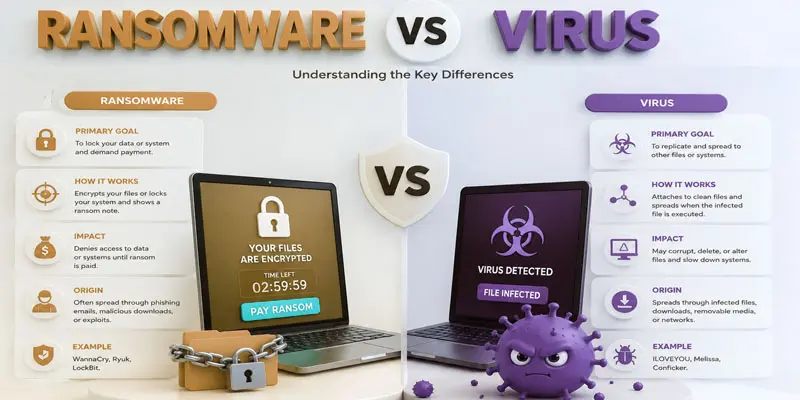
What is the Difference between Virus and Ransomware?
Understanding the difference between a virus and ransomware is important because both are harmful types of malware, but they attack computers and data in very different ways.
| Virus | Ransomware |
|---|---|
| A computer virus is harmful software that infects files and can spread to other devices. | Ransomware is a cyber threat that blocks or encrypts files and demands money for recovery. |
| The ILOVEYOU Virus spread through email attachments. | The WannaCry Ransomware attack encrypted files worldwide. |
| To infect, damage, or disrupt systems. | To extort money from victims. |
| Spread and cause harm. | Lock data and demand a ransom. |
| Usually does not encrypt files. | Encrypts files and restricts access. |
| Does not ask for payment. | Demands money for file recovery. |
| Infected files, software, and media. | Phishing emails, malicious links, and exploits. |
| Can replicate itself and spread. | Usually does not self-replicate. |
| May modify, corrupt, or delete files. | Makes files inaccessible through encryption. |
| Can slow down or crash a system. | Can completely lock users out of important data. |
| May remain hidden for a long time. | Usually announces itself with a ransom note. |
| Often requires opening an infected file. | Often starts after clicking a malicious link or attachment. |
| Usually not financially motivated. | Primarily created for financial gain. |
| May steal or damage data. | Some variants also steal sensitive information. |
| Antivirus software can often remove it. | Recovery may require backups or decryption tools. |
| Files, applications, and operating systems. | Valuable files, databases, and business data. |
| Causes operational disruptions. | Can cause severe financial losses. |
| May damage personal files. | Can block access to personal documents and photos. |
| Can spread across connected systems. | Some variants can spread through networks. |
| Often detected by antivirus tools. | Detected by security software and monitoring tools. |
| Generally easier to remove. | Often harder to recover from. |
| Helpful but not always essential. | Critical for restoring encrypted files. |
| Usually indirect or none. | Directly generates profit through ransom payments. |
| Often slows down device performance. | May not affect speed until encryption begins. |
| May show unusual errors or pop-ups. | Displays a ransom message after encryption. |
| Infected downloads and removable drives. | Phishing emails and vulnerable software. |
| Moderate to high. | High to critical. |
| Individual users and organizations. | Individuals, businesses, hospitals, and government agencies. |
| Antivirus software and safe downloads. | Regular backups, security updates, and phishing awareness. |
| Damages or disrupts systems and files. | Holds data hostage and demands payment for access. |
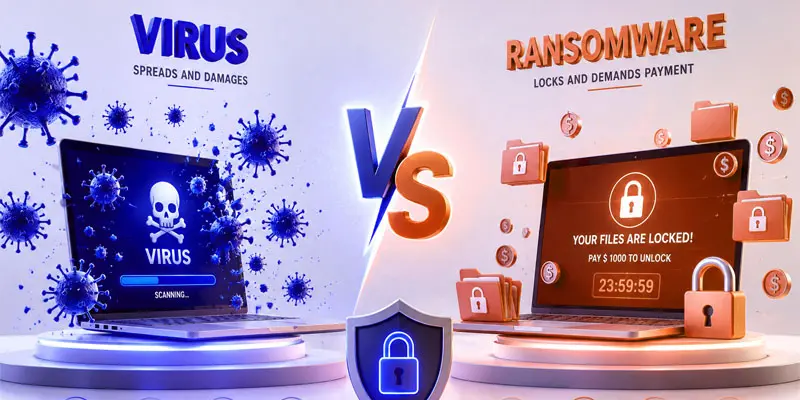
How Viruses and Ransomware Infect Your Devices?
Viruses and ransomware can enter your device through different online activities. Understanding these common infection methods can help you stay safe from malware and cyber threats.
- Phishing Emails: Cybercriminals send fake emails that look legitimate. Opening a harmful attachment or clicking a malicious link can infect your device.
- Unsafe Downloads: Downloading software, games, movies, or files from untrusted websites may install malware without your knowledge.
- Malicious Websites: Some websites contain harmful code that can automatically download viruses or ransomware onto your computer.
- Fake Software Updates: Attackers sometimes create fake update messages. Installing these updates can infect your system.
- Infected USB Drives: A virus can spread when you connect an infected USB flash drive or external storage device.
- Outdated Software: Old software may have security weaknesses. Cybercriminals can exploit these gaps to install ransomware or other malware.
- File Sharing Networks: Downloading files from unknown users on peer-to-peer platforms increases the risk of infection.
- Weak Security Practices: Using weak passwords and ignoring security updates makes devices easier targets.
How to Protect Yourself from Virus and Ransomware?
Protecting your device from viruses and ransomware does not have to be difficult. A few simple cybersecurity habits can greatly reduce your risk of a malware infection.
- Use a trusted antivirus program to find and remove harmful threats before they can damage your device.
- Keep your system, browser, and applications updated, as updates often fix important security issues.
- Do not trust unknown emails, avoid links and attachments because they can carry ransomware attacks.
- Download from Trusted Sources. Only download software, apps, and files from official websites and trusted platforms.
- Use strong and unique passwords for each account to reduce the risk of unauthorized access.
- Enable Multi-Factor Authentication (MFA). This adds an extra layer of account security.
- Keep backups of your important files on cloud storage or an external device so you can restore them after a ransomware attack.
- Be Careful Online: Avoid suspicious websites, pop-up ads, and unknown downloads.
Final Thoughts
Understanding virus and ransomware is an important step toward better online security. Viruses can spread and damage files, while ransomware can lock your data and demand payment. Knowing the warning signs, using antivirus software, and creating regular backups can help protect your devices from malware attacks. Stay informed, follow safe browsing habits, and take action today to strengthen your cybersecurity. Taking small safety steps today can help you avoid serious problems in the future.
FAQs
Ransomware is not actually a virus. It is a type of malware that encrypts files or locks devices and demands payment for access. Unlike traditional computer viruses, ransomware focuses on extorting money rather than spreading between files.
Another name for ransomware is crypto-malware, especially when it encrypts files and data. Some cybersecurity experts also call it file-encrypting malware because its main purpose is to block access to important information until a ransom is paid.
The main cause of ransomware infections is phishing emails with malicious links or attachments. Cybercriminals also use fake downloads, unsafe websites, and software vulnerabilities to install ransomware on computers and networks.
Yes, ransomware can sometimes be removed using antivirus or anti-malware tools. However, removing the malware does not always restore encrypted files. Regular data backups provide the best chance of recovering important information after an attack.
Strong cybersecurity practices help prevent ransomware attacks. Keep software updated, use trusted antivirus protection, avoid suspicious emails, enable multi-factor authentication, and back up important files regularly to protect your data and devices.




- Be Respectful
- Stay Relevant
- Stay Positive
- True Feedback
- Encourage Discussion
- Avoid Spamming
- No Fake News
- Don't Copy-Paste
- No Personal Attacks
- Be Respectful
- Stay Relevant
- Stay Positive
- True Feedback
- Encourage Discussion
- Avoid Spamming
- No Fake News
- Don't Copy-Paste
- No Personal Attacks
