Difference Between Malware and Ransomware in Simple Words
Published: 11 May 2026
Have you ever clicked on a file or link and suddenly your device starts acting strangely? Maybe it becomes slow, pop-ups appear, or worse, your files get locked, and you cannot access them. In today’s digital world, these problems are more common than you think. Many users get confused between malware and ransomware, and this confusion can put their personal data, photos, and even financial information at risk.
Malware and ransomware are two of the most important topics in cybersecurity today. Malware is the general term for a harmful software that can damage your device, steal your data, or spy on your activity. Ransomware, on the other hand, is a more dangerous type that locks your files and demands money to unlock them.
If you don’t understand the difference, you may not know how to protect yourself properly. The good news is that once you learn how both threats work, you can easily avoid them with simple safety steps. In this article, you will learn the key differences between malware and ransomware, how they spread, and simple ways to protect your devices from attacks.
What is Malware?
Malware is harmful software made to damage your device or steal your data. It often enters through fake emails, unsafe websites, or downloaded files. Once installed, it can slow down your system, show unwanted ads, or steal personal information. For example, downloading a cracked app may secretly install malware on your phone or computer. It runs in the background without your knowledge and causes security risks.
What is Ransomware?
Ransomware is a kind of harmful software that blocks access to your files or device and demands payment to restore access. It often spreads through phishing emails, fake links, or unsafe downloads. Once it attacks, you may lose access to photos, documents, or important data. For example, clicking a fake invoice email can lock your system instantly. It is risky because it can stop you from using your files or system until money is paid or the data is recovered.
What is the Difference between Malware and Ransomware?
Understanding the difference between malware and ransomware helps you recognize cyber threats clearly and protect your device from data theft, system damage, and file-locking attacks.
| Malware | Ransomware |
|---|---|
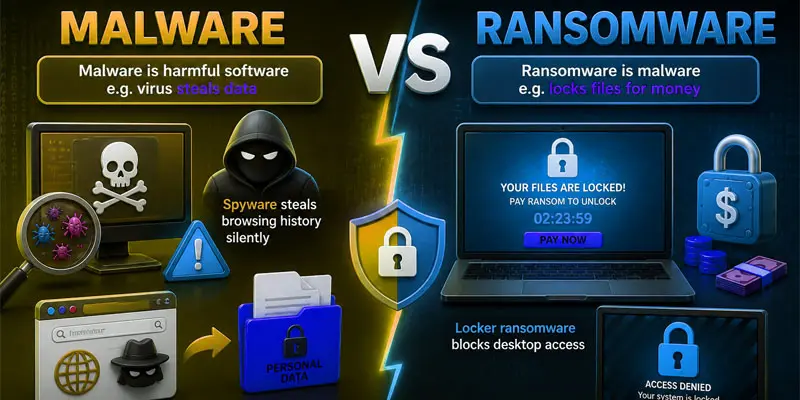
| Malware is harmful software, e.g. virus steals data. | Ransomware is malware, e.g. locks files for money. |
| Malware means bad software harming devices. | Ransomware means files locked until payment. |
| Malware is a broad cyber threat category. | Ransomware is one malware type. |
| Malware aims at data theft or damage. | Ransomware aims money from victims. |
| Malware enters via downloads or fake apps. | Ransomware spreads via phishing emails. |
| Malware spreads through files or links. | Ransomware spreads through malicious attachments. |
| Malware often runs hidden in the background. | Ransomware shows a warning screen after an attack. |
| Users may not notice a malware infection. | Users quickly notice locked files. |
| Malware can steal passwords and data. | Ransomware mainly blocks access to data. |
| Malware may corrupt system files. | Ransomware encrypts and locks files. |
| Malware may or may not encrypt data. | Ransomware always encrypts files. |
| Malware usually does not ask for money. | Ransomware demands ransom payment. |
| Malware gives a hacker silent control. | Ransomware gives the attacker full file control. |
| Malware slows system performance. | Ransomware stops file access completely. |
| Malware can spread slowly over time. | Ransomware attacks are fast and sudden. |
| Malware is harder to detect early. | Ransomware is easy to notice quickly. |
| Malware removed by antivirus tools. | Ransomware removal is difficult. |
| Spyware steals browsing history silently. | Locker ransomware blocks desktop access. |
| Malware hides in fake email links. | Ransomware spreads via phishing emails. |
| Malware downloads from unsafe sites. | Ransomware installs from malicious pop-ups. |
| Malware hides in cracked apps. | Ransomware spreads via fake apps. |
| Malware makes the device slow and laggy. | Ransomware freezes system functions. |
| Antivirus detects most malware types. | Advanced tools needed for ransomware. |
| Malware is avoided by safe browsing habits. | Ransomware avoided by email caution. |
| Malware removed without major damage. | Ransomware needs backup or decryption. |
How Can You Protect Yourself?
Understanding how to stay protected is very important to keep your devices safe from malware, ransomware, and other online threats that may steal or lock your data.
- Use a trusted antivirus program. It helps detect malware, spyware, and ransomware early. For example, it can block a fake software file before it harms your device.
- Do not open links from emails or messages you don’t trust. Many ransomware attacks begin with fake phishing emails that seem real but are unsafe.
- Download apps only from official stores. Cracked or pirated apps often hide malware that can steal your data.
- Keep your system and apps updated. Updates fix security gaps that hackers use to attack devices.
- Always use strong passwords. Avoid simple passwords like “123456” and use a mix of letters, numbers, and symbols.
- Turn on two-factor authentication to give your accounts extra security and make them harder for hackers to access.
- Back up your important files regularly. If ransomware locks your data, you can restore it easily from backup.
- Try not to use public Wi-Fi for important activities like online banking, as open networks can be easily monitored by hackers.
Final Thoughts
Understanding malware vs ransomware helps you stay safe in today’s digital world. Malware can steal data or slow your device, while ransomware locks your files for money. Knowing the difference helps you take the right protection steps, like using antivirus software, avoiding unknown links, and keeping backups. Stay alert, practice safe browsing, and protect your personal data. Start applying these cybersecurity tips today to keep your devices safe from threats.
FAQs
Is ransomware always malware?
Yes, ransomware is always malware because it is a harmful software designed to lock files or systems and demand payment. It spreads through phishing emails, fake links, or unsafe downloads, making it a serious cyber threat.
Can ransomware be removed?
Yes, ransomware can sometimes be removed using antivirus tools or professional recovery methods. If you keep a secure backup, you can recover your files safely without paying attackers or permanently losing your important data.
How to 100% get rid of malware?
You can remove malware completely by using a trusted antivirus scan, deleting infected files, and resetting your system if needed. Regular updates and safe browsing help ensure malware does not return again.
What kills viruses naturally?
Strong antivirus software, system updates, and safe browsing habits effectively remove viruses. In some cases, restarting in safe mode and deleting suspicious files also helps stop virus activity without harming your system.
What do hackers hate the most?
Hackers hate strong security measures like updated antivirus, two-factor authentication, and regular data backups. These protections make it hard for them to steal data, lock files, or gain unauthorized access to your system.






- Be Respectful
- Stay Relevant
- Stay Positive
- True Feedback
- Encourage Discussion
- Avoid Spamming
- No Fake News
- Don't Copy-Paste
- No Personal Attacks
- Be Respectful
- Stay Relevant
- Stay Positive
- True Feedback
- Encourage Discussion
- Avoid Spamming
- No Fake News
- Don't Copy-Paste
- No Personal Attacks
