Features of a Laser Printer Explained Simply and Clearly
Published: 28 Sep 2025
Laser printers are renowned for their outstanding quality and speed. With features like fast printing, high resolution, and low cost per page, they remain the go-to choice for both personal and professional use. Understanding the key characteristics of a laser printer can help you make an informed decision when choosing the right model.
Are you confused about which printer to pick for your home or office? The wide variety of features, such as resolution, speed, and print quality, can leave many wondering which laser printer truly fits their needs. By exploring the features of laser printer, you’ll better understand which one can meet your specific printing demands.
Many users struggle with finding a reliable printer that doesn’t drain their budget on ink or require constant maintenance. The characteristics of laser printers, like efficient toner usage, low running costs, and long-lasting components, address these pain points, making laser printers a practical solution for both businesses and households.
What are the Key Characteristics of Laser Printers?
The key characteristics of laser printers highlight their speed, quality, and efficiency, making them a top choice for homes and offices.
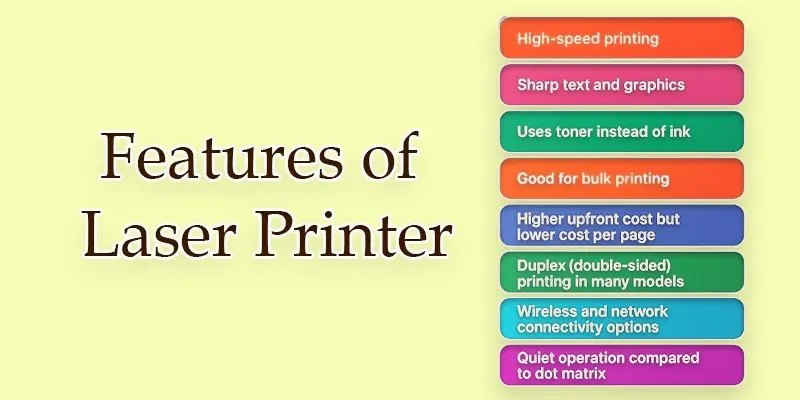
- Speed
- Resolution
- Print Quality
- Paper Handling
- Printer Language & Compatibility
- Text and Graphics Support
- Cost Efficiency
- Noise Level
- Maintenance Needs
- Energy Consumption
Speed
The number of pages a laser printer can print in a minute is known as its speed. Most laser printers are faster than inkjet printers and can print between 15 and 100 pages per minute. This makes them a great choice for offices where a lot of documents need to be printed quickly. Fast speed also saves time and increases work efficiency.
Resolution
A laser printer’s resolution indicates how crisp and clear the final product will be. The unit of measurement is dots per inch, or DPI. The majority of laser printers have a 600 DPI starting point and can reach up to 1200 DPI. This high resolution makes text and images look clean and professional. It is ideal for reports, graphics, and detailed documents.
Print Quality
The print quality of laser printers is renowned for being crisp and clean. They produce clear text and smooth graphics without smudges. Even small letters look clean and easy to read. This makes them perfect for printing reports, professional documents, and study material. The quality stays consistent even when printing in large volumes.
Paper Handling
Laser printers can handle different paper sizes and types. They usually come with paper trays that hold many sheets at once. Most models can print on both sides of the paper, called duplex printing. This saves paper and makes printing more efficient. Some advanced printers also support cardstock and labels.
Printer Language & Compatibility
Printer language is the way a printer talks to the computer. Common languages include PCL (Printer Command Language) and PostScript. These help the printer understand and print text, images, or graphics correctly. Good compatibility means the laser printer can work with different devices and operating systems without problems.
Text and Graphics Support
Laser printers are designed to print sharp text and clear graphics. They handle small fonts, detailed charts, and images very well. With high resolution, both text and graphics look smooth and professional. This makes them useful for business reports, school projects, and design work.
Cost Efficiency
In the long term, laser printers do indeed save money. Their toner lasts longer than ink cartridges, despite their initial higher cost. This indicates that the price per page is significantly less than that of inkjet printers. They are a good choice for people or offices that need to print a lot.
Noise Level
Laser printers make less noise compared to many other printers. Most of the sound comes when the paper moves and the fuser works. In offices, the noise is usually low and not disturbing. Modern models are designed to be even quieter, making them good for home and workplace use.
Maintenance Needs
Laser printers need less maintenance compared to inkjet printers. The main task is replacing the toner cartridge when it runs out. Sometimes, parts like the drum or fuser may need changing after heavy use. Regular cleaning also helps keep the printer working smoothly. With proper care, they last for many years.
Energy Consumption
Laser printers use more power when warming up and printing. However, many models have energy-saving modes that reduce electricity use when idle. On average, they consume more energy than inkjet printers but are still efficient for heavy printing tasks. Using duplex printing and eco-mode can also help save power.
Conclusion
A laser printer’s characteristics demonstrate why they are a wise investment for both home and business use. From fast speed to sharp resolution, they offer value that saves time and money. Personally, I recommend choosing a multifunction laser printer if you want scanning and copying along with printing. Take the next step today and explore the best models to match your needs.
FAQS
The primary purpose of a laser printer is to rapidly print text and images onto paper. Graphics, reports, and documents all use it. Additionally, some models can fax, scan, and copy.
Yes, colour printing is possible with certain laser printers. Multiple toner cartridges are used by colour laser printers to create crisp, vivid text and image outputs.
Laser printers are very fast. Most models print between 15 and 100 pages per minute, depending on the type and size of the printer.
The main properties include high speed, sharp print quality, low running cost, and durability. They are also quiet and handle large volumes easily.
Laser printers are special because they give fast, clear, and professional prints. They work well for bulk printing and save money in the long run.
Laser printers use electro-photographic technology. A laser beam draws the image on a drum, and toner powder sticks to it before being fused onto paper.
A laser printer’s fuser may reach temperatures of 180°C to 200°C. The toner is melted by this intense heat, which makes it adhere to the paper securely.
The four main properties are coherence, direction, monochromatic light, and high intensity. These make lasers very precise and powerful.






- Be Respectful
- Stay Relevant
- Stay Positive
- True Feedback
- Encourage Discussion
- Avoid Spamming
- No Fake News
- Don't Copy-Paste
- No Personal Attacks
- Be Respectful
- Stay Relevant
- Stay Positive
- True Feedback
- Encourage Discussion
- Avoid Spamming
- No Fake News
- Don't Copy-Paste
- No Personal Attacks
