Best Photo Printer | Wireless And Compact
Published: 19 Nov 2025
Printing photos at home sounds easy, until you end up with faded colors, uneven tones, or wasted ink. Many people buy a regular printer thinking it can handle photo-quality output, only to be disappointed with dull, low-resolution results. The truth is, not all printers are made for vibrant photo printing. The wrong choice can leave your images looking flat, grainy, or washed out, and waste both your ink and paper.
That’s why finding the best photo printer is so important. The right printer can reproduce lifelike colors, sharp details, and smooth gradients that truly capture the beauty of your photos. Whether you’re printing family portraits, travel memories, or professional shots, a high-quality image printer helps you turn digital images into beautiful keepsakes you can hold in your hands.
In this guide, we’ll help you discover the top photo printers that deliver professional results without breaking the bank. We’ll cover options for every need, from a compact wireless snapshot photo printer for everyday use to professional-grade models for photographers who want gallery-level quality. You’ll also learn what features matter most, such as ink quality, resolution, paper handling, and cost efficiency, so you can make the best choice for your needs.
By the end, you’ll know exactly which printer gives you the best balance of performance, price, and photo quality, so you can finally enjoy rich, long-lasting prints right from the comfort of your home.
Table of Contents
Quick Overview Of The Best Photo Printer 2026
Key Features:
| Feature | Details |
|---|---|
| Best For | Home photo printing and DIY crafts |
| Print Size | 4×6 inches |
| Connectivity | Wi-Fi, USB, App Control |
| Key Feature | Thermal dye-sublimation printing with vibrant, long-lasting color. |
Canon SELPHY CP1500 Compact Photo Printer
Key Features:
| Feature | Details |
|---|---|
| Best For | Printing high-quality photos at home or on the go |
| Print Size | 4×6 inches (postcard size) |
| Connectivity | Wi-Fi, USB, Memory Card |
| Key Feature | Durable dye-sublimation prints that are water-resistant and long-lasting |
KODAK Dock Plus 4PASS Instant Photo Printer
Key Features:
| Feature | Details |
|---|---|
| Best For | Printing photos directly from your phone for home use or gifting |
| Print Size | 4×6 inches |
| Connectivity | Bluetooth, Dock (2-in-1) |
| Key Feature | Dye-sublimation technology for fingerprint-proof, water-resistant photos |
Epson EcoTank Photo ET-8500 Printer
Key Features:
| Feature | Details |
|---|---|
| Best For | Professional photo printing, scanning, and copying at home or studio |
| Print Size | Up to 8.5″ x 11″ (borderless) |
| Connectivity | Wi-Fi, Wi-Fi Direct, USB, Ethernet |
| Key Feature | Cartridge-free 6-color ink system for stunning, vibrant photos and huge ink savings |
Key Features:
| Feature | Details |
|---|---|
| Best For | Printing on the go, perfect for travel, business, or students |
| Print Size | Up to 8.5″ x 11″ |
| Connectivity | Wi-Fi, USB |
| Key Feature | Lightweight and portable printer with wireless direct printing and a 1.44” OLED display |
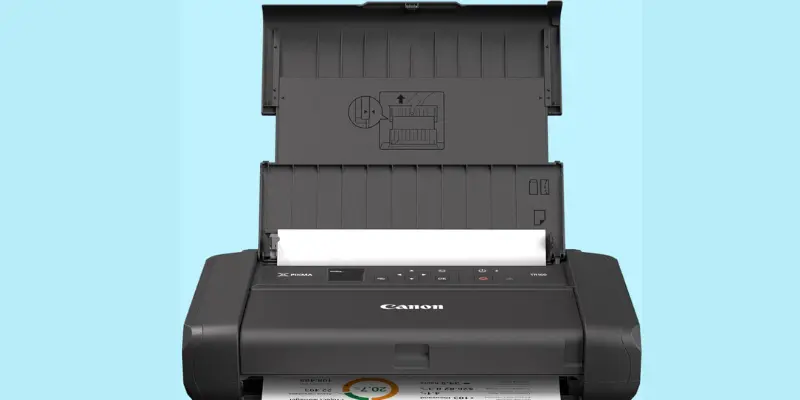
Key Features:
| Feature | Details |
|---|---|
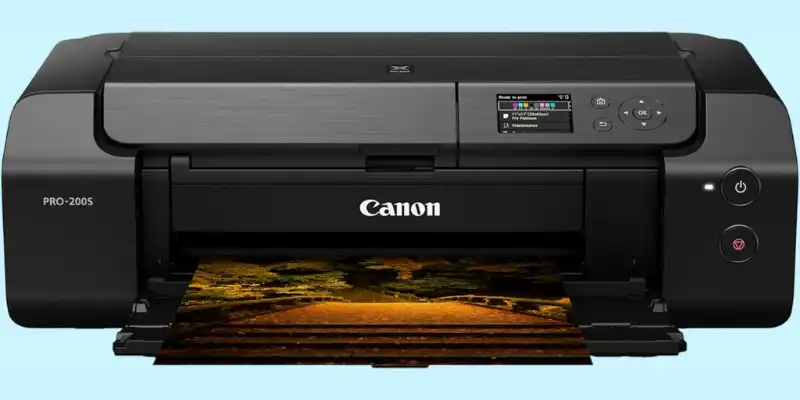
| Best For | Professional photographers and artists who need gallery-quality prints |
| Print Size | Up to 13″ x 19″ |
| Connectivity | Wi-Fi |
| Key Feature | Color dye-based ink system for lively colors and a 3.0” color LCD monitor for easy control |
| Affiliate Disclosure: As an Amazon Associate, I earn from qualifying purchases. |
Comprehensive Overview Of the Best Photo Printer 2026
A comprehensive overview of the best camera photo printer covers a range of options, from compact, on-the-go dye-sublimation models to high-quality, wide-format inkjet printers for photos with multi-colour ink systems, while balancing print quality, cost per print, connectivity, and your specific needs.
Best Photo Printer For Home
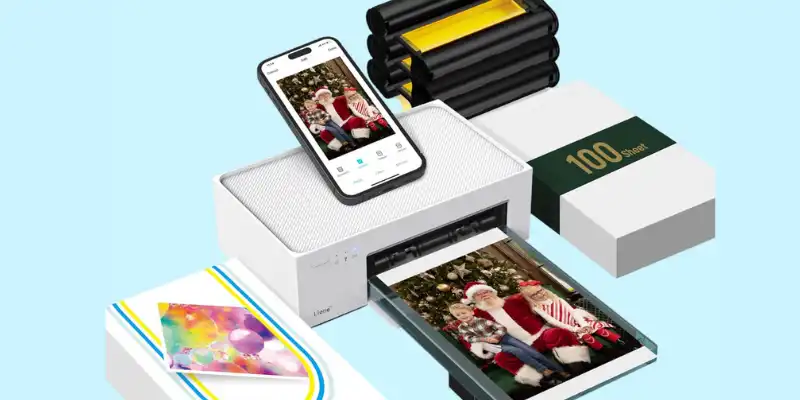
Liene M100 4×6″ Photo Printer
There’s something special about holding your memories in your hands, not just scrolling through them on a screen. The Liene M100 4×6″ long-lasting photo prints bring that feeling back with every print. This is the best printer for photos designed for those who love capturing life’s moments. This elegant picture printer lets you turn phone snapshots into beautiful, lab-quality photos in seconds.
Using advanced thermal dye-sublimation technology, the Liene M100 delivers smooth, rich, and vibrant colors that bring every detail to life. Each print feels like a keepsake, waterproof, fingerprint-resistant, and made to last for years. Whether it’s family portraits, travel shots, or your favorite candid moments, every image comes out bright and true-to-life.
Setting it up is effortless. With built-in Wi-Fi, you can connect your iPhone or Android and print directly from your phone, no cables, no hassle. This picture printer comes with 100 sheets of photo paper and 3 color cartridges, so you can start printing right away without any extra purchases.
Compact yet powerful, the Liene M100 fits beautifully on any desk or shelf. Its clean design adds a touch of modern elegance to your workspace or home. More than just a gadget, it’s a thoughtful companion for those who take pride in preserving memories with care and style.
Specifications Of Liene M100 4×6″ Photo Printer
| Feature | Details |
|---|---|
| Printer Type | Portable phone photo printer |
| Best For | Home and mobile photo printing |
| Functions | Color photo printing only |
| Max Print Size | 4×6 inches |
| Resolution | 300 printer DPI |
| Print Speed | 1 photo per minute |
| Connectivity | USB, Wi-Fi (built-in hotspot) |
| Ink System | 3-color dye-sublimation cartridge |
| Media Type | Liene 4×6 glossy photo paper |
| Color Output | Full color, borderless prints |
| Control | Through Liene App (iOS/Android) |
| Paper Handling | 20-sheet cassette; includes 100 sheets total |
| App Features | Filters, ID photos, editing tools |
| Refill Cost | Low-cost combo packs |
| Noise Level | Quiet operation |
| Setup | Quick and easy |
| Special Feature | Borderless, waterproof photos |
| Design | Compact, white, magnetic cover |
| Power Use | Energy-efficient |
| Dimensions | 7.48″ D × 9.84″ W × 7.48″ H |
| Ideal User | Beginners, families, travelers |
Pros And Cons Of Liene M100 4×6″ Photo Printer
Pros
- Produces bright, high-quality, full-color photos.
- Easy wireless printing from iPhone and Android.
- Compact and stylish design fits any space.
- Prints are waterproof and long-lasting.
Cons
- Printing speed is moderate, not super fast.
- Requires only Liene photo paper for best results.
If you’ve ever wished to bring your favorite photos to life, effortlessly and beautifully, the Liene M100 phone photo printer is made just for you.
Best Portable Photo Printer
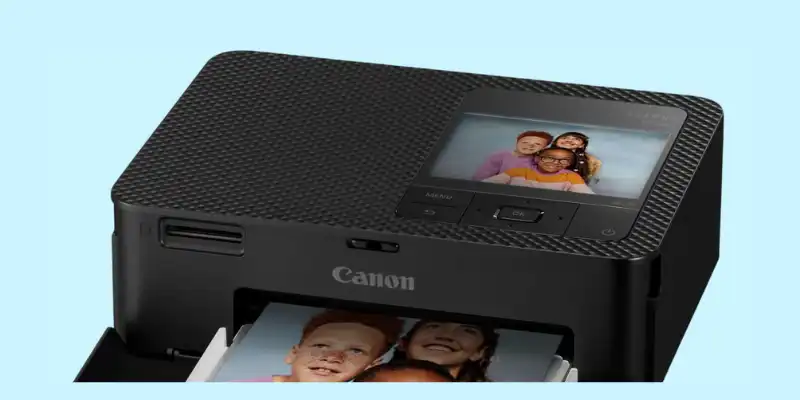
Canon SELPHY CP1500 Photo Printer
Some memories deserve more than a screen; they deserve to be held, framed, and shared. The Canon SELPHY CP1500 turns your favorite moments into stunning, high-quality photo prints you can treasure forever. This compact phone photo printer with an elegant design fits anywhere, making it the perfect companion for family gatherings, celebrations, and creative projects.
This best tank printer for phots comes with vibrant dye-sublimation printing, every photo comes out rich in color, smooth in tone, and ready to last for decades. You’ll love how easy it is to connect your phone or camera and print wirelessly, no stress, no cables, just instant joy.
Specifications Of Canon SELPHY CP1500 Photo Printer
| Feature | Details |
|---|---|
| Printer Type | Compact photo printer |
| Best For | Home, travel, and personal photo vibrant color printing |
| Functions | Color photo printing |
| Max Print Size / Format | 4×6 inches |
| Print Resolution | 300 x 300 DPI |
| Print Speed (PPM) | Up to 10 ppm |
| Connectivity Options | Bluetooth, Wi-Fi, USB, SD card |
| Ink System Type | Dye-sublimation |
| Supported Media Types | Glossy photo paper, sticker paper |
| Color Output | Full color |
| Display / Control | 3.5″ LCD screen |
| Paper Handling | Postcard-size cassette; supports multiple paper sizes |
| Mobile App Compatibility | SELPHY Layout App (iOS & Android) |
| Refill Cost | Low-cost ink + paper combo packs |
| Noise Level | Quiet printing |
| Ease of Setup | Simple and quick setup |
| Special Features | Wireless printing, battery support, customizable finishes |
| Build Quality / Design | Sleek, portable black body |
| Power Efficiency | Energy-efficient with AC power supply |
| Ideal User | Families, travelers, and hobby photographers |
Pros And Cons Of Canon SELPHY CP1500 Photo Printer
Pros
- Prints bright, high-quality photos.
- Easy wireless vibrant color printing from phone or camera.
- Compact and stylish design.
- Photos are water and fade resistant.
- Comes with extra ink and paper sets.
Cons
- Limited to 4×6” photo size.
- Needs Canon paper for best results.
This bundle includes two KP-108IN color ink and paper sets, giving you everything you need to start printing right away. Whether it’s baby photos, travel snapshots, or your favorite smiles, the SELPHY CP1500 sublimation printer helps you turn them into beautiful keepsakes that warm the heart.
Bring your stories to life, one print at a time, because happiness looks best in print.
Best 4×6 Photo Printer For iPhone
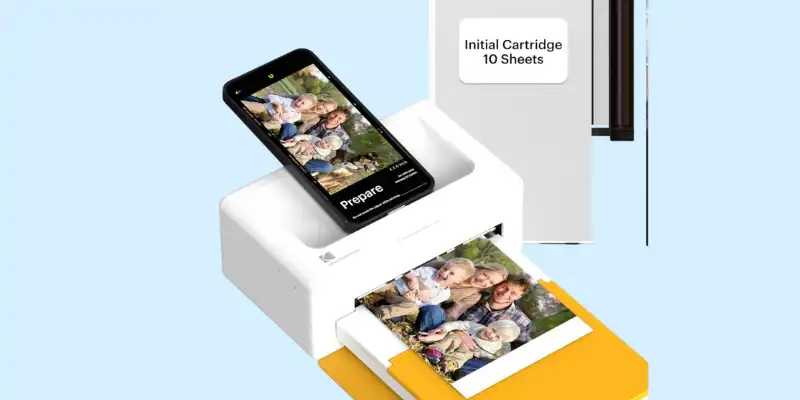
KODAK 4PASS Instant Photo Printer
If you love printing your photos as much as I do, the KODAK Dock Plus will quickly become your favorite companion. Honestly, I fell in love the first time I saw it. It’s small, sleek, and so easy to use, yet it prints gorgeous 4×6” photos that actually capture all the colors and details like magic.
What I really adore about this instant printer is its 2-in-1 dock and portable design. I can leave it on my desk for home printing, or just grab it and take it anywhere. The Bluetooth connection makes it super easy to print directly from my iPhone or Android, no cables, no fuss. And the colors? Simply vibrant. Each photo feels professional and long-lasting.
This cellphone printer for photographers comes with a 50-sheet bundle, so I can print for family gatherings, scrapbooks, or just for fun without running out of paper immediately. Plus, the prints are smooth, glossy, and perfect for framing or gifting. Honestly, for anyone who loves preserving memories in a fun, hands-on way, this decent printer makes it effortless and joyful.
Specifications Of KODAK Dock Plus 4PASS Instant Photo Printer
| Feature | Details |
|---|---|
| Printer Type | Portable 4×6” photo printer |
| Best For | Home, school, or personal use |
| Functions | Color photo printing |
| Max Print Size / Format | 4×6 inches |
| Print Resolution | 300 DPI (4PASS Dye Sublimation) |
| Print Speed (PPM) | 1 ppm |
| Connectivity Options | Bluetooth, Wireless |
| Ink System Type | 4-color dye sublimation (Cyan, Magenta, Yellow, Black) |
| Supported Media Types | Kodak 4×6 photo paper |
| Color Output | Full color, borderless printing |
| Display / Control | Controlled via cell phone/tablet app |
| Paper Handling | Initial cartridge + photo papers included |
| Mobile App Compatibility | iOS & Android |
| Refill Cost | Affordable Kodak paper + cartridge bundles |
| Noise Level | Quiet operation |
| Ease of Setup | Plug-and-play, easy docking |
| Special Features | Borderless printing, phone dock & charger |
| Build Quality / Design | Compact, sleek, color |
| Power Efficiency | Energy-efficient with power adapter |
| Ideal User | Printer lovers, families, students, travelers |
Pros And Cons Of KODAK Dock Plus 4PASS Instant Photo Printer
Pros
- Prints sharp, vibrant 4×6” photos.
- Easy Bluetooth printing from iPhone and Android.
- Comes with 50 sheets for immediate printing.
- Perfect for home, gifts, and scrapbooks.
Cons
- Printing speed is moderate.
Every time I pull a fresh photo out, I feel proud; it’s like holding a little piece of happiness in my hands. That’s why the KODAK Dock Plus has earned a permanent spot on my desk.
Best All-In-One Photo Printer
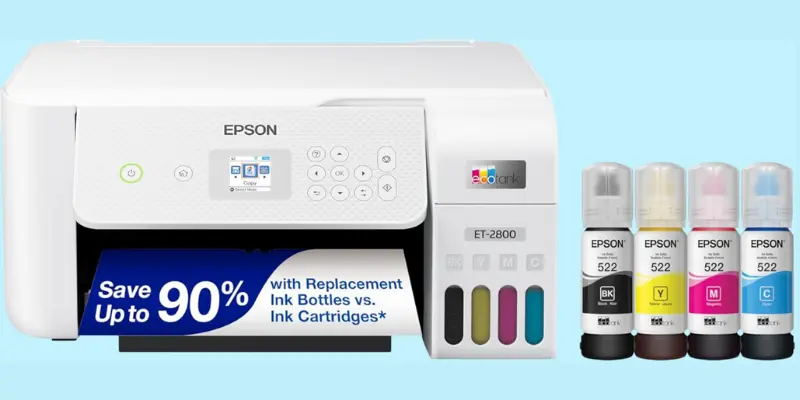
Epson EcoTank Photo ET-8500 Printer
If you love printing photos at home but hate constantly replacing ink cartridges, the Epson EcoTank Photo ET-8500 is a game-changer. I honestly love this instant printer because it combines high-quality photo printing with the convenience of a full all-in-one machine, scan, copy, and print, all from one sleek, white device.
What makes this mini picture printer really special is the EcoTank system. You get huge, refillable ink tanks instead of tiny cartridges, which means you can print hundreds of photos without worrying about running out of ink. And the prints? Crisp, vibrant, and full of detail, perfect for family albums, travel memories, or creative projects.
Wide-format photo printer setting it up is simple, and the wireless and Ethernet connectivity make it easy to print directly from your computer, smartphone, or tablet. The 4.3-inch color touchscreen gives you full control, making adjustments, scanning, or copying quick and intuitive.
Specifications Of Epson EcoTank Photo ET-8500 Printer
| Feature | Details |
|---|---|
| Printer Type | All-in-one portrait photo printer. |
| Best For | Home, office, and creative projects |
| Functions | Print, scan, copy |
| Max Print Size / Format | Up to 8.5 x 11 inches (borderless) |
| Print Resolution | High-quality inkjet |
| Print Speed (Color) | 12 ppm |
| Print Speed (Monochrome) | 16 ppm |
| Connectivity Options | Wi-Fi, Wi-Fi Direct, Ethernet, USB |
| Ink System Type | Claria ET Premium 6-color refillable EcoTank |
| Supported Media Types | Photo paper, cardstock, envelopes, CDs/DVDs |
| Color Output | Color and monochrome |
| Display / Control | 4.3-inch touchscreen |
| Paper Handling | Multiple paper sizes, auto-duplex support |
| Mobile App Compatibility | Epson iPrint app (iOS & Android) |
| Refill Cost | Cost-effective EcoTank bottles |
| Noise Level | Quiet operation |
| Ease of Setup | User-friendly guided setup |
| Special Features | Borderless printing, double-sided scanning, wireless, touchscreen, auto-duplex |
| Build Quality / Design | Sleek white all-in-one design |
| Power Efficiency | Energy-efficient |
| Ideal User | Families, hobbyists, and small business users |
Pros And Cons Of Epson EcoTank Photo ET-8500 Printer
Pros
- Prints high-quality, vibrant photos.
- Refillable EcoTank saves money on ink.
- All-in-one functionality: print, scan, copy.
- Wireless and Ethernet connectivity.
- Easy-to-use 4.3” color touchscreen.
Cons
- Larger and bulkier than compact color image printers.
- Initial setup takes a bit of time.
Whether you want professional-quality photos, everyday documents, or creative projects, this decent printer Epson ET-8500 combines performance, convenience, and cost-saving efficiency. For anyone who loves printing with pride and ease, this instant printer is a joy to use every day.
Best Photo Printer For Scrapbooking
Canon PIXMA TR160 Printer
If you love printing on the go, the Canon PIXMA TR160 is a small camera printer that packs a big punch. I really enjoy how portable and lightweight it is, perfect for home, office, or even a quick print session at a friend’s place. Despite its size, it delivers sharp, colorful prints for photos, documents, and creative projects.
This mini picture printer is available with a 50-sheet paper tray and a 1.44-inch display, setup and printing are simple. You can easily select options, check ink levels, and manage print jobs without fuss. It works with Android and iOS devices, so you can print directly from your phone or tablet using the Canon PRINT app, no cables required.
The TR160 uses a 5-color ink system, producing bright colors and crisp text, making your photos and documents look professional. It’s perfect printer for anyone who wants convenience, quality, and portability all in one printer.
Specifications Of Canon PIXMA TR160 Printer
| Feature | Details |
|---|---|
| Printer Type | Portable inkjet printer |
| Best For | Mobile printing, home, and small office use |
| Functions | Color printing (documents & photos) |
| Max Print Size / Format | Up to 8.5 × 11 inches |
| Print Resolution | Sharp text and vibrant color (5-color hybrid ink system) |
| Print Speed (Color) | 5.5 ppm |
| Print Speed (Monochrome) | 9 ppm |
| Connectivity Options | USB, Canon PRINT app, Apple AirPrint, Mopria |
| Ink System Type | 5-color hybrid ink cartridges |
| Supported Media Types | Photo paper, plain paper, borderless printing |
| Color Output | Full color |
| Display / Control | 1.44” OLED display |
| Paper Handling | 50-sheet paper tray |
| Mobile App Compatibility | iOS & Android (Canon PRINT app) |
| Refill Cost | Standard Canon cartridges |
| Noise Level | Quiet operation |
| Ease of Setup | Easy, lightweight, portable |
| Special Features | Energy Star certified, wireless direct mode |
| Build Quality / Design | Compact, lightweight black body (4.5 lbs) |
| Power Efficiency | Energy-saving mode |
| Ideal User | Travelers, students, and mobile professionals |
Pros And Cons Of Canon PIXMA TR160 Printer
Pros
- Portable and lightweight, easy to carry anywhere.
- Prints sharp photos and documents.
- Works with Android and iOS devices via Canon PRINT app.
- Simple 1.44-inch display for easy control.
Cons
- Uses ink cartridges, which need replacement.
- Not as fast as larger office printers.
Whether you’re printing memories, reports, or fun DIY projects, the Canon PIXMA TR160 makes it easy, quick, and enjoyable every time.
Best Photo Printer For Beginners
Canon PIXMA PRO-200S Printer
If you’re someone who loves photography and printing, the Canon PIXMA PRO-200S is an absolute joy. I have to say, what really got me hooked is the vibrant 8-color dye-based ink system, every photo pops with detail, color, and life that honestly surprises you. It’s like holding a mini art gallery right on your desk.
The camera printer handles up to 13-inch prints, which means you can print large, professional-quality photos without any compromise. I love using the 3.0” color LCD monitor to preview my prints, adjust settings, or choose paper types, it feels intuitive and gives you full control.
It’s wireless, so I can print directly from my computer or even from compatible mobile devices without dealing with messy cables. For someone who enjoys experimenting with colors, textures, and photo projects, this bluetooth printer feels like a creative partner rather than just a device.
Specifications Of Canon PIXMA PRO-200S Printer
| Feature | Details |
|---|---|
| Printer Type | Professional inkjet picture printer |
| Best For | Photographers, artists, creative professionals |
| Functions | Color photo printing |
| Max Print Size / Format | 13” x 19” (borderless) |
| Print Resolution | High-quality 8-color dye-based ink |
| Print Speed (Color) | 2 ppm |
| Print Speed (Monochrome) | 2 ppm |
| Connectivity Options | Wi-Fi |
| Ink System Type | 8-color dye-based ink cartridges |
| Supported Media Types | Glossy, matte, fine art paper |
| Color Output | Full color |
| Display / Control | 3.0” color LCD |
| Paper Handling | Single-sheet feed; borderless printing |
| Mobile App Compatibility | Canon PRINT app (iOS & Android) |
| Refill Cost | Medium to high (professional ink set) |
| Noise Level | Quiet |
| Ease of Setup | User-friendly setup |
| Special Features | Borderless printing, professional photo quality |
| Build Quality / Design | Compact, sleek black design |
| Power Efficiency | Energy Star certified |
| Ideal User | Professional photographers and creative hobbyists |
Pros And Cons Of Canon PIXMA PRO-200S Printer
Pros
- Prints large, professional-quality photos up to 13 inches.
- Vibrant and accurate colors with 8-color dye-based ink system.
- Wireless printing from computer and mobile devices.
- Ideal for photographers, artists, and creative projects.
Cons
- Larger and heavier than a compact digital camera shot printer.
- Uses dye-based inks, which can be more expensive than standard cartridges.
Honestly, every time I pull out a fresh print, I feel proud. The colors, the sharpness, the depth, it’s exactly what I envisioned. If you love capturing memories or creating stunning photo art, the Canon PIXMA PRO-200S is definitely worth the desk space.
Beginner-Friendly Best Photo Printer – Buying Guide
Choosing a photo printer can feel confusing, but don’t be tense. This simple informational guide will help you understand what matters, why it matters, and how to pick the right one for your needs.
Know Your Purpose
Before buying, ask yourself a simple question:
“What do I want to print?”
- Small 4×6 photos? Choose a compact dye-sub photo printer.
- Large, professional prints? Go for an inkjet best photo printer with more color inks.
- Everyday tasks + photos? Pick an all-in-one printer.
Tip: Your purpose decides your budget and print quality.
Print Quality (The Most Important Part)
Look for clear, sharp photos with bright colors.
- DPI: Higher DPI gives cleaner details.
- Ink type:
- Dye-sublimation: Smooth, long-lasting prints.
- Inkjet 6–8 color: Better for professional photo quality.
- Borderless printing: Gives photos a clean, full look.
Ask yourself: Do you want basic prints or gallery-level quality?
Print Size Options
Make sure the printer supports the size you need.
- 4×6” – best for everyday snapshots.
- 5×7”, 8×10” – better for framing.
- 13×19” (A3+) – great for professional prints and portfolios.
Connectivity And Ease of Use
Choose what fits your lifestyle.
- Wi-Fi / Bluetooth: Print directly from your phone.
- App support: Faster, easier editing.
- USB / Ethernet: Stable connection for computers.
- Screen display: Touchscreens make printing simple.
Tip: If you rely on your phone, pick a printer with strong wireless features.
Ink System And Running Cost
Best Photo printers can vary a lot in long-term cost.
- Cartridges: Cheaper upfront but need replacing often.
- Supertank (EcoTank): Saves money long-term; great for heavy printing.
- Dye-sub kits: Print cost is predictable per photo.
Check: Price of ink + number of photos per refill.
Speed And Volume
If you print many photos, speed matters.
- Small printers: Usually print slower (40–60 seconds per photo).
- Large pro printers: Faster for big batches.
Portability
Choose based on where you will use it.
- Portable printers: Light, easy to carry, print from your phone.
- Studio printers: Bigger, heavier, better quality.
Durability And Print Lifespan
Good photo printers create prints that last years.
- Dye-sublimation: Fade-resistant and water-proof photos.
- Pigment ink: Best for long-lasting, archival prints.
Extra Features to Look For
- Borderless printing
- Auto color correction
- Memory card slot
- LCD screen
- Mobile apps
- Fast-drying ink
- Replaceable print heads
Budget Planning
Best photo printers come at different price points:
- $100–$200: Small 4×6 printers for casual printing.
- $200–$500: Strong home printers with better colors.
- $600+: Professional printers for photographers and artists.
Final Tip
Choose the printer that matches your photo style, budget, and daily routine. A good photo printer should make you happy every time you press “print.”
Print Your Memories Right: Choose the Best Photo Printer!
Finding the right photo printer doesn’t have to be overwhelming. Whether you want a compact portable printer like the Liene M100 or Canon PIXMA TR160 for quick, on-the-go printing, a fun 2-in-1 dock Bluetooth printer like the Kodak Dock Plus, a reliable all-in-one like the Epson ET-8500, or a professional powerhouse like the Canon PIXMA PRO-200S, there’s a mini picture printer for every need and style.
Think about what matters most to you: portability, print size, connectivity, or professional quality, and pick the one that fits your lifestyle. With the right printer, you can turn your favorite moments into lasting memories and enjoy the satisfaction of crisp, vibrant prints every time.
FAQs
Which printer prints the best photos?
The printer that prints the best photos right now is the Canon imagePROGRAF PRO-310. It gives very rich colors and deep blacks, which makes your photos look clean and professional. If you want great quality at a lower price, the Epson EcoTank Photo ET-8500 or Canon PIXMA G620 are strong picks. For a tight budget, the Canon PIXMA TS7720 still gives sharp and bright pictures.
Which printer is best for photographs?
Inkjet photo printers are the best for printing photographs because they use fine ink droplets to create sharp and colorful images. Models with more ink colors, like the Canon Pro-3100, Epson ET-8550, and Canon G620, give even better results. These printers work well with glossy and matte photo paper, so your photos look bright and detailed.
What type of printer is best for photos?
An inkjet printer is the best type for photos. It sprays tiny drops of ink to produce smooth colors and sharp details. Good photo inkjets use special dye or pigment inks to make photos look bright and long-lasting. If you print many photos, choose an ink-tank model like EcoTank or MegaTank to save money per print.
What is the best photo printer to buy?
The best photo printer depends on your budget and needs. For professional work, the Canon imagePROGRAF PRO-310 is the top choice. For home use with high-quality prints, the Epson EcoTank Photo ET-8550 and Canon G620 are very reliable. If you want something simple and acheap, the Canon PIXMA PRO-200 or Canon Selphy CP1500 works well.
What do professional photographers use to print their photos?
Professional photographers usually use high-end inkjet decent photo printers with many ink colors. Popular choices include the Canon imagePROGRAF series and the Epson SureColor P700/P900. These printers give excellent color accuracy, deep blacks, and long-lasting prints. They also support large paper sizes for gallery or client work.





- Be Respectful
- Stay Relevant
- Stay Positive
- True Feedback
- Encourage Discussion
- Avoid Spamming
- No Fake News
- Don't Copy-Paste
- No Personal Attacks
- Be Respectful
- Stay Relevant
- Stay Positive
- True Feedback
- Encourage Discussion
- Avoid Spamming
- No Fake News
- Don't Copy-Paste
- No Personal Attacks
