How to Remove Virus on the Phone Easily
Published: 2 Aug 2026
Have you ever noticed your phone suddenly slowing down, showing too many ads, or installing apps you never downloaded? It can feel scary and frustrating at the same time. Many users face this problem every day and do not know what is causing it. In most cases, a phone virus or malware is the main reason behind these issues. It can enter your device through unsafe apps, fake links, or unknown websites.
Once inside, it can harm your phone, steal data, and reduce performance. The good news is that you can fix this problem easily. In this guide on how to remove the virus in phone, you will learn simple and safe methods to clean your device. You do not need to be a tech expert.
Just follow easy steps like removing harmful apps, using safe mode, and running a trusted antivirus scan. By the end, your phone will feel faster, safer, and fresh again. Staying aware of these issues can also help you prevent future infections and keep your phone running smoothly for a longer time without stress today.
What is a Phone Virus?
A phone virus is a harmful software that enters your mobile device and affects its normal functioning. It is also called mobile malware or a malicious app. It can slow down your phone, show unwanted ads, or steal personal data like passwords. For example, you may download a free game from an unknown website, and it secretly installs harmful code in the background. Phone viruses usually spread through unsafe apps, fake links, or suspicious downloads. They reduce performance and can risk your privacy and security if not removed quickly.
How to Remove the Virus in Phone? (Step-by-Step Guide)
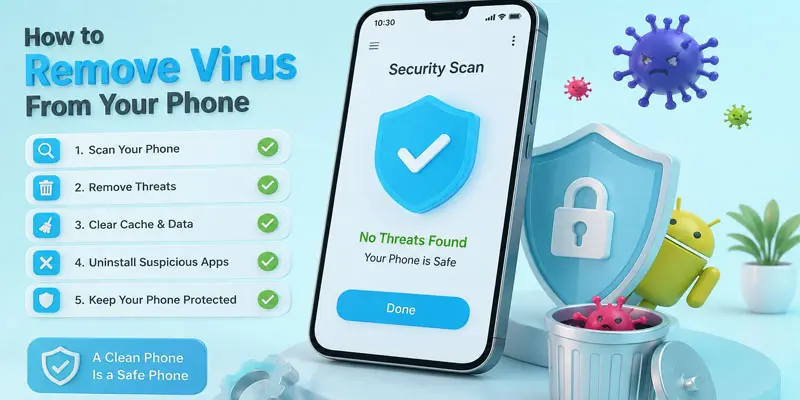
If your phone has a virus, follow these simple steps to remove harmful apps, clean your device, and improve your phone’s security and performance.
- Restart Your Phone
- Remove Suspicious Apps
- Use Safe Mode
- Run an Antivirus Scan
- Clear Browser Data
- Update Your Phone Software
- Reset Your Phone (Factory Reset)
Restart Your Phone
Restarting your phone is the first simple step to fix small virus-related problems. It can stop unwanted processes running in the background and refresh your device. Turn off your phone, wait a few seconds, and turn it on again. If the problem continues, try the next virus removal steps.
Remove Suspicious Apps
Check your phone for apps that you do not recognize or did not install yourself. These apps may contain harmful files or malware that can damage your device. Delete any suspicious apps from your phone settings. Removing unsafe apps helps keep your phone secure and improves its performance.
Use Safe Mode
Safe Mode helps you find and remove harmful apps from your phone. It starts your device with only the important system apps running. If your phone works better in Safe Mode, a downloaded app may be causing the problem. You can then remove the app that looks suspicious.
Run an Antivirus Scan
An antivirus scan helps find and remove viruses, malware, and harmful files from your phone. Install a trusted antivirus app and start a full device scan. The app checks your phone for security threats and suggests actions to remove them. Regular scans can help keep your phone safe.
Clear Browser Data
Clearing browser data can remove unwanted files, pop-up ads, and suspicious website activity. Open your browser settings and delete cache, cookies, and browsing history. This step helps fix browser-related problems and improves your browsing experience. It also reduces the chance of harmful websites affecting your phone.
Update Your Phone Software
Updating your phone software helps fix security problems and protects your device from new threats. Software updates often include important security improvements and bug fixes. Check your phone settings for available updates and install them regularly. An updated phone works better and stays safer.
Reset Your Phone (Factory Reset)
A factory reset removes all data, apps, and settings from your phone and returns it to its original state. It can help remove stubborn viruses that other methods cannot fix. Before resetting, save your important photos, contacts, and files. Use this step only when other virus removal methods do not work.
How Can You Tell If Your Phone Has a Virus?
Not sure if your phone is acting normally or infected with a virus? Here are the key signs that help you quickly identify a possible mobile malware problem.
- Your phone starts running very slowly, even when you are not using heavy apps.
- You see too many pop-up ads on your screen, even when no app is open.
- Unknown apps appear on your phone without your permission. For example, you find a game or tool you never installed.
- Your battery drains very fast because hidden apps keep running in the background.
- Your phone heats up quickly, even with normal use like texting or browsing.
- Apps crash often or behave strangely without any reason.
- Your internet data usage increases suddenly without heavy browsing or streaming.
- You receive strange messages or alerts from unknown numbers or apps.
- Your browser keeps opening random websites on its own.
How to Protect Your Phone from Future Viruses?
Protecting your phone from future viruses is easy when you follow simple safety steps that keep your device secure and your personal data safe.
- Install applications only through reliable platforms such as verified app stores. Avoid downloading APK files from unfamiliar websites because they can carry harmful software.
- Regularly update your mobile operating system and installed apps. New updates improve security and remove weaknesses that hackers may use.
- Stay away from unknown links in texts, emails, and random pop-ups. Clicking these links can lead you to unsafe websites or security risks.
- Use a strong password or screen lock to protect your personal information from unauthorized access.
- Install a trusted antivirus app to scan your phone and detect possible security risks.
- Avoid connecting to unsafe public Wi-Fi networks without protection. Hackers can use insecure networks to access your data.
- Remove apps you do not use or trust. Some apps may collect data or create security issues in the background.
- Back up your important files regularly. This helps protect your photos, contacts, and documents if your phone gets infected.
What Common Mistakes Should You Avoid to Keep Your Phone Safe?
Avoiding common phone mistakes can help protect your device from viruses, malware, and security risks while keeping your personal data safe.
- Downloading apps from unknown websites can put your phone at risk. These apps may contain viruses, malware, or harmful files. Always use trusted app stores.
- Opening unknown links from emails or messages can redirect you to dangerous sites. These pages may attempt to collect your private details or misuse your information.
- Ignoring phone updates is another common mistake. Updates fix security issues and help protect your device from new threats.
- Using weak passwords makes it easier for others to access your phone. Create strong passwords and use screen locks for better security.
- Installing too many unnecessary apps can slow down your phone. Some apps may run in the background and affect your privacy.
- Using unknown antivirus apps can also create problems. Choose trusted security tools to scan and protect your device.
- Not backing up your important data can cause problems if your phone gets infected. Save your files regularly to keep them safe.
Final Thoughts
Removing a phone virus is simple when you follow the right steps. You learned how to detect malware, delete harmful apps, use safe mode, and scan your device with antivirus tools. These steps help improve phone speed, security, and performance. Keep your phone safe by avoiding unknown apps and risky links. If your phone shows warning signs again, act quickly and clean it using these methods. Stay safe and keep your device protected every day.
FAQs
You can clear your mobile phone of viruses by removing suspicious apps, running an antivirus scan, and updating your device software. Also, clear browser data and avoid unsafe downloads to keep your phone clean and secure.
You can remove most viruses by deleting harmful apps, using trusted antivirus tools, and resetting your phone if needed. A factory reset can remove stubborn threats, but always back up important data first.
You can check for a phone virus by looking for signs like slow performance, pop-up ads, unknown apps, battery drain, and unusual data usage. A security scan can also help detect malware.
Most phone viruses can be removed with proper steps, such as scanning, deleting infected apps, and updating software. Some serious infections may require a factory reset to fully clean the device.
A trusted antivirus scan, removing suspicious apps, and restarting your phone can quickly reduce virus problems. Taking fast action helps protect your data and improve your phone’s performance.






- Be Respectful
- Stay Relevant
- Stay Positive
- True Feedback
- Encourage Discussion
- Avoid Spamming
- No Fake News
- Don't Copy-Paste
- No Personal Attacks
- Be Respectful
- Stay Relevant
- Stay Positive
- True Feedback
- Encourage Discussion
- Avoid Spamming
- No Fake News
- Don't Copy-Paste
- No Personal Attacks
