What Is Malware Analysis? Complete Simple Explanation
Published: 8 Jun 2026
Have you ever clicked a file or email link and suddenly noticed your device acting strangely? Slow performance, missing files, pop-up ads, or locked data can all be signs of malware. Cyber threats are growing every day, and many people do not know how dangerous these attacks can become until it is too late. That is where malware analysis becomes important.
Malware analysis helps experts understand how harmful software works, where it comes from, and how to stop it before it causes serious damage. Businesses use it to protect customer data, while individuals use it to keep their devices and personal information safe. Without proper analysis, malware can spread quietly and steal passwords, financial details, and sensitive files.
The good news is that learning the basics of malware analysis is not as difficult as it sounds. With the right knowledge, tools, and safety steps, you can better understand cyber threats and improve your online security. In this guide, you will learn different types of malware analysis, common tools, key techniques, and useful tips to stay protected from modern cyber attacks.
What is the Malware Analysis?
Malware analysis is the process of studying harmful software to understand how it works and how to stop it. Cybersecurity experts use malware analysis to detect threats, protect data, and improve system security. For example, if a suspicious email attachment infects a computer, analysts examine the file to find its behavior and damage. This process helps businesses and individuals stay safe from viruses, ransomware, spyware, and other cyber attacks.
What are the Best Practices for Safe Malware Analysis?
Following safe malware analysis practices is essential for protecting systems from hidden cyber threats while ensuring accurate detection, controlled testing, and strong cybersecurity defense.
- Safe malware analysis starts with using a secure environment. Always use virtual machines or sandbox systems to study harmful files. This keeps your main device and data safe from infection.
- Keep all security software updated. Updated antivirus tools and firewalls help block known threats and improve malware detection.
- Never run suspicious files on your real system. For example, if you receive an unknown email attachment, first test it in a controlled lab environment before opening it.
- Always isolate the analysis system from your main network. This prevents malware from spreading to other devices or business systems.
- Use trusted malware analysis tools like process monitors, network analyzers, and sandbox platforms to observe behavior safely.
- Take regular backups of important data. If something goes wrong during testing, backups help restore your system quickly.
- Follow the principle of least privilege, meaning only give necessary access during analysis. This reduces the risk of damage.
- Monitor system activity closely, including file changes, memory usage, and network traffic, to detect hidden malicious behavior.
- Keep learning about new cyber threats because malware is always evolving. Staying updated improves your analysis skills and protection level.
- For example, a ransomware sample may look harmless at first, but proper sandbox testing can reveal how it encrypts files and demands payment.
- Finally, always document your findings clearly. This helps cybersecurity teams respond faster and improve overall malware protection strategies.
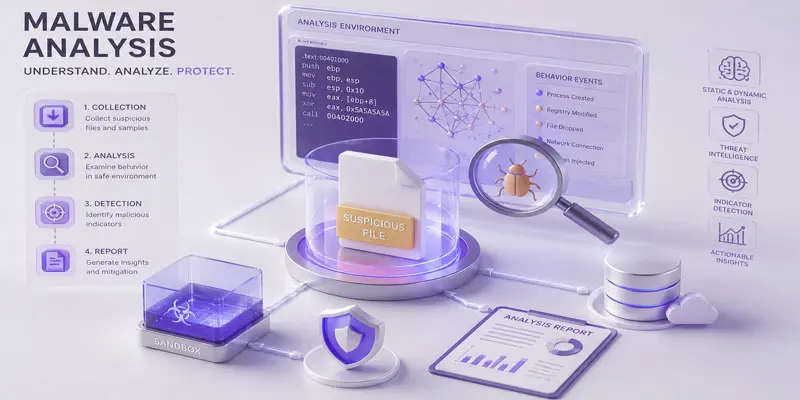
What is the Malware Analysis Process?
The malware analysis process is a step-by-step method used to study harmful software and understand how it infects, damages, or controls a device or network.
- The malware analysis process helps cybersecurity experts study harmful software and understand how it affects devices, networks, or files. It also helps improve malware detection and cyber threat protection.
- The first step is collecting the suspicious file or program. This may come from a phishing email, an unsafe website, or an infected download. For example, a fake invoice attachment may contain ransomware.
- Next, experts create a safe testing environment. They often use:
- Virtual machines
- Sandbox environments
- Isolated systems
- These tools prevent the malware from spreading to real computers or business networks.
- After that, analysts begin static analysis. In this step, they inspect the malware file without opening or running it. They check:
- File name
- File type
- Hidden code
- File behavior clues
- Then comes dynamic analysis. Here, the malware runs inside a secure environment so experts can watch its actions. They monitor:
- System changes
- Internet activity
- File modifications
- Password-stealing attempts
- Analysts also study network traffic to see if the malware connects to dangerous servers or downloads more harmful files.
- Finally, they document the results and create a security report. This helps businesses improve cybersecurity, block future attacks, and remove malicious software more effectively.
What are the Different Types of Malware Analysis?
Different types of malware analysis help cybersecurity experts study harmful software in various ways to detect threats, understand malware behavior, and improve system security.
- Static Malware Analysis
- Dynamic Malware Analysis
- Hybrid Malware Analysis
- Behavioral Malware Analysis
- Code Analysis
- Memory Analysis
- Network Malware Analysis
- Automated Malware Analysis
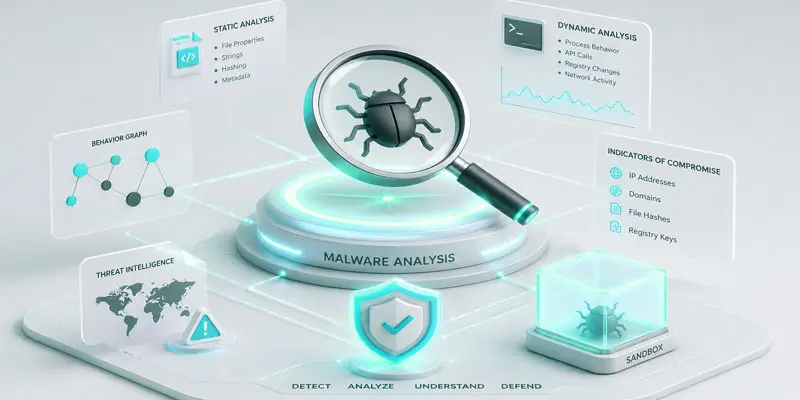
Static Malware Analysis
Static malware analysis studies harmful files without running them on a device. Cybersecurity experts inspect the file structure, code, file name, and hidden data to identify possible threats. This method is safer because the malware stays inactive during inspection. For example, analysts may check a suspicious email attachment before opening it to avoid infecting the system.
Dynamic Malware Analysis
Dynamic malware analysis involves running malware inside a secure virtual environment to observe its real behavior. Experts monitor system activity, file changes, internet connections, and harmful actions. This method helps detect hidden threats that do not appear during static analysis. For example, ransomware may start locking files only after the program runs on a device.
Hybrid Malware Analysis
Hybrid malware analysis combines static and dynamic analysis methods for deeper threat detection. Analysts first inspect the malware file safely and then run it in a protected environment to observe its behavior. This method delivers more precise outcomes and strengthens overall cybersecurity defense. Many security teams use hybrid analysis to detect advanced malware and complex cyber attacks.
Behavioral Malware Analysis
Behavioral malware analysis focuses on how malware acts after infecting a system. Analysts study activities like data theft, file deletion, password stealing, or unusual network traffic. This method helps identify dangerous behavior patterns and improve malware detection systems. For example, spyware may secretly track user activity and send private information to cybercriminals online.
Code Analysis
Code analysis examines the programming code used inside malware. Cybersecurity experts study scripts, commands, and hidden instructions to understand how the malicious software works. This helps security teams create better antivirus solutions and remove threats more effectively. For example, analysts may inspect ransomware code to discover how it encrypts files on infected computers.
Memory Analysis
Memory analysis studies the data stored in a computer’s memory while malware is active. Some cyber threats hide in system memory to avoid detection by antivirus software. Analysts use memory forensics tools to uncover these hidden activities. For example, fileless malware often stays in memory and leaves very few traces on the hard drive.
Network Malware Analysis
Network malware analysis examines internet and network activity created by malware. Experts monitor data traffic, suspicious connections, and communication between infected devices and remote servers. This process helps detect cyber attacks and prevent malware from spreading across networks. For example, a Trojan virus may secretly connect to a hacker-controlled server to steal sensitive information.
Automated Malware Analysis
Automated malware analysis uses advanced tools and artificial intelligence to study malicious software quickly. These systems scan suspicious files, detect threats, and generate security reports automatically. This method saves time and improves cybersecurity efficiency. For example, online malware scanners can instantly check uploaded files for viruses, spyware, ransomware, and other harmful programs.
What are the Advantages and Disadvantages of Malware Analysis?
Malware analysis helps detect cyber threats and improve security, but it also comes with challenges, making it important to understand both its advantages and disadvantages for better protection against modern attacks.
Advantages of Malware Analysis
- Malware analysis helps identify cyber threats early before they can damage systems or steal data.
- It improves cybersecurity by helping experts understand how viruses, ransomware, and spyware behave.
- It protects personal and business data from hackers and unauthorized access.
- It helps security teams create better antivirus tools and stronger defense systems.
- For example, if a phishing email contains a harmful attachment, malware analysis can detect it before users open it.
- It reduces financial loss by preventing data breaches and system attacks.
- It also helps IT teams respond quickly to active cyber threats.
- It builds awareness about safe online behavior and risky files.
Disadvantages of Malware Analysis
- Malware analysis requires advanced technical skills, so beginners may find it difficult to learn.
- It can be time-consuming because experts must carefully study each file or behavior.
- Some malware is highly complex and uses encryption or hiding techniques, making analysis harder.
- It needs safe environments like virtual machines, which may require extra setup and resources.
- For example, fileless malware can hide in system memory, making detection more challenging.
- There is also a risk if the analysis is done incorrectly in a non-secure system.
- Some tools used for malware analysis can be expensive for individuals or small businesses.
- Constantly evolving cyber threats make it difficult to stay updated at all times.
Why is Malware Analysis Important?
Malware analysis is important because it helps detect and stop cyber threats before they cause serious damage. It allows cybersecurity experts to understand how viruses, ransomware, spyware, and other malicious software behave. This knowledge helps improve system security and protect sensitive data.
For example, if a user downloads a fake software update, malware analysis can identify the hidden threat and prevent data theft or system damage. It also helps businesses avoid financial loss and protect customer information from hackers.
Malware analysis supports faster threat detection, better antivirus tools, and stronger cybersecurity systems. It also improves online safety for individuals by reducing risks from phishing emails, unsafe downloads, and infected websites. In simple words, it acts as a shield that helps keep computers, networks, and personal data safe from modern cyber attacks.
What are the Challenges in Malware Analysis?
Malware analysis is becoming more difficult as cyber threats grow smarter, making it important to understand the key challenges that experts face while detecting and analyzing malicious software.
- Malware analysis is not easy because modern cyber threats are becoming more advanced and harder to detect. Cybercriminals use new techniques to hide malicious software and avoid security tools.
- One major challenge is encrypted malware, which hides its code so analysts cannot easily read or understand it. This makes threat detection slow and complex.
- Another issue is fileless malware, which runs directly in system memory instead of installing files on a device. For example, it can steal data without leaving clear traces on the hard drive.
- Some malware also uses anti-analysis techniques. It can detect virtual machines or sandbox environments and change its behavior to avoid being studied.
- The process also requires skilled experts and advanced tools, which may not always be available for beginners or small organizations.
- Malware analysis can take a lot of time because each suspicious file must be carefully examined.
- Cyber threats are also constantly evolving, so analysts must keep learning new techniques to stay updated.
- In real life, a simple phishing email attachment may hide multiple layers of malware, making it difficult to analyze completely.
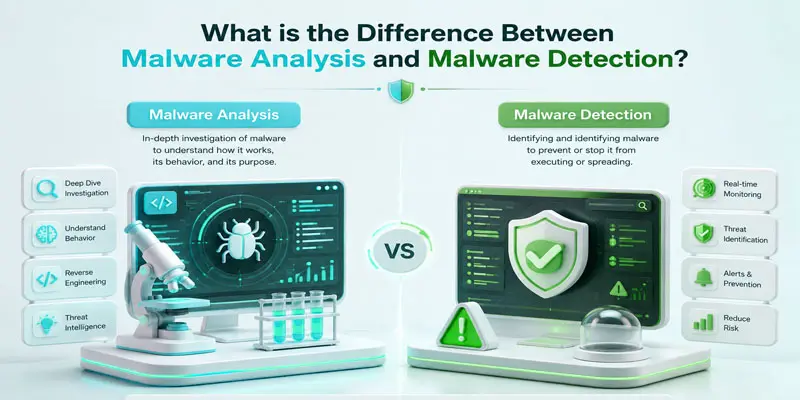
What is the Difference Between Malware Analysis and Malware Detection?
Malware analysis and malware detection both help protect systems from cyber threats, but they work in different ways, making it important to understand how each one identifies and handles malicious software.
| Malware Ana | Malware Det |
|---|---|
| Identifies possible threats quickly. | Studies malware in detail. |
| Works in real-time security systems. | Works in controlled lab environments. |
| Uses antivirus signatures. | Uses deep technical investigation. |
| Focuses on blocking threats. | Focuses on understanding behavior. |
| Provides fast alerts. | Provides detailed reports. |
| May miss unknown malware. | Detects new and hidden malware. |
| Used in daily system protection. | Used by cybersecurity experts. |
| Prevents immediate attacks. | Helps improve future protection. |
| Less technical process. | Highly technical process. |
| Runs automatically in the background. | Requires manual analysis work. |
Final Thoughts
Malware analysis helps detect, study, and stop harmful cyber threats before they cause serious damage. By learning malware detection methods, analysis techniques, and cybersecurity best practices, you can better protect your devices and data. Stay alert, use trusted security tools, and continue learning about online threats. Strong cybersecurity knowledge today can help create a safer digital future tomorrow.
FAQs
Is malware analysis a good career?
Yes, malware analysis is a strong and growing career in cybersecurity. It offers high demand, good salary, and job security. Beginners can start with basic IT skills and grow into roles like malware analyst or security researcher.
What are the 4 stages of malware analysis?
The four main stages of malware analysis are collection, static analysis, dynamic analysis, and reporting. Analysts first gather the sample, study its code safely, observe its behavior, and finally document findings to improve cybersecurity protection.
Is a CS degree needed for malware analysis?
No, a computer science degree is not always needed for malware analysis. Many professionals enter through cybersecurity courses, certifications, and hands-on practice. Strong skills in networking, operating systems, and security tools matter more than formal degrees.
Will AI replace malware analysts?
No, AI will not fully replace malware analysts, but it will support their work. AI can speed up threat detection, while humans handle complex analysis, decision-making, and understanding advanced cyber attacks that require critical thinking.






- Be Respectful
- Stay Relevant
- Stay Positive
- True Feedback
- Encourage Discussion
- Avoid Spamming
- No Fake News
- Don't Copy-Paste
- No Personal Attacks
- Be Respectful
- Stay Relevant
- Stay Positive
- True Feedback
- Encourage Discussion
- Avoid Spamming
- No Fake News
- Don't Copy-Paste
- No Personal Attacks
