Best Wireless Gaming Keyboard 2026
Published: 20 Mar 2025
Gaming is fun, but we can understand if you have a wired keyboard, sometimes it can become frustrating. A wired keyboard binds you to one place. Sometimes you want to play on a bed or a couch, but the wires are limited in length and you do not move to your favourite spot.
Gaming wireless keyboards offer the freedom of movement and a cleaner setup, perfect for immersive play in your favourite spot. If you are buying a gaming keyboard good for the first time, it’s important to understand the responsiveness, switch type, key press sound, layout and overall feel.
If you don’t know about these things, don’t worry, we have put together a great collection of the best wireless gaming keyboards for you that are expert-tested. In this blog, you’ll also learn how to choose a top wireless keyboard for gaming and what features to look for. Let’s dive into details!
Quick Overview – Best Wireless Gaming Keyboard 2026
Key Features:
| Switch type | Pre-lubricated NX Snow linear switches and ROG NX Storm clicky switches |
| keyboard type | Mechanical |
| Backlighting | RGB |
| Connectivity | Wired + Wireless |
| Battery Life | 8 to 10 days |

Key Features:
| Switch type | Hot-Swappable Switches |
| keyboard type | Gaming Keyboard |
| Backlighting | RGB |
| Connectivity | Tri-Mode |
| Compatible | PC, Laptop, Tablet, Smartphone, Gaming Console |
Key Features:
| Switch type | Magnetic and Mechanical |
| keyboard type | Ergonomic, 60% Layout |
| Backlighting | ARGB |
| Connectivity | Wired / 2.4GHz Lag-free |
| Compatible | PC, Laptop, Tablet, Smartphone, Gaming Console |
Key Features:
| Switch type | Low-Profile GL Mechanical |
| keyboard type | Mechanical Gaming Keyboard |
| Backlighting | RGB |
| Connectivity | LIGHTSPEED Wireless, Bluetooth, USB-A (Wired) |
| Compatible | Laptop, PC |
| Battery Life | Up to 36 Hours |
Key Features:
| Switch type | GX Brown Tactile Mechanical Switches |
| keyboard type | Tenkyless |
| Backlighting | RGB |
| Connectivity | LIGHTSPEED Wireless, Bluetooth, Wired (USB-C to USB-A) |
| Compatible | Gaming Consoles, PC, Mac |
| Battery Life | 25 hours |

| If you want to buy a keyboard that not only spcific for gaming, read our other recomendations on best programming keyboard and best typing keyboard. If you want to play gaming in traveling check out our recomendations on best portable keyboard. If your budget is low check these best cheap keyboard. |
Comprehensive Overview – Is A Wireless Keyboard Good For Gaming?
A wireless keyboard can be good for gaming if it offers low latency, fast response, and a strong connection. Many modern cell phone keyboards feel smooth and quick, just like wired ones. But the experience depends on build quality, battery life, and how stable the wireless link is during gameplay. Here is a great collection of gaming keyboards for you!
Best Overall Gaming Keyboard
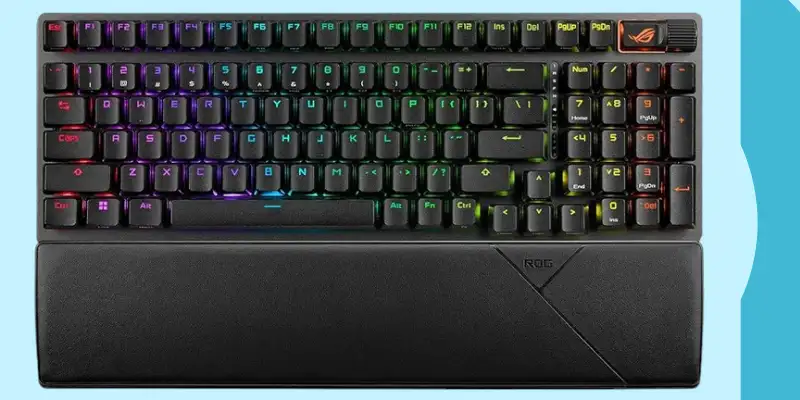
ASUS ROG Strix Scope Keyboard
The ASUS ROG design is impressive, and its 96% layout makes me feel comfortable when I start playing games with it. If you are thinking that it will cover all your desk space and no space left for your mouse. You are thinking wrong, despite it having all keys, but its frame built in a space-saving design.
It keeps the number pad and function keys while giving you more room for mouse movement, perfect for gamers with limited desk space.
This best wireless gaming keyboard has high-quality PBT doubleshot keycaps that resist shine and wear, giving a premium feel for its users. The detachable wrist rest available, so whenever your hands get tired between long gaming or typing, you can attach it to make your hands fully rest. Its clean, modern look paired with customizable RGB lighting adds both style and functionality to any setup.
Specifications
| Features | Details |
| Layout | 96% layout |
| Switch Type | Pre-lubricated NX Snow linear switches and ROG NX Storm clicky switches |
| Keyboard Type | Mechanical (Hot-Swappable) |
| Wrist Rest | Detachable |
| Back Lighting | RGB |
| Connectivity | Available in both wired and Lag free |
| Battery Life | 8 to 10 Days |
| Software Support | Available |
| Keycaps | ROG PBT or UV-coated ABS keycaps |
| Compatibility | Gaming Console |
Pros And Cons Of ASUS ROG Strix Scope
Pros
- Compact 96% Layout: Offers all essential keys in a smaller frame, saving desk space.
- Hot-Swappable Switches: Easily swap switches without bonding for customization.
- High-Quality PBT Keycaps: Durable and resistant to shine for long-term use.
- Removable Rist Rest: Adds comfort and flexibility for different setups
- Smooth, Pre-Lubricated Switches: Delivers a satisfying and responsive typing experience.
Cons
- Complex Software: Software can be slow and tricky to navigate.
- Backlighting may not be vivid in well-lit environments
The ASUS best keyboard for gaming is specially designed for gamers. Hot-swappable switches that you can easily change without any difficulty. I got excited after using its smooth NX Snow linear or clicky ROG NX Storm switches, both pre-lubricated for a better typing feel.
The keyboard supports tri-mode connectivity; you can connect via Bluetooth, 2.4GHz low-latency (with ROG SpeedNova technology), or a wired USB-C connection. It’s built-in sound-dampening foam improves keystroke acoustics by reducing noise and echo. This feature makes you comfortable in playing at night or in a place where this click-clack sound disturbs others.
The high-quality PBT or UV-coated ABS keycaps with customizable RGB lighting and excellent battery life, this keyboard is perfect for gamers who want flexibility, performance, and style in one compact package.
Even during intense gameplay, the keyboard remains steady and comfortable, offering a reliable experience that keeps up with high-speed action.
Rating
| Speed | 5/5 |
| Customization | 4.5/5 |
| Typing feel | 5/5 |
| Portability | 4/5 |
| Comfort | 5/5 |
| Controls | 4.5/5 |
Verdict: The ASUS gaming keyboard is a solid choice for gamers who want performance, flexibility, and premium build quality in a compact form. With its responsive switches, multiple connectivity options, and thoughtful design features like hot-swappable keys and sound-dampening layers, it delivers an excellent gaming and typing experience.
Click here to buy!
Best Cheap Keyboard For Gaming
Redragon K580 Pro Keyboard
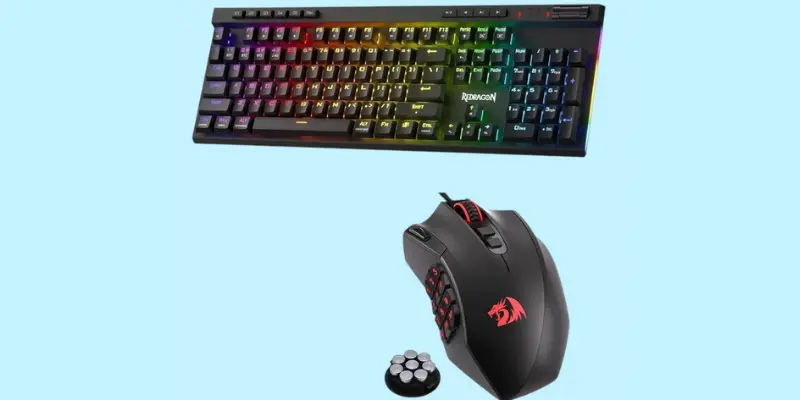
This gaming wireless keyboard has a full layout, but its design is space-saving, so if you ever felt that your keyboard always crowds your desk, it’s time to change that with the Redragon K580 Pro. This keyboard’s design and features have a large number of positive reviews. I could say that it impressed me.
The mechanical keyboard K580 comes with blue switches that are tactile and quite. These switches give the vibes of Cherry MX switches and most of the users could not notice the difference between them. RGB backlighting that can be adjusted according to your use. On the right side, dedicated media control keys are available, so you can control the sound, lower or mute by using them without any interruption in your gaming.
Redragon Wireless Gaming Keyboard – Full Specification
| Feature | Details |
| Keyboard Type | Gaming Keyboard |
| Number of Keys | 104 |
| Backlighting Support | RGB (Adjustable via wheel and software) |
| Compatible Devices | Gaming Consoles |
| Connectivity Technology | Tri-Mode: Bluetooth (BT 3.0/5.0), 2.4GHz Wireless, USB-C Wired |
| Special Features | Ergonomic Design, Hot-Swappable Switches, Backlit, 5 Macro Keys (G1–G5), Multimedia Controls, Volume/Backlight Wheel, Pro Software Support |
| Switch Compatibility | Supports 3-pin and 5-pin switches |
| Macro Keys | 5 programmable macro keys (on-the-fly recording, no software required) |
| Multimedia Controls | Play, Pause, Skip, plus Volume and Backlight Control via side wheel |
| Software Customization | Supported via Redragon software – customize lighting, keybindings, macros, and more |
| Keyboard Layout | Full-size layout |
| Hot-Swappable Support | Yes – compatible with most 3-pin/5-pin mechanical switches |
| Build Design | Ergonomic with premium comfort focus |
Pros And Cons Of
Pros
- Customizable RGB backlighting
- Dedicated media control keys
- Budget Friendly
- Mechanical hot switch
Cons
- Software is not working well for some users on Windows 10
The maros key (G1 – G5) is available in this best wireless gaming keyboard, which makes your typing or gaming more comfortable. These keys can be customize by Redragon software without any difficulty. The N-key rollover can register all the keys that you press simultaneously.
Rating
| Speed | 4.5/5 |
| Customization | 4/5 |
| Typing feel | 4.5/5 |
| Portability | 4/5 |
| Comfort | 5/5 |
| Controls | 4.5/5 |
Verdict: So this wireless keyboard is a full pack of features that fit in a gamer’s setup. It has RGB backlighting, mechanical switches, dedicated media control keys, software and N Key rollover. You don’t need to buy a keyboard with these features at a high price when you have the option of the Redragon K580 keyboard as a budget-friendly option.
Click here to buy!
Best Budget Wireless Gaming Keyboard
MonsGeek FUN60 Ultra TMR Keyboard
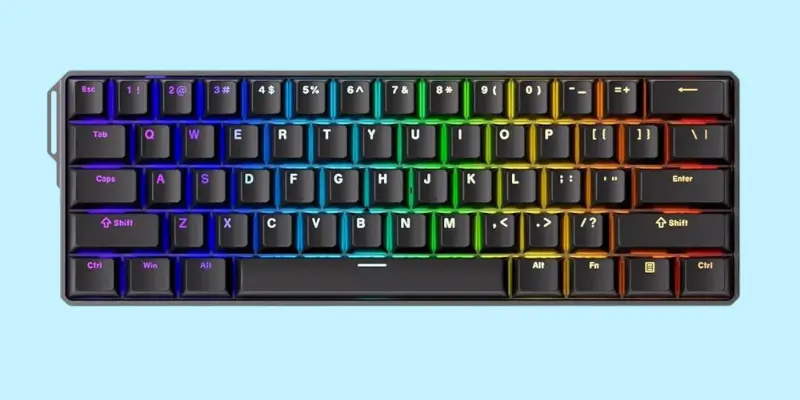
The MonsGeek FUN60 Ultra is a compact 60% glorius wireless keyboard made from strong aluminium. It saves space on your desk but skips some useful keys like arrows and function keys. Despite its small size, it’s pretty heavy and feels very solid. The PBT keycaps are smooth and the typing experience is both fast and responsive thanks to pre-lubed switches.
This mini best wireless gaming keyboard is great for gaming and typing, thanks to its TMR magnetic switches and deep customization options. You can adjust how fast keys respond and assign shortcuts. It has a software function, though the software can be tricky to use, but you can adjust lighting with it easily. A big drawback is the hidden switch under the Caps Lock, which makes changing modes harder than it should be.
MONSGEEK FUN60 Ultra Keyboard – Full Specification
| Feature | Details |
| Compatible Devices | PC, Laptop, Tablet, Smartphone, Gaming Console |
| Connectivity Technology | Wired / 2.4GHz Low latency |
| Keyboard Type | Ergonomic, 60% Layout |
| Number of Keys | 61 Keys |
| Power Source | USB Powered / Rechargeable Battery (Wireless mode) |
| Switch Type | Magnetic and Mechanical |
| Switch Compatibility | Works with 5 third-party magnetic switches and standard mechanical switches |
| Keyboard Layout | QWERTY |
| Polling Rate | 8,000 Hz (wired/2.4GHz modes) |
| Lighting | ARGB (Individually controlled LEDs, flicker-free, Alpha channel supported) |
| Advanced Features | DKS, Toggle Key, Mod-Tap support |
| Typing/Gaming Flexibility | Combine magnetic for keys like WASD and mechanical for rest |
| Best For | Gaming, Typing, Competitive play |
Pros And Cons
Pros
- Best built quality
- Great TMR switches
- Satisfying and snappy performance
- Very cheap
Cons
- Software is complex to use
- Function and media keys are not available
Of course, I love this best keyboard for gaming despite its flaws. In the budget, the FUN60 Ultra offers high-end build quality, smooth performance, and serious value for pro player keyboards who have no issue with the smaller layout.
Rating
| Speed | 5/5 |
| Customization | 4.5/5 |
| Typing feel | 5/5 |
| Portability | 4/5 |
| Comfort | 4.5/5 |
| Controls | 5/5 |
Verdict: The MonsGeek FUN60 Ultra is a feature-packed 60% wireless keyboard that truly delivers more than you’d expect for the price. While it’s not built specifically for office work, its solid aluminium body, quiet typing experience, and wireless options make it a good pick for everyday use too, if you’re okay without arrow keys or a Numpad. Whether you’re a gamer, casual user, or keyboard enthusiast, the TMR analogue switches, fast response time, and deep customization make this keyboard a joy to use.
Yes, there are some odd choices, like the hidden mode switch and a software that could be better, but those are small trade-offs compared to what you get: smooth typing, premium feel, and great performance even in wireless mode. The best compact mechanical keyboards you can buy without spending a lot. If you understand its layout limits and want top-tier features at a budget-friendly price, this keyboard is a smart choice.
You can buy the best wireless gaming keyboard from Amazon.
Best Mechanical Keyboard For Gaming
Logitech G515 TKL Keyboard
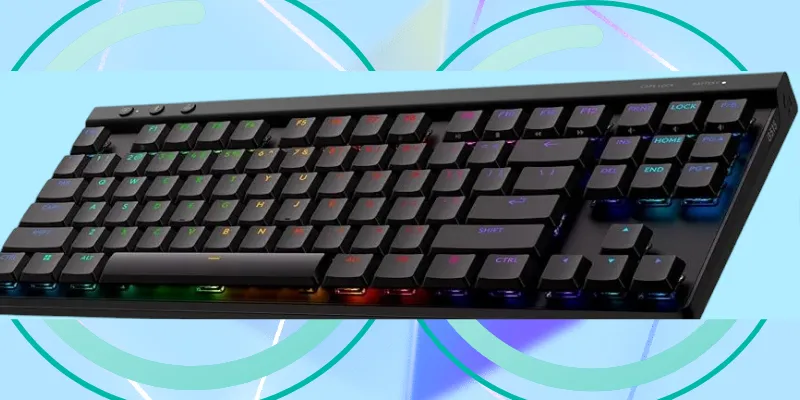
The Logitech is one of my favourite keyboards and the G515 is one of them. It’s best for typing and gaming with a TKL layout. It has low-profile key switches that are smooth and quiet, so its the best for home and office use. It has five slim rubber strips that save the keyboard from slipping during intense gaming.
There are flip-out feet under the Bluetooth keyboard at an angle that makes gaming and typing comfortable without an ergonomic feature. It is a 75% layout keyboard and does not have numpad, volume and media keys separately. But the good news is it has three separate keys: 2.4GHz wireless, Bluetooth and gaming mode keys on the top left side.
Logitech G515 LIGHTSPEED TKL – Specifications
| Feature | Details |
| Compatible Devices | Laptop, PC |
| Connectivity Technology | LIGHTSPEED Wireless, Bluetooth, USB-A (Wired) |
| Keyboard Description | Mechanical Gaming Keyboard |
| Recommended Uses | Business, Education, Gaming, Multimedia, Programming |
| Number of Keys | 90 |
| Backlighting | RGB (16.8 Million Colors via LIGHTSYNC RGB) |
| Switch Type | Low-Profile GL Mechanical (Linear and Tactile options, factory-lubed) |
| Keyboard Style | Tenkeyless (No Numpad) |
| Battery Life | Up to 36 Hours (Depends on usage and backlight settings) |
| Key Customization | KEYCONTROL Technology – Customizable per key via Logitech G HUB |
| Keycaps | Double-shot PBT with anti-oil coating for durability and a premium feel |
| Hotkeys | 3 Hotkeys for quick access: Wireless, Bluetooth, and Game Mode |
| Wireless Speed | LIGHTSPEED Wireless – 1ms ultra-fast report rate |
| Dual Device Pairing | Supports pairing keyboard and mouse bundle using a single LIGHTSPEED USB receiver |
Pros And Cons
Pros
- Built quality is really good
- Has good battery life
- RGB backlighting and shiny keycaps
- Customizable
Cons
- No wrist rest
- Numpad is missing
Logitech’s G HUB software lets you customize key mapping, RGB lighting, macros, and save profiles to onboard memory. While it’s feature-rich and easy to use, some users may find it heavy on system resources and frustrating due to frequent updates.
The G515 TKL best wireless gaming keyboard features upgraded low-profile GL switches with a new POM cross-style stem for better stability and keycap compatibility. Its thick, doubleshot PBT keycaps feel premium and show off RGB lighting well, though some uneven backlighting may be noticeable due to visible switch stems.
| Read our full review on ligitech mx keys s and logitech g915. |
Rating
| Speed | 5/5 |
| Customization | 4.5/5 |
| Typing feel | 5/5 |
| Portability | 4/5 |
| Comfort | 4/5 |
| Controls | 4.5/5 |
Verdict: I found the Logitech G515 Lightspeed TKL is a well-built, low-profile best wireless keyboard with impressive battery life, smooth mechanical switches, and solid gaming performance. While the low-profile design won’t suit everyone, its durable keycaps, replaceable battery, and responsive wireless connectivity make it a great option for fans of compact, fast keyboards.
Buy it from Amazon
Best TKL Wireless Gaming Keyboard
Logitech G715 Wireless Mechanical Gaming Keyboard
The Logitech G715 is a wireless mechanical good gaming bluetooth keyboard made for comfort and style. It uses GX Brown tactile switches, has bright RGB lighting, and includes a soft, cloud-shaped palm rest for relaxed gaming. With LIGHTSPEED and Bluetooth, it connects easily and runs up to 25 hours on a single charge.
With its dreamy White Mist finish and compact tenkeyless (TKL) layout, the G715 stands out on any desk. The adjustable height and soft palm rest add extra comfort, while the colorful RGB lighting brings your setup to life. The GX Brown switches give a smooth and responsive feel with every press.
Logitech G715 Lightspeed – Specifications
| Specification | Details |
| Switch Type | GX Brown Tactile Mechanical Switches |
| Compatible Devices | Gaming Consoles, PC, Mac |
| Connectivity Technology | LIGHTSPEED Wireless, Bluetooth, Wired (USB-C to USB-A) |
| Special Features | Backlit, Wrist Rest, Rechargeable Battery, LIGHTSYNC RGB, Dual Wireless Mode |
| Type | Tenkeyless (TKL) |
| Keyboard Layout | QWERTY |
| Adjustable Height | Yes |
| Battery Life | Up to 25 hours (with full RGB lighting) |
| Lighting | Per-key RGB & perimeter LIGHTSYNC RGB with customizable Play Mood animations |
| RGB Control Software | Logitech G HUB |
| Multi-device Pairing | Can sync with Logitech mouse using a single USB receiver |
| Wired Option | USB-C to USB-A Cable included |
| Customization Options | Keycaps and top plates available in additional colorways (sold separately) |
| Included Palm Rest | Yes, cloud-shaped and cushioned |
| Keyboard Backlighting Color Support | RGB |
| Number of Keys | 87 (Tenkeyless layout) |
Pros And Cons Of Logitech G715 Wireless Keyboard
Pros
- Comfortable Palm Rest
- GX Brown Switches
- Long Battery Life
Cons
- No Dedicated Macro Keys
- No Numpad
Verdict: Whether you’re using LIGHTSPEED or Bluetooth, you’ll enjoy fast, reliable gameplay with no lag, plus long battery life for extended sessions. The Logitech G715 is perfect for gamers who want performance and beauty in one keyboard. It’s stylish, comfortable, and packed with features that work well for both casual and serious gaming.
Rating
| Speed | 5/5 |
| Customization | 4.5/5 |
| Typing feel | 4.8/5 |
| Portability | 4/5 |
| Comfort | 5/5 |
| Controls | 4.6/5 |
Click here to buy the best wireless gaming keyboard!
What Our Rating Explains About These Keyboards?
Our rating shows how well each glorious gaming keyboard performs in real gaming use. It explains the speed, comfort, build quality, and wireless stability you can expect. This helps beginners pick a keyboard that feels smooth, responds fast, and matches their gaming style without confusion.
Speed
- This measures how fast the switches register your inputs.
- A keyboard with low actuation force, short travel, and fast wireless (like Logitech’s LIGHTSPEED) will score high.
- Ideal for gamers and high-speed typists.
Customization
- Looks at how much you can personalize the keyboard.
- Includes RGB lighting, key remapping, macros, profiles, and onboard memory.
- KeyControl and Logitech G HUB give strong options here.
Typing Experience
- Considers tactile feedback, smoothness, noise level, and overall satisfaction.
- High-quality switches, stable keycaps, and layout matter here.
Comfort Level
- This focuses on long-use comfort, keycap curve, wrist support, and typing fatigue.
- A comfortable keyboard reduces strain during long sessions.
Control
- Checks for quick-access controls like dedicated media keys, game mode, device switching, and connectivity.
- Gives users more command with fewer interruptions.
Portability
- Measures size, wireless ability, and durability when carried or used on different setups.
- Good portability means easy switching between devices and simple setup.
We use these six categories to give you a well-rounded, honest rating. A keyboard doesn’t have to be perfect in every area, it depends on your priorities. Some might care more about comfort and typing, others about speed and wireless control. Our goal is to help you choose based on what matters most to you.
What Are The Most Important Specs In The Best Wireless Gaming Keyboards?
Choosing the right specs in a good wireless gaming keyboard is important because it directly affects your game performance, reaction time, and comfort. Whether you’re a casual player or a competitive gamer, the right features can make your gameplay smoother, faster, and more enjoyable.
These are the specifications you should know before buying.
Battery Life
A long battery life (typically 30 to 70+ hours) ensures uninterrupted gaming, especially during long sessions or tournaments. You don’t want your keyboard dying mid-battle. Some keyboards offer quick charge features that give hours of use from just minutes of charging. Make sure the keyboard supports wired use while charging, so you don’t have to stop gaming when the battery runs low.
Wireless Performance
- Low latency is key: Fast-paced games require instant keystroke registration. Low latency ensures your inputs register without delay.
- Wireless types:
- RF (Radio Frequency) – Usually offers the fastest, most stable connection through a USB dongle.
- Bluetooth – Better for portability and device switching, but may have slightly higher latency.
- Dual-mode (RF + Bluetooth) – Gives you the best of both worlds.
- Look for trusted prebuilt wireless technologies like Logitech LIGHTSPEED, Razer HyperSpeed, or Corsair Slipstream, which are designed specifically for gaming reliability.
Switch Type
- Mechanical vs. Membrane:
- Mechanical key switches are the top choice for gamers because they are faster, more durable, and give better feedback.
- Membrane switches are softer and cheaper but less responsive, usually not ideal for gaming.
- Types of Mechanical Switches:
- Linear switches (e.g., Red): Smooth and quiet, great for fast-paced games.
- Tactile switches (e.g., Brown): A Slight bump gives feedback without the noise.
- Clicky switches (e.g., Blue): Loud and bumpy, best if you like a strong typing feel.
Mechanical switches offer faster actuation, which means quicker reactions in-game. They also last longer, most rated for 50+ million keystrokes.
Build Quality
PBT keycaps are more durable and offer a premium feel, while ABS keycaps wear out faster. Keyboards with metal frames feel sturdier than plastic ones. For better durability, look for features like spill resistance and dust protection to withstand heavy use.
Customization Features
Best wireless gaming keyboards often come with RGB lighting that lets you choose from millions of colors and effects like waves, breathing, or per-key lighting for a personalized look. Many also support macros and programmable keys, which let you assign shortcuts or actions to improve speed and efficiency while gaming. Some models include onboard memory to save your settings directly to the keyboard, while others rely on software like Logitech G HUB or Razer Synapse for advanced customization options.
Layout and Size
Best gaming keyboards come in different sizes, such as full-size, tenkeyless (TKL), and compact 60% layouts. Full-size keyboards offer all keys, including a number pad, making them ideal for work and multitasking. TKL models remove the number pad to save space and give your mouse more room to move, which is great for gaming. For ultimate portability, 60% keyboards are the smallest, dropping the function row and arrow keys, perfect for small desks or travel. Choose a layout that fits your space, mobility needs, and gaming style.
Comfort and Ergonomics
Comfort is key when using a wireless gaming keyboard for long hours. Low-profile designs are thinner and often more comfortable, while standard-height keyboards might need a wrist rest for support. A detachable wrist rest can ease wrist strain and improve posture during intense gaming or work sessions. Key spacing also matters, well-spaced keys help reduce finger fatigue and boost typing accuracy. The feel of the keys, whether soft or firm, plays a big role in long-term comfort too.
Multi-Device and Connectivity Options
Modern wireless gaming keyboards often support dual-mode or tri-mode connectivity, letting you switch between USB dongle (RF), Bluetooth, and wired connections. This makes it easier to use the same keyboard across multiple devices like PCs, tablets, and phones. Some keyboards even allow one-click switching between devices, which is perfect for multitaskers or gamers who use multiple platforms.
When choosing a best wireless gaming keyboard, focus on the most important specs: long battery life, fast and reliable wireless performance, responsive mechanical switches, strong build quality, and deep customization options. Features like RGB lighting, programmable keys, and tri-mode connectivity can make a big difference in both performance and comfort. Think about your space, comfort, and gaming habits before you buy. The right keyboard can boost your performance and make gaming even more fun.
Final Thought
If you’re just starting your gaming journey, picking the best wireless gaming keyboard can feel confusing. But with the right one, you’ll notice better speed, comfort, and control. Whether you want cool lights, fast response, or something compact, our list has beginner-friendly choices that work great for all types of games. We hope this guide helped narrow things down so you can pick with confidence and jump back into the game.
When you buy through our affiliate links, you get the best gaming keyboards at the best prices, and we may receive a small commission, with no additional cost to you. This helps us bring you expert recommendations you can trust.
FAQs
What is the best wireless keyboard for gaming?
The best wireless gaming keyboard depends on your needs. Popular picks include Logitech G515, Razer BlackWidow V3 Pro, and SteelSeries Apex Pro Mini Wireless. They offer low-latency performance, long battery life, and great build quality.
Are wireless keyboards good for gaming?
Yes, modern wireless keyboards are great for gaming! Many use fast connections like 2.4GHz, which feel just as responsive as wired ones.
What keyboard do most gamers use?
Many gamers use mechanical keyboards from brands like Logitech, Razer, or SteelSeries. The choice depends on game type, budget, and personal preference.
What is the highest-rated gaming keyboard?
The Logitech G915 TKL and SteelSeries Apex Pro are often top-rated. They’re known for fast wireless, premium build, and customizable keys.
Why do gamers use 60% keyboards?
60% keyboards are smaller and save desk space. Gamers like them for their portability and because they keep only the most-used keys.
What’s the fastest gaming keyboard right now?
Keyboards like the Razer Huntsman V2 and SteelSeries Apex Pro Mini are super fast. They use optical or adjustable switches for lightning-quick response times.






- Be Respectful
- Stay Relevant
- Stay Positive
- True Feedback
- Encourage Discussion
- Avoid Spamming
- No Fake News
- Don't Copy-Paste
- No Personal Attacks
- Be Respectful
- Stay Relevant
- Stay Positive
- True Feedback
- Encourage Discussion
- Avoid Spamming
- No Fake News
- Don't Copy-Paste
- No Personal Attacks
