Best Printer For Stickers Making 2026
Published: 4 Nov 2025
Making your own stickers can be fun, until you realize not every printer delivers you the results you expect. Many beginners struggle with faded colors, paper jams, or stickers that smudge easily. It can feel frustrating when your creative ideas don’t look as bright and sharp on paper as they do on screen.
That’s why choosing the best printer for stickers and cardstock matters. The right printer gives you vibrant colors, crisp details, and long-lasting prints that stick perfectly. Whether you’re creating custom labels for your small business or fun designs for personal use, the right color sticker printer makes it easy to bring your ideas to life.
In this guide, we’ll help you find the perfect sticker printer for your needs, one that saves time, ink, and money while delivering high-quality results. Let’s start by understanding what to look for and which printers truly stand out for sticker printing.
Table of Contents
Quick Overview Of the Best Printer For Stickers
Key Features:
| Best For | DIY crafts & custom labels with high quality |
| Print Size | Up to ~4 × 7 inches. |
| Connectivity | Bluetooth |
| Key Feature | All-in-one print + cut machine with thermal dye-sublimation and AI auto-cutting |
Key Features:
| Best For | Portable label making, study notes, small business labels |
| Print Size | ~50 × 30 mm (≈2 × 1.2 inch) |
| Connectivity | Bluetooth |
| Key Feature | 300 DPI label printer, inkless thermal print, compact design |
Key Features:
| Best For | Quick sticker prints on the go, DIY, students |
| Print Size | 2-inch wide roll (≈2 inches) |
| Connectivity | Bluetooth |
| Key Feature | Lightweight, inkless thermal sticker maker compatible with smartphone |
Canon IVY 2 Mini Photo Printer
Key Features:
| Best For | Portable photo stickers, journaling & gifting. |
| Print Size | ~2 × 3 inches |
| Connectivity | Bluetooth |
| Key Feature | Zero-Ink ZINk technology with peel-and-stick backing, pocket-sized |
| Affiliate Disclosure: As an Amazon Associate, I earn from qualifying purchases. |
Comprehensive Overview – Best Printer For Stickers 2025
Best Printer For Stickers And Sublimation
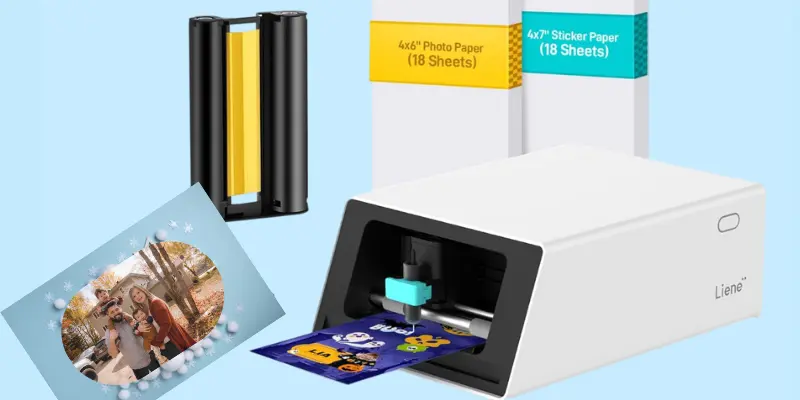
Liene PixCut S1 Color Sticker Printer And Cutting Machine
Turn your creative ideas into real, beautiful stickers with the Liene PixCut S1. This all-in-one printer that prints stickers and a cutting machine is made for anyone who loves DIY crafts, custom labels, or thoughtful handmade gifts. It helps you print and cut stickers that look bright, clean, and perfectly shaped, all in one smooth process.
With its 300 DPI thermal dye-sublimation printing, every color comes out rich and detailed, making your designs shine just the way you imagine them. The AI auto-cutting feature trims each sticker precisely, so you don’t have to get tense about rough edges or extra steps.
Whether you’re decorating notebooks, personalizing gift boxes, or starting a small sticker shop, the Liene PixCut S1 sticker maker makes it feel effortless. It’s more than a color sticker printer; it’s your little creative partner that turns moments of inspiration into something you can hold and smile at.
Specifications Of Liene PixCut S1 Color Sticker Maker Machine
| Feature | Details |
|---|---|
| AI auto-cutting, image extraction, waterproof, and fade-resistant stickers. | All-in-one sticker printer and cutter (Thermal Dye-Sublimation). |
| Best For | DIY crafts, custom labels, small business stickers, and personalized gifts. |
| Functions | Print and cut stickers in one smooth step using AI precision. |
| Max Print Size / Format | Prints up to 4 x 6 inches. |
| Print Resolution | 300 DPI for sharp, colorful, photo-quality results. |
| Print Speed (PPM) | Around 1 page per minute (color and mono). |
| Connectivity Options | Bluetooth connection — print easily from your smartphone. |
| Ink System Type | Thermal dye-sublimation ink, no messy cartridges. |
| Supported Media Types | Sticker paper, photo paper, and glossy sheets. |
| Color Output | Full-color printing with 16.7 million color tones. |
| Display / Control | Controlled via a mobile app (simple and beginner-friendly). |
| Paper Handling | Comes with photo and sticker paper ready to use. |
| Mobile App Compatibility | Works with Liene’s user-friendly app for editing, printing, and cutting. |
| Refill Cost | Affordable ink and paper refills available from Liene. |
| Noise Level | Quiet printing, ideal for home use or small studios. |
| Ease of Setup | Plug, connect, and print — beginner-friendly setup. |
| Special Features | AI auto-cutting, image extraction, waterproof and fade-resistant stickers. |
| Build Quality / Design | Compact, sleek white body — lightweight and durable. |
| Power Efficiency | Uses low energy; designed for daily creative use. |
| Ideal User | Crafters, small business owners, and DIY lovers who want quality stickers fast. |
Pros and Cons of Liene PixCut S1 Color Sticker Printer
Pros
- All-in-one design – Prints and cuts stickers in one step.
- AI image extraction – Turns any photo into a custom sticker easily.
- High-quality prints – 300 DPI resolution with bright, rich colors.
- Durable results – Stickers are waterproof, fade-resistant, and scratch-proof.
- Easy Bluetooth setup – Print directly from your phone with the app.
Cons
- Slow print speed – Only 1 page per minute.
- No Wi-Fi or USB printing – Bluetooth only.
The Liene PixCut S1 is the best printer for stickers for anyone who wants to make fun, high-quality stickers without fuss. Suppose you’re into DIY crafts, personalized gifts or small business labels and you don’t mind working with smaller print sizes and Bluetooth only. In that case, this machine delivers reliable results with ease and joy.
Click here to buy your dream printer!
| We have a huge collection of printers like the best sublimation printers, DTF printers, Color laser printers and screen printing machines. |
Best Sticker Printer For Small Business
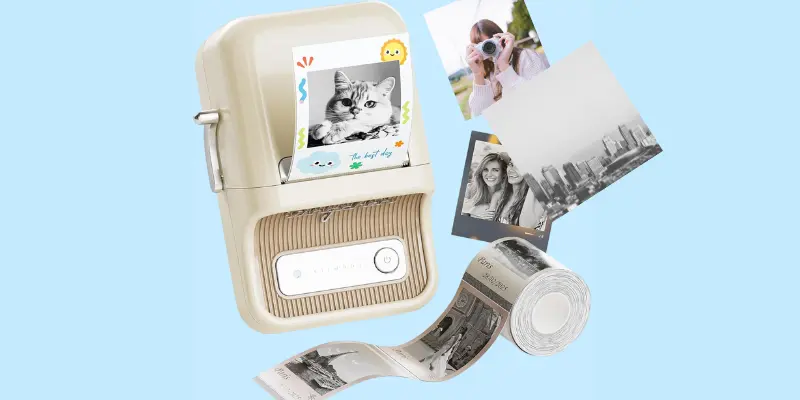
NIIMBOT B21 Pro Portable Sticker Maker Printer
If you love organizing, creating, or just adding a personal touch to everything, you’re going to love the NIIMBOT B21 Pro. This little Bluetooth label maker is like having your own pocket-sized creative tool. It’s small, smart, and seriously fun to use.
What I really like about it is how easy and quick it makes everything. You just connect it to your phone, type what you want, pick a cute design, and print, all in seconds. The 300 DPI print quality gives you sharp, clean text and bright images, even on tiny 50x30mm labels. This label printer for small business, perfect for study notes, memos, mini graphics, and photo stickers that actually look neat and professional.
Another thing that makes the B21 Pro the best printer for making stickers is its lightweight, portable design. You can carry it anywhere, to your desk, classroom, or craft corner and it’s ready to print without any mess or cables. The built-in Bluetooth keeps things simple and wireless, so you can focus on creating, not setting up.
If you’re a student, crafter, or someone who loves to keep things organized in style, the NIIMBOT B21 portable printer might just become your new favorite gadget. It’s practical, fun, and gives every label that clean, personal touch that makes you smile every time you print.
Specifications Of NIIMBOT B21 Pro Portable Sticker Printer
| Feature | Details |
|---|---|
| Printer Type | Portable thermal label and sticker maker printer |
| Best For | Students, crafters, small businesses, and home organizers |
| Functions | Prints labels, photos, memos, and study graphics |
| Max Print Size / Format | Up to 50mm x 170mm (2″ x 6.7″) |
| Print Resolution | 300 DPI for sharp text and clear images |
| Print Speed (PPM) | Up to 30 ppm (color) / 60 ppm (mono) |
| Connectivity Options | Bluetooth and USB (for PC) |
| Ink System Type | Thermal printing — no ink or toner needed |
| Supported Media Types | Label stickers (0.8 to 2-inch width) |
| Color Output | Black and red (requires special label paper) |
| Display / Control | Controlled via NIIMBOT mobile app (Android/iOS) |
| Paper Handling | Auto label size detection with batch printing support |
| Mobile App Compatibility | Works with NIIMBOT App — 30+ fonts, 100+ borders, 1500+ symbols |
| Refill Cost | Low — uses affordable thermal label rolls |
| Noise Level | Quiet operation, ideal for desk or office use |
| Ease of Setup | Plug-and-print setup with quick Bluetooth pairing |
| Special Features | Photo printing, color label support, AI image recognition, and batch printing |
| Build Quality / Design | Retro-style white body, made from durable ABS material |
| Power Efficiency | Rechargeable 1500mAh battery, lasts up to 2 weeks per charge |
| Ideal User | Creative individuals, students, and small shop owners who love stylish organization |
Pros and Cons of NIIMBOT B21 Pro Portable Printer
Pros
- Portable and lightweight – easy to carry anywhere.
- Sharp 300 DPI print quality – clear text and photos, even on small labels.
- Ink-free thermal printing – no cartridges or messy refills needed.
- Long battery life – lasts up to two weeks on a full charge.
- Dual color printing – supports black and red labels with special paper.
Cons
- Limited to label-sized prints – not for full-page photos.
- Requires special paper for color or photo printing.
If you love labelling, journaling, or adding creativity to your workspace, the NIIMBOT B21 Pro sticker maker is a fun, portable, and reliable tool.
It’s perfect for anyone who enjoys neat, colorful organization, whether you’re a student, crafter, or owner of a small business who wants style and simplicity in one compact printer for making stickers.
Buy it from here!
Best Printer For Stickers And Labels
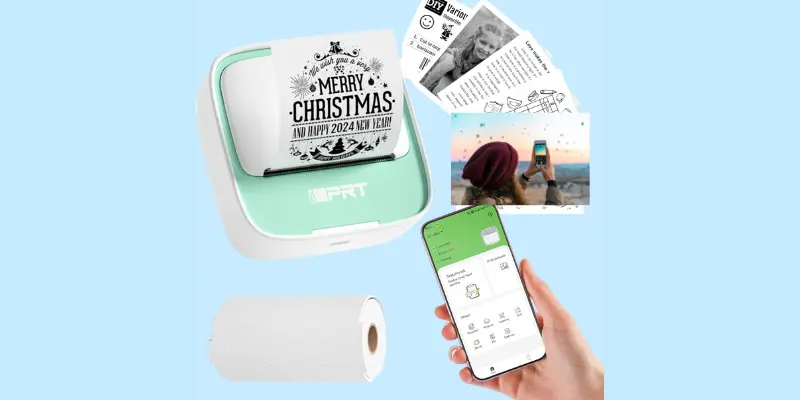
iDPRT Portable Mini Sticker Printer
If you’re someone who loves creating cute notes, photo stickers, or DIY labels on the go, the iDPRT Portable Mini Sticker printer that prints stickers is one of those gadgets that instantly makes you smile. It’s small, stylish, and connects to your phone in seconds, no messy cables, no ink, just pure creativity.
What I really enjoy about this little ticker printer machine is how simple and satisfying it feels to use. You can print your favorite pictures, study notes, or even to-do lists straight from your smartphone. The inkless thermal technology keeps things clean, no refills no spills, and the printouts come out crisp and clear every time.
This best printer for making stickers also comes with a starter roll of sticker paper, so you can start printing right out of the box. Whether you’re decorating a journal, labeling your storage jars, or making tiny gifts for friends, this printer that prints stickers makes it all feel easy and fun.
The Bluetooth connection works smoothly, and the whole setup takes just a minute. As someone who loves gadgets that combine creativity with convenience, I have to say, the iDPRT Mini Sticker Printing Machine really nails that balance. It’s the perfect mix of portable design, playful energy, and smart tech that turns everyday printing into something a bit more magical.
Specifications Of iDPRT Portable Mini Printer
| Feature | Details |
|---|---|
| Printer Type | Portable mini thermal sticker printer |
| Best For | Students, professionals, and DIY lovers who want quick, creative printing anywhere |
| Functions | Prints labels, notes, pictures, and small graphics |
| Max Print Size / Format | Works with 2-inch-wide thermal paper |
| Print Resolution | 203 DPI for clear, sharp black-and-white prints |
| Print Speed (PPM) | Up to 40 pages per minute (monochrome) |
| Connectivity Options | Bluetooth – works with both iPhone and Android |
| Ink System Type | Inkless thermal printing – no ink or toner needed |
| Supported Media Types | Thermal sticker paper and label rolls |
| Color Output | Monochrome (black and white) |
| Display / Control | Managed through the iDPRT mobile app with creative templates |
| Paper Handling | Auto document feeder with easy paper loading system |
| Mobile App Compatibility | Customizable fonts, icons, and templates for personal designs |
| Refill Cost | Low-cost refills, thermal paper rolls are affordable and easy to replace |
| Noise Level | Quiet printing, great for classrooms or shared spaces |
| Ease of Setup | Plug-and-print via Bluetooth; app setup in under a minute |
| Special Features | Inkless printing, compact body, lightweight, and auto document feeding |
| Build Quality / Design | Durable ABS shell in soft green; sleek and travel-friendly |
| Power Efficiency | Rechargeable battery with long standby time |
| Ideal User | Students, travelers, small business owners, or craft lovers who want quick, portable printing |
Pros And Cons Of iDPRT S1 Mini Printer
Pros
- Portable and Unheavy – fits easily in your pocket or bag.
- Comes with templates and fonts in the app for creative printing.
- Fast, quiet, and ideal for study notes, labels, and travel use.
Cons
- Only supports black-and-white printing (no color option).
If you love creative projects or just enjoy organizing your space with style, the iDPRT S1 Mini Printer is a little game-changer. It is the best printer for stickers compact, simple to use, and doesn’t need any ink, just pure, mess-free printing fun. I personally love how quickly it connects to my phone and prints out cute stickers or study notes on the go.
Buy for students, DIY lovers, and anyone who likes tech that makes life easier, this sticker printing printer machine is a smart and satisfying pick.
Best Printer For Stickers And Photos
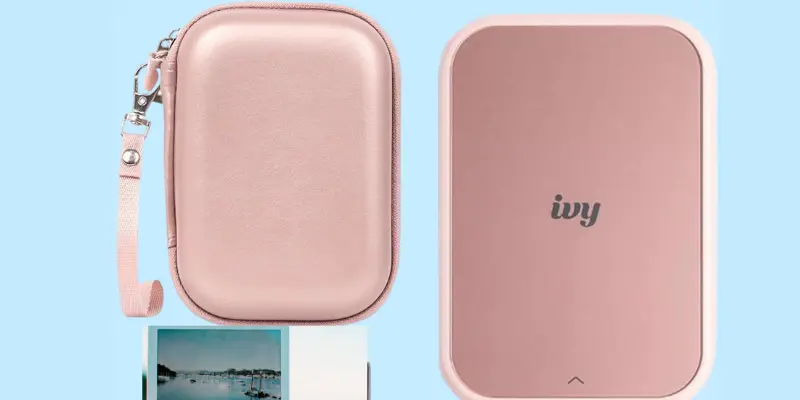
Canon Ivy 2 Mini Photo Printer
The Canon Ivy 2 Mini Photo sticker machine feels like having a tiny magic box in your pocket. With just a tap on your phone, you can turn your favorite memories into beautiful, sticky-back photos that you can place anywhere, on your notebook, phone case, or wall. It’s compact, stylish, and gives every print a soft, elegant finish that makes your pictures feel extra special.
What I love most is how easy and comforting it feels to use. You don’t need ink or a complicated setup, just connect through Bluetooth and print from your iPhone or Android. It is perfect for travel, journaling, or making cute personalized gifts. Every time you use this best printer for stickers, you will feel that small spark of pride seeing that your moments come to life in such a lovely way.
Specifications Of Canon Ivy 2 Mini Photo Printer
| Feature | Details |
|---|---|
| Printer Type | Portable Mini Photo Printer |
| Best For | Printing photos on the go from iOS and Android devices |
| Functions | Photo printing with peel-and-stick backing |
| Max Print Size / Format | 2″ x 3″ ZINK™ photo paper |
| Print Resolution | High-quality ZINK crystal-based color printing |
| Print Speed (PPM) | Approx. 0.01 (prints in under a minute) |
| Connectivity Options | Bluetooth 5.0 |
| Ink System Type | ZINK (Zero Ink) Technology |
| Supported Media Types | ZINK sticky-back photo paper |
| Color Output | Full color |
| Display / Control | Operated via Canon Mini Print App |
| Paper Handling | Single-sheet load |
| Mobile App Compatibility | Canon Mini Print App (iOS and Android) |
| Refill Cost | Affordable ZINK paper packs |
| Noise Level | Quiet operation |
| Ease of Setup | Plug-and-play via Bluetooth |
| Special Features | Peel-and-stick photos, improved color tone, sharper prints |
| Build Quality / Design | Sleek, compact, and lightweight white finish |
| Power Efficiency | Rechargeable battery (USB-C) |
| Ideal User | Travel lovers, scrapbookers, and photo journaling enthusiasts |
Pros and Cons of Canon Ivy 2 Mini Photo Printer
Pros
- No messy ink refills, just load the ZINK paper and print.
- Peel-and-Stick Prints: Turn your memories into instant wall décor or scrapbook stickers.
- Improved Print Quality: Better skin tone accuracy, sharper details, and richer colors than the previous model.
Cons
- Small Print Size: Limited to 2×3-inch photos only.
- No Display Screen: All controls depend on the mobile app.
The Canon Ivy 2 Mini Photo Printer is a little joy machine for anyone who likes capturing and sharing moments. It’s not built for big printing jobs, it’s built for fun, creativity, and connection. The photo quality feels warm and personal, and the peel-and-stick feature adds a playful touch that brings your memories to life.
If you love journaling, decorating, or gifting personalized keepsakes, this sticker machine feels like a tiny piece of happiness you can carry in your pocket. Simple, elegant, and full of charm, it’s a must-have best printer for stickers for memory lovers.
What Makes a Great Printer for Stickers?
When it comes to making beautiful, long-lasting stickers, the right sticker machine can truly make all the difference. As someone who loves creating custom labels and fun sticker sheets, I’ve learned that a few key features can turn a regular printer into a sticker-making star. Let’s break them down in a simple, honest way.
Inkjet Printers vs. Laser Printers
If you’re into bright, colorful designs with fine details, go for an inkjet printer. They handle gradients, photos, and smooth color transitions like a dream. I personally love how inkjet prints make my stickers look vibrant and full of life.
But if you’re printing in bulk and want sharp text or simple graphics, a laser printer might be your better match. It’s faster, more cost-efficient for large runs, and the prints are smudge-resistant right out of the tray.
Read our full guide on inkjet vs laser printer and ink tank printer vs laser printer here.
Print Resolution And Color Quality
Sticker printing is all about the little details, those crisp lines and rich colors. Look for printers with at least 1200 x 1200 DPI or higher. A higher DPI means your stickers will have cleaner edges and more color depth.
I’ve noticed that printers with better color calibration make your designs pop, especially when printing illustrations or photos. The difference between “okay” and “wow” often comes down to print resolution.
Ink Type and Running Cost
Ink can be tricky; it’s what makes your stickers shine, but it can also add up in cost. Dye-based inks give you stunning color but aren’t waterproof, while pigment inks are more durable and resistant to smudges or fading. Personally, I prefer pigment ink for sticker sheets because it keeps colors bright even after months of use.
And here’s a tip: always check the cost of replacement cartridges before buying a printer. It’s better to choose one that balances quality with reasonable running costs.
Material Support and Paper Handling
A great sticker printer should handle different materials, from glossy and matte sticker paper to vinyl sheets. I love testing new textures, and having a printer that feeds various media smoothly is a huge plus.
Also, look for rear or manual feed options, they handle thicker sticker paper better. Nothing’s worse than a jam when your creativity is flowing!
In short, a great printer for stickers should give you vibrant colors, sharp details, affordable ink use, and flexible material handling. Whether you’re crafting for fun or running a small business, the right printer feels like a creative partner, one that turns your digital ideas into something you can proudly hold in your hand.
Buying Guide: How to Choose the Best Printer For Stickers
If you love creating stickers, whether for journaling, small business packaging, or just for fun—you need a printer that can bring your ideas to life. Choosing the right sticker printer isn’t just about price or brand. It’s about print quality, material support, and how easy it fits into your creative workflow. Let’s go through everything step by step in a simple, honest way.
Choose the Right Printer Type
There are two main options: inkjet and laser printers.
- Inkjet Printers are perfect for colorful, detailed sticker designs. They deliver rich tones and photo-quality prints. If you love printing illustrations, digital art, or vivid photos, an inkjet printer will make your stickers pop. I personally prefer inkjet for its softer gradients and vibrant color depth.
- Laser Printers are great for bulk printing and text-heavy labels. They use toner instead of liquid ink, so your prints are smudge-proof and ready instantly. If you run a small business and need speed and volume, laser printers are a practical pick.
My Take: For creative or personal sticker projects, inkjet wins. For fast, professional batches, laser takes the lead.
Check Print Resolution and Quality
Resolution determines how sharp and colorful your stickers look. Always aim for at least 1200 x 1200 resolution DPI or higher.
A high-resolution printer ensures every line, shade, and tiny detail is clear. This is especially important if you print small stickers with text or intricate designs. I’ve found that better color calibration also means your stickers look more “real” and less pixelated.
Pro Tip: Look for printers with built-in color management or photo enhancement features for the best results.
Understand Ink Type and Running Cost
The type of ink affects both the look and durability of your stickers.
- Dye-Based Ink: Bright, smooth, and great for photo stickers—but not waterproof.
- Pigment Ink: Long-lasting, fade-resistant, and water-safe—ideal for vinyl or outdoor stickers.
If you’re printing in high volume, running cost matters. Some printers come with refillable ink tanks or high-yield cartridges that save money in the long run.
My Opinion: Go for pigment ink if you want stickers that last. For creative projects where you print occasionally, dye-based ink works beautifully.
Material Support and Paper Handling
Not all printers handle sticker paper equally. You’ll want a model that supports different materials—like matte, glossy, clear, and vinyl sheets.
Printers with rear or manual feed trays work best for thicker sticker sheets. This prevents jams and helps your prints come out flat and clean.
Pro Tip: Check your printer’s supported paper weight and size. A flexible feed system means you can experiment more with creative textures.
Connectivity Options and Compatibility
Wireless printing makes your life easier. Look for printers with Bluetooth, Wi-Fi, or mobile app support. This way, you can print directly from your phone, tablet, or laptop without cables.
Apps that let you edit, resize, or preview stickers before printing are a big bonus. They save time and help avoid wasted paper.
Example: Canon, Epson, and HP all offer mobile printing apps that are surprisingly beginner-friendly.
Special Features That Make a Difference
Some small features can make a big impact:
- Borderless Printing: For edge-to-edge stickers.
- Cutter or Trimmer Compatibility: Helps you finish projects neatly.
- Thermal or Inkless Printing: Great for minimal mess and zero maintenance.
- Compact Design: Perfect if you want to take your printer on the go.
If you love crafting, these extras turn a simple printer into a true creative tool.
Ease of Use and Maintenance
Choose a printer that’s beginner-friendly. A simple setup, clear app interface, and easy paper loading make a huge difference.
Thermal printers are usually maintenance-free since they don’t use ink. Inkjet and laser models might need cleaning or alignment occasionally, but nothing too complex.
The easier the setup, the more you’ll actually use your printer. Complicated models often end up collecting dust!
Budget and Long-Term Value
Don’t just focus on the printer’s upfront cost, factor in ink, paper, and maintenance. A slightly higher initial investment often saves more in the long run if the printer has affordable refills and reliable performance.
Pro Tip: Check for bundle deals that include starter paper packs or extra cartridges.
In The Last
A great sticker printer should match your creative style. If you love color, go for a high-resolution inkjet. If you prioritize speed and durability, pick a laser or thermal model.
Personally, I look for a printer that feels like a creative partner, one that makes printing fun, easy, and rewarding. When your stickers come out looking exactly how you imagined them, that’s when you know you’ve found the one.
Whether you’re printing for fun, study, or business, the right sticker printer transforms your ideas into something you can proudly hold in your hands.
Final Thoughts
A good sticker printer does more than print; it brings your creativity to life. Whether you’re decorating your journal, branding your products, or designing just for fun, the right printer makes every detail pop with color and precision.
Think about what matters most to you, color quality, speed, or portability, and choose the best printer for stickers that fits your style. Once you do, making stickers won’t just be a task; it’ll become your favorite part of the creative process.
FAQs
Is inkjet or laser better for stickers?
Inkjet printers are better for colorful and detailed stickers. They make your designs look bright and vivid. Laser printers are faster and good for large batches or business labels. If you love creative, photo-style stickers, go with inkjet.
Can I use a normal printer for stickers?
Yes, you can! Just make sure to use sticker paper that matches your printer type, inkjet or laser. Regular printers work fine for simple sticker projects. Always check the paper instructions before printing to avoid jams or smudges.
Is a laser or an inkjet printer better for graphic design?
For rich colors and smooth gradients, inkjet printers are best. Laser printers are sharper and faster, but not as colorful. If you design art or photos, an inkjet will give you better results. A laser is ideal if you print text-heavy designs or need quick results.
What printer is best for stickers?
The best printer for stickers depends on your needs. Inkjet printers are perfect for creative and colorful designs, while laser printers suit business labels. Look for one that supports sticker paper and gives high-quality prints. If you love DIY crafts, a compact inkjet or thermal printer is a fun choice.




- Be Respectful
- Stay Relevant
- Stay Positive
- True Feedback
- Encourage Discussion
- Avoid Spamming
- No Fake News
- Don't Copy-Paste
- No Personal Attacks
- Be Respectful
- Stay Relevant
- Stay Positive
- True Feedback
- Encourage Discussion
- Avoid Spamming
- No Fake News
- Don't Copy-Paste
- No Personal Attacks
