Difference Between Solid Ink Printer and Laser Printer Explained
Published: 10 Nov 2025
Printers have come a long way from simple black-and-white machines to advanced models built for speed and color accuracy. Today, two popular choices dominate the market Solid Ink vs Laser Printer, each known for unique performance, quality, and cost benefits that suit different users. Knowing how they differ can help you pick the right one for your daily tasks.
Ever wondered why some printers deliver brighter colors while others print faster and sharper text? Many people feel confused when deciding between a Solid Ink vs Laser Printer, especially when both promise great results. This comparison clears the doubts and helps you understand what really matters before buying.
If you’re tired of slow printing, high costs, or fading colors, this guide is for you. Choosing between a Solid Ink vs a Laser Printer can seem tricky, but we’ll make it simple. You’ll learn which printer saves money, delivers better prints, and fits your personal or business needs perfectly.
Solid Ink Printer
A printer that uses solid blocks of colored ink rather than liquid or powder is known as a solid ink printer. These ink blocks melt inside the printer and stick to the paper to create bright, smooth prints. It’s like melting crayons to draw colorful pictures. Solid ink printers are known for their rich color quality and eco-friendly design because they produce less waste. They’re great for offices that need vibrant color prints and simple maintenance.
Laser Printer
A laser printer prints text and graphics on paper using a laser beam and toner powder. The laser creates an image on a drum, and the toner sticks to it before being pressed and heated onto the paper. This makes the prints sharp, clear, and quick. Laser printers are great for offices or homes that need fast, high-quality black-and-white or color documents. They’re reliable and work well for large printing jobs.
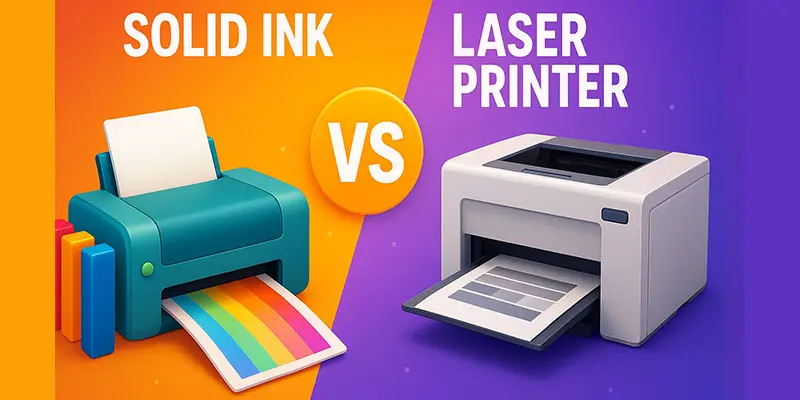
What are the Key Differences Between Solid Ink and Laser Printers?
When choosing between the two, it’s important to know how Solid Ink and Laser Printers differ in print quality, speed, cost, and overall performance.
| Solid Ink Printer | Laser Printer |
|---|---|
| Uses melted solid ink blocks to print on paper. | Uses toner powder and a laser beam to form images. |
| Produces bright, vibrant, and smooth colors. | Delivers sharp, clear, and professional text prints. |
| Slower because the ink melts before printing. | Very fast, ideal for high-volume printing. |
| Needs time to heat and melt ink blocks. | Starts printing quickly with minimal delay. |
| Excellent for rich and vivid colors. | Good for color prints, but less vibrant. |
| Good, but not as crisp as a laser. | Excellent for text-heavy documents. |
| Slightly higher due to ink cost. | Lower cost per page for large batches. |
| Usually mid-range in price. | Various basic models are cheaper. |
| Type uses solid wax-like ink sticks. | Uses fine powder toner cartridges. |
| Easy, fewer moving parts. | Toner replacement can be messy. |
| Solid ink may fade in heat. | Toner prints stay crisp and last long. |
| Eco-friendly with less packaging waste. | Toner cartridges create more waste. |
| Compact and stylish. | Often larger and bulkier. |
| Quiet during printing. | Slightly noisier when printing fast. |
| Ink may smudge if not cooled properly. | Toner prints are dry and smudge-free. |
| Best for colorful marketing materials. | Perfect for reports and office documents. |
| Uses more power to melt ink. | More energy-efficient during long runs. |
| Easy to insert solid ink sticks. | Requires toner cartridge replacement. |
| Smooth, waxy finish. | Dry and matte finish. |
| Ink can soften in high heat. | Not affected by temperature. |
| Fewer models are available today. | Widely available in all price ranges. |
| Moderate ink heads may wear out. | Long-lasting and durable. |
| Best for light to medium use. | Designed for heavy and continuous printing. |
| Common features like USB and Wi-Fi. | Supports Wi-Fi, Ethernet, and cloud printing. |
| A small design studio printing colorful flyers. | A busy office printing hundreds of reports daily. |
What are the benefits and drawbacks of laser and solid ink printers?
To determine which printer best suits your printing requirements, it’s useful to learn about the benefits and drawbacks of both solid ink and laser printers.
What are the Advantages of Solid Ink Printers?
- Produces bright and vibrant colors.
- Eco-friendly with less waste.
- Compact and stylish design.
- Easy to maintain and refill.
- Works well for colorful graphics and marketing prints.
What are the Disadvantages of Solid Ink Printers?
- Takes time to warm up before printing.
- Ink can melt in hot environments.
- Slower than laser printers.
- Limited model availability.
- Not ideal for heavy or large-volume printing.
What are the Advantages of Laser Printers?
- Fast printing speed, ideal for offices.
- Sharp and clear text quality.
- Cost-effective for large print volumes.
- Durable prints that don’t smudge.
- Reliable and long-lasting performance.
What are the Disadvantages of Laser Printers?
- Toner cartridges can be expensive.
- Larger and heavier design.
- Color quality is less vibrant.
- Toner replacement can be messy.
- Consumes more power during operation.
Which Printer Should You Choose?
Choosing the right printer depends on what you print most colorful designs, detailed images, or fast black-and-white documents for daily use.
When Should You Choose a Solid Ink Printer?
- You often print colorful designs or graphics.
- You want eco-friendly printing with less waste.
- You need bright, vibrant prints for marketing materials.
- You prefer a compact printer with simple maintenance.
- You print in small to medium volumes.
When Should You Choose a Laser Printer?
- You print large volumes of documents daily.
- You need fast, sharp, and clear text prints.
- You want low printing costs per page.
- You work in an office or business setting.
- You need a reliable printer for long-term use.
Final Thought
Understanding the Solid Ink vs Laser Printer debate helps you pick the right device for your needs. If you value eco-friendly printing and vibrant colors, I personally recommend going for a solid ink printer. But if speed and long-term cost matter more, a laser printer is your best choice. Take a moment to compare features today and choose the printer that fits your daily tasks perfectly.
FAQS
Laser printers are better for fast and large-volume printing. Ink printers give brighter photos but work more slowly. If you print often, choose a laser printer. For colorful pictures or home use, go with an ink printer.
Yes, solid ink printers can print photos with bright and rich colors. They give smooth results on glossy paper. However, photo quality may not be as sharp as inkjet printers.
Laser printers are cheaper to maintain over time. Inkjet printers cost less to buy but need frequent ink refills. Laser printers use toner, which lasts much longer.
Some laser printers are being phased out because they use more power and produce toner waste. Many companies now prefer eco-friendly ink or solid ink models.
No, laser printers do not dry up. They use toner powder instead of liquid ink. Even after long gaps, the toner stays good and ready to print.
The main problem is that the ink can dry up if not used often. This clogs the print head and causes poor print quality.
Yes, sometimes you can. Soak the cartridge nozzle in warm water for a few minutes to loosen the dried ink. Then wipe it and try printing again.
Yes, you can use a cotton swab with a tiny bit of rubbing alcohol. To get rid of debris or dried ink, gently wipe the print head or contacts.
Print in draft mode for regular use, and only use high-quality mode when needed. Keep cartridges clean, and turn off the printer properly. Also, print something once a week to prevent drying.
Remove the cartridge and gently wipe the nozzle with a damp cloth or warm water. Let it dry completely, then reinstall it. You can also use a cleaning kit for deep cleaning.





- Be Respectful
- Stay Relevant
- Stay Positive
- True Feedback
- Encourage Discussion
- Avoid Spamming
- No Fake News
- Don't Copy-Paste
- No Personal Attacks
- Be Respectful
- Stay Relevant
- Stay Positive
- True Feedback
- Encourage Discussion
- Avoid Spamming
- No Fake News
- Don't Copy-Paste
- No Personal Attacks
