Best Sublimation Printer For Small Business 2026
Published: 20 Oct 2025
If you’ve ever tried printing your own designs at home, you’ve probably been there: the colors don’t pop, the image fades after a few washes, or the print just doesn’t look as sharp as it did on your screen. I remember feeling that same frustration when I first started making custom mugs and T-shirts. Regular printers just couldn’t handle it.
That’s when I discovered dedicated sublimation printing, and honestly, it changed everything. The colors came out brighter, the designs looked professional, and best of all, the prints lasted. No peeling, no fading, just clean, beautiful results every time.
So, if you’re a creator, crafter, or small business owner who wants to bring your ideas to life with that professional finish, finding the best sublimation printer is a total game-changer. In this guide, I’ll share my top picks of sublimation printing machines and what makes each one worth your attention, because good prints deserve great tools.
| Affiliate Disclosure: As an Amazon Associate, I earn from qualifying purchases. |
Quick Overview Of The Best Sublimation Printer 2025
Key Features:
| Feature | Details |
|---|---|
| Best Use | Compact sublimation for small crafts, mugs, and apparel |
| Max Print Size | 8.5″ × 11″ |
| Connectivity | Wi-Fi, USB, Ethernet |
| Standout Feature | Comes with genuine Epson sublimation ink and full OEM support |
Key Features:
| Feature | Details |
|---|---|
| Best Use | Ideal for home printing, school projects, and casual color use |
| Max Print Size | Up to letter size (8.5″ × 11″) |
| Connectivity | Wireless, USB |
| Standout Feature | Cartridge-free refill system for cost-saving, eco-friendly printing |
Key Features:
| Feature | Details |
|---|---|
| Best Use | Perfect for business and wide-format color printing |
| Max Print Size | Up to 13″ × 19″ |
| Connectivity | Wi-Fi, Ethernet, USB |
| Standout Feature | All-in-one printer with scan, copy, and fax plus automatic-duplex printing |
Key Features:
| Feature | Details |
|---|---|
| Best Use | Photo printing, creative design, and art projects |
| Max Print Size | Borderless wide-format up to 13″ × 19″ |
| Connectivity | Wireless, Ethernet, USB |
| Standout Feature | 6-color premium ink system, 4.3-inch touchscreen display |
Brother SP-1 Sublimation Printer
Key Features:
| Feature | Details |
|---|---|
| Best Use | Beginner-friendly sublimation for small DIY and craft projects |
| Max Print Size | Small / craft-sized media |
| Connectivity | Wi-Fi (via Artspira app) |
| Standout Feature | Simple app-driven printing for easy personalized designs and quick results |
| Read our other write-up on the best screen printing machines and DTF printers. |
Comprehensive Overview Of The Best Photo Sublimation Printer
Best Sublimation Printer For Small Business
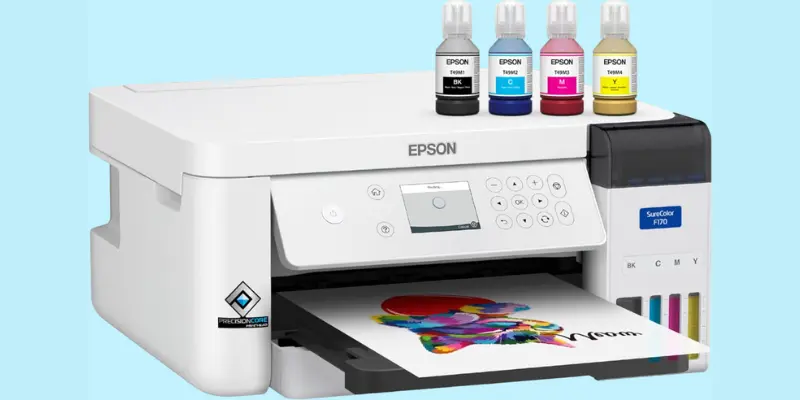
Epson SureColor F170 Dye-Sublimation Printer
Let’s start with one of my personal favorites, the Epson SureColor F170. This compact photo printer proves that you don’t need a bulky setup to get professional-quality prints. It’s perfect for beginners and small business owners who want reliable results without the learning curve or technical headaches.
What I love most about the F170 is how ready-to-use it is. Right out of the box, you get genuine Epson ink, a user guide, and a power cable, so setup feels effortless. No confusing conversions or extra purchases, it’s a true OEM product with full manufacturer support, which means you can trust the color accuracy and long-term performance.
Despite the sublimation ink printer’s small 8.5″ x 11″ format, the F170 delivers bright, detailed, and consistent prints every time. It’s ideal for customizing mugs, phone cases, t-shirts, and other small items. The heat transfer results are crisp, and the prints hold up beautifully, even after multiple washes.
Specifications of Epson SureColor F170
| Feature | Details |
|---|---|
| Printing Technology | Dye-Sublimation |
| Connectivity | Wireless, USB, Ethernet |
| Printer Output | Color |
| Maximum Print Speed (Color) | 1 ppm |
| Maximum Print Speed (Monochrome) | 1 ppm |
| Special Feature | Network-Ready |
| Item Weight | 16 Pounds |
| Included Components | Full set of Epson Sublimation Ink, User Guide, Power Cable |
| Ink Type | Genuine Epson Dye-Sublimation Ink |
| Print Quality | High-precision printing powered by PrecisionCore technology with sharp, vivid results |
| Media Support | 150-sheet auto-feed tray with dust-resistant design for cleaner, professional-quality prints |
| System Compatibility | Works with both Mac & Windows |
| Ink Filling System | Auto-stop ink bottles for mess-free refilling |
| Best For | Hobbyists, crafters, and small business owners |
What Are The Pros And Cons Of Epson SureColor F170
Pros
- Compact and fits easily in small workspaces
- Simple setup, beginner-friendly, and quick to start
- Includes genuine Epson sublimation inks
- Produces sharp, vibrant, and professional-quality prints
- Clean, mess-free ink refilling system
- Reliable performance with full manufacturer support
Cons
- Not designed for large production runs
- Lacks a direct wireless printing feature
If you’re just getting into a good sublimation printer or need a compact printer that fits your workspace, this one’s hard to beat. Epson clearly designed it with creators in mind; it’s reliable, beginner-friendly, and delivers the kind of results that make your designs look shop-ready.
Best Wireless Sublimation Printer for T-Shirts
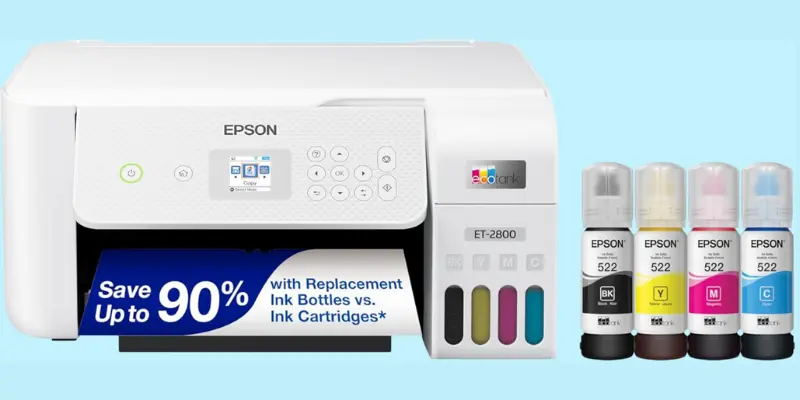
Epson EcoTank ET-2800
Let me be honest, the EcoTank ET-2800 is one of those printers that just makes life easier. I’ve checked plenty of printers over the years, but this one stands out because it’s so simple and affordable to live with. No messy cartridges, no constant ink runs, just smooth, worry-free printing whenever you need it.
What I love most is the cartridge-free design. Those refillable ink tanks are a total game-changer! You fill them once, and they last for months, sometimes even a year. It’s perfect for anyone who prints school work, family photos, or everyday documents and doesn’t want to deal with the hassle (or cost) of buying ink every few weeks.
And the best part is photo sublimation printer is wireless and all-in-one, so you can print, scan, and copy from anywhere in your home. You can even print from your phone while sitting on the couch; it’s that easy. Plus, its white design looks sleek and clean, so it fits beautifully on any desk.
Specifications of Epson EcoTank ET-2800
| Feature | Details |
|---|---|
| Printing Technology | Inkjet |
| Connectivity | Wired, Wireless |
| Printer Output | Color |
| Maximum Print Speed (Color) | 5 ppm |
| Maximum Print Speed (Monochrome) | 10 ppm |
| Special Features | Mobile Printing Capability, Refillable Ink Tank |
| Print Quality | Sharp text and vivid colors with Heat-Free Technology |
| Ink System | Cartridge-free, high-capacity refnewel ink tanks |
| Ink Savings | Save up to 90% on ink |
| Page | Prints up to 4,500 black pages / 7,500 color pages |
| Sustainability | Zero cartridge waste – reduces landfill impact |
| Ease of Use | EcoFit ink bottles for clean and simple refilling |
What Are The Pros And Cons Of Epson EcoTank ET-2800?
Pros
- Cartridge-free design saves money and reduces waste
- Easy, mess-free refilling with EcoFit ink bottles
- Produces keen text and vital color prints
- Built-in scanner and copier for everyday use
- Works wirelessly, print from your phone or laptop
Cons
- Absence of an automatic document feeder (ADF)
- No duplex (two-sided) printing option
If you’re after a budget-friendly home printer that delivers great color prints without drama, the ET-2800 feels like that reliable friend who’s always there when you need them, quiet, efficient, and surprisingly good at everything.
Best Sublimation Printer Under 800$
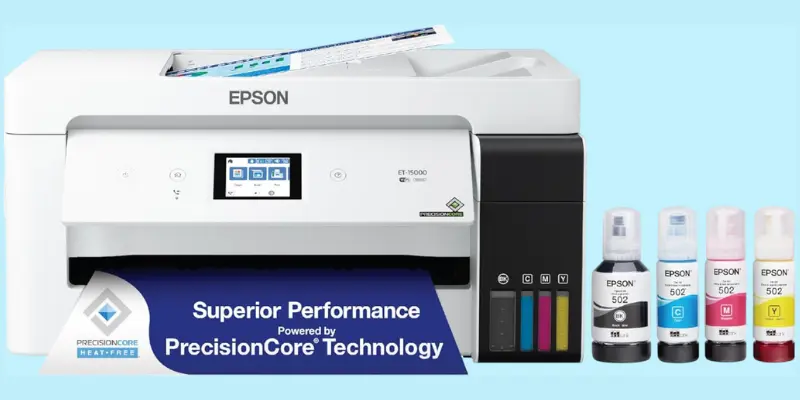
Epson EcoTank ET-15000
If there’s one printer that makes you feel like you’ve truly upgraded your workspace, it’s the Epson EcoTank ET-15000. This isn’t just a printer, it’s a full professional setup packed into a sleek, modern design. Every time you use it, you can’t help but feel a bit of pride. It looks elegant, runs quietly, and handles just about everything I throw at it, from wide 13″ x 19″ prints to quick document copies and even faxes.
What really stands out is the professional sublimation printer’s versatility and efficiency. The EcoTank system gives you the freedom to print thousands of pages before even thinking about refilling. No messy cartridges, no surprise “ink low” warnings, just smooth, consistent color output every single time. It’s that comfortable reliability that makes you trust it for big jobs or last-minute projects.
And let’s talk about print quality, crisp, rich, and professional. Whether compact sublimation business printer reports, posters, or photos, the ET-15000 delivers results that look polished and vibrant. Plus, the wireless printing and Ethernet connection make it easy to share across devices, keeping your workspace organized and stress-free.
Specifications Of Epson EcoTank ET-15000
| Feature | Details |
|---|---|
| Printing Technology | Inkjet |
| Connectivity | Wi-Fi, Ethernet, USB |
| Printer Output | Color |
| Maximum Print Speed (Color) | 9 ppm |
| Maximum Print Speed (Monochrome) | 17 ppm |
| Special Features | Auto Document suppler, Auto-Duplex, Fill again Ink Tank |
| Print Size | Up to 13″ x 19″ (Borderless Printing up to 11″ x 17″) |
| Features | Print, Scan, Copy, Fax |
| Wireless Printing | Yes – supports mobile printing from phone or tablet |
| Ease of Use | User-friendly setup and navigation |
| Business Ready | Ideal for offices, marketing prints, and home-based businesses |
| Design | Sleek white body with compact all-in-one functionality |
| Performance | Smooth, fast, and reliable for high-volume color printing |
| Eco-Friendly | Refillable ink tanks reduce cartridge waste |
What Are The Pros And Cons Of Epson EcoTank ET-15000?
Pros
- All-in-one design handles printing, scanning, copying, and faxing
- Crisp and colorful print quality for both documents and photos
- Wireless, Ethernet, and USB connections for flexible setup
- Auto-duplex and auto document feeder make multitasking easier
- Reliable performance for both home offices and small businesses
Cons
- Color print speed (9 ppm) is moderate for large workloads
- Slightly bulky design, needs more desk space
If you love the idea of combining performance with elegance, this printer feels like the perfect partner. It’s smart, dependable, and built for those who want their printing experience to be as effortless as it is impressive.
Best Sublimation Printer For Beginners
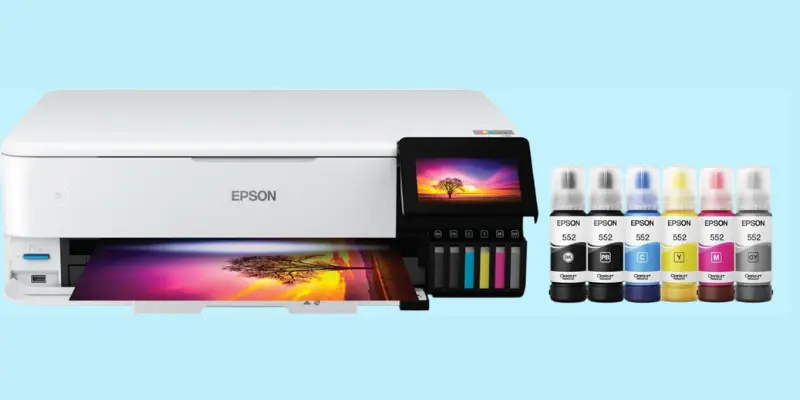
Epson EcoTank Photo ET-8550
This is more than a printer; it’s a little piece of joy for your home. It brings your memories to life with rich, stunning colors that look just as beautiful as the moment you captured them. Whether it’s your child’s first drawing, a vacation photo, or a family portrait, this printer turns them into keepsakes you can hold and cherish.
What makes this heat press printing even better is how easy it is to use. The 4.3-inch color touchscreen feels modern and smooth, and you can print directly from your phone without any mess or stress. Thanks to its high quality refillable ink tanks, you save money while enjoying thousands of vibrant prints, no more rushing out for cartridges.
Specifications Of Epson EcoTank Photo ET-8550
| Feature | Details |
|---|---|
| Printing Technology | Inkjet |
| Connectivity | USB |
| Printer Output | Color transfer printing |
| Maximum Print Speed (Color) | 12 ppm |
| Maximum Print Speed (Monochrome) | 16 ppm |
| Special Feature | Refillable Ink Tank |
| Ideal For | Photo printing, creative projects, borderless prints up to 13” x 19”, and strong point for media like CDs/DVDs |
| Ink System | Cartridge-free, refillable ink bottles |
| Media Support | Borderless photos, 2-sided printing, media up to 1.3 mm thick |
| Mobile Printing | Works with Epson Smart Panel app (iOS and Android) |
| Eco-Friendly | Zero cartridge waste – one ink set = 100 cartridges |
| Cost Efficiency | Saves up to 80% on ink; prints 4×6” photos for about each |
Pros And Cons Of Epson EcoTank Photo ET-8550
Pros
- Prints up to 13″ x 19″ — perfect for wide-format projects.
- Very low running cost with refillable ink tanks.
- All-in-one: print, scan, copy, and fax.
- Supports Wi-Fi and USB.
- Eco-friendly and less waste.
Cons
- Takes up more space.
- No duplex scanning.
It’s also wide-format, so you can print large, borderless photos up to 13 x 19 inches, perfect for framing or gifting. Whether you’re creating something special for loved ones or simply decorating your walls, the ET-8550 makes every print feel personal, heartfelt, and full of life.
Ink And Toner Best Sublimation Printer
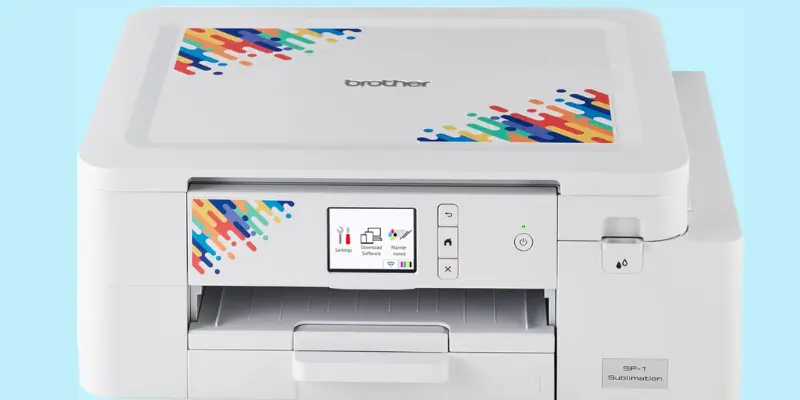
Brother SP-1 Sublimation Printer
If you love turning creative ideas into colorful designs, the Brother SP-1 best sublimation printer might just steal your heart. It’s compact, stylish, and built for people who enjoy personalizing everything, from T-shirts and mugs to tote bags and home decor.
What makes this high quality dye-sublimation printer special is how easy and fun it is to use. You just open the Artspira app, choose or create your design, print it, and heat press it. That’s it. Within minutes, your design comes to life in bright, vivid colors. It’s perfect for beginners who want professional-quality prints without any complicated setup.
I personally love how smooth and fast it works. The wireless connection keeps things clutter-free, and the built-in display makes it simple to manage every print. Plus, Brother’s reliability gives you confidence that every project will come out crisp, colorful, and clean.
Specification Of Brother SP-1 Sublimation Printer
| Feature | Details |
|---|---|
| Printing Technology | Dye Sublimation |
| Connectivity | Wi-Fi |
| Printer Output | Color |
| Maximum Print Speed (Color) | 0.01 ppm |
| Maximum Print Speed (Monochrome) | 0.01 ppm |
| Special Feature | Display Screen |
| App Compatibility | Works with the Artspira app for importing, saving, and creating up to 20 designs |
| Creative Access | Access 100+ ready-made sublimation designs and photo-style templates in Artspira |
| DIY Customization | Perfect for creating personalized T-shirts, mugs, or tote bags using a heat press |
| Ease of Use | Simple setup—create, print, and press your design in minutes |
| Performance | Fast and vibrant printing for professional-looking results |
| Ideal For | Crafters, small businesses, and creative hobbyists who love DIY projects |
Pros And Cons Of Brother SP-1 Sublimation Printer
Pros
- Beginner-friendly setup
- Vibrant color results
- Wireless printing
Cons
- Heat press required
Whether you’re crafting for fun or running a small business, the Brother SP-1 gives you the freedom to create your world, your way. It’s not just a printer; it’s your personal design studio in one smart device.
What Makes a Good Sublimation Printer?
A best sublimation printer delivers sharp, vibrant colors and consistent results on different materials. It should support high-quality sublimation ink, offer wide print size options, and have reliable wireless or USB connectivity for smooth printing.
Sublimation Ink (Quality And Compatibility)
- Genuine, formulated ink: Choose a printer that uses real sublimation-compatible inks (not regular dye inks). The quality of your prints, sharpness, color, durability, depends heavily on this.
- High-capacity ink bottles or tanks: If your printer uses refillable tanks or bottles, you’ll save cost and waste. You won’t be constantly replacing tiny cartridges.
- Stable and consistent color output: A good printer/ink combo maintains color accuracy over time. Your red stays red, blue stays blue, even after lots of prints.
- Certification or safety marks: Some inks come with textile-safe or eco-certifications (e.g. OEKO-TEX) which are important if you print wearables.
Print Size And Media Flexibility
- Maximum printable dimensions: Make sure the printer supports the size you want to create. If you plan to print small items (mugs, phone cases), a compact size is enough. If you want posters or large art, pick wide-format support (13″×19″, A3+, etc.).
- Support for specialty media: The printer should allow printing on various surfaces, thick cardstock, glossy paper, heat transfer sheets, even CDs or boards sometimes.
- Borderless printing: The ability to print edge-to-edge is a big plus for professional-looking results.
- Thickness & rigidity capacity: If you print on thick substrates, the printer’s feed mechanism should handle heavier or rigid media without jamming.
Connectivity Options & Workflow
- Wireless (Wi-Fi / Wi-Fi Direct / Mobile Printing): This gives you freedom, print from your phone, tablet, or laptop without dragging cables.
- Ethernet / Wired (USB / LAN): For reliability and faster data transfer, especially in workshop setups or when sharing the printer among users.
- App support / smart interfaces: Printers that offer companion apps or built-in touchscreen panels make things intuitive. You can monitor ink, manage queues, and operate from your phone.
- Network-ready and sharing capabilities: If multiple users or computers will use the printer, network access is essential.
- Ease of setup and driver support: A good printer should install smoothly and have reliable driver/software support for all your devices (Windows, Mac, mobile).
| My “Tech Lover” Tip When I’m choosing a sublimation printer, these three things stack together like building blocks. Even if everything else is great, if the ink is weak or the media size is too small, you’ll hit limits soon. A good printer feels like it’s ready for your future ideas, whatever project you think of next, it can already handle. |
Buying Guide: How to Choose the Top Sublimation Printer for Your Needs
If you’re thinking about starting your sublimation journey, whether for a small business, a creative hobby, or just for fun, choosing the right sublimation printer can make all the difference. Let’s go through everything you need to know before you buy, explained in simple words and real-life context.
Understand – What Is Sublimation Printing?
Sublimation printing is all about transferring designs onto materials like mugs, shirts, or keychains using heat. The printer uses special sublimation ink that turns into gas when heated and permanently bonds to the surface. The result? Bright, long-lasting colors that don’t fade or peel off.
So, when buying a printer for sublimation, think about what kind of items you want to create, because that decides the printer type and size you’ll need.
Print Size and Media Support
Not every best sublimation printer can handle the same size.
- For small crafts like mugs, phone cases, and t-shirts, a compact printer such as the Epson SureColor F170 or Brother SP-1 is perfect.
- For larger designs like banners, hoodies, or art prints, go for a wide-format printer like the Epson EcoTank ET-15000 or ET-8550.
Also, check if the printer supports different media types like cardstock, photo paper, and thick sublimation sheets. The more flexible it is, the better your creative freedom.
Ink Type and Cost
Ink plays a huge role in your printing quality. Top sublimation printers usually use refillable ink bottles instead of cartridges, which saves you money and reduces waste.
Look for printers with high-yield ink bottles, such as Epson’s EcoTank series. They last longer and cost less to refill.
Always use genuine sublimation ink recommended by the manufacturer to keep colors consistent and prints long-lasting.
Print Quality
Your prints should look sharp, colorful, and professional.
Choose a printer that offers:
- High resolution (for detailed images)
- Heat-Free or PrecisionCore technology (for even color coverage)
- Multiple color inks (like Epson’s 6-color Claria system for more natural tones)
If your goal is to sell products or print photos, print quality is non-negotiable.
Connectivity Options
Printing should be simple, not stressful. Look for printers that support:
- Wi-Fi or mobile printing (so you can print directly from your phone or tablet)
- USB and Ethernet connections for stable, wired setups
- Compatibility with apps like Epson Smart Panel or Brother Artspira for easy design transfers
This makes your workflow faster, smoother, and more enjoyable.
Speed and Efficiency
If you plan to print in bulk, speed matters. Some models focus on quality over speed, while others balance both.
For businesses, choose one with a fast pages-per-minute rate and an auto-document feeder.
For personal or hobby use, even a slower printer can be fine, especially if it delivers top-notch detail.
Ideal Users
- Crafters And Hobbyists: Look for compact printers like Epson F170 or Brother SP-1.
- Small Business Owners: Choose versatile printers like Epson ET-15000 or ET-8550.
- Photographers And Artists: Go for printers with extended color systems for realistic prints.
Buying a sublimation printer isn’t just about specs, it’s about choosing a partner for your creativity. Whether you want to print personalized gifts, start a small business, or simply explore your artistic side, the right printer should make you feel confident, proud, and inspired.
Pick one that matches your needs, budget, and creative goals, and you’ll never look back.
Wrap Up
Choosing the best printer for sublimation isn’t just about features or specs, it’s about how it makes you feel when you see your designs come to life. Whether it’s the smooth confidence of the Epson EcoTank ET-15000, the creative spark of the Brother SP-1, or the professional perfection of the Epson SureColor F170, each one adds its own touch of pride and elegance to your work.
There’s a quiet comfort in knowing your printer won’t let you down, every color comes out bright, every print feels just right. So go ahead, trust your passion, and create something beautiful. After all, printing isn’t just a task, it’s a reflection of your creativity and care.
FAQs
The best sublimation printer depends on your needs. For most users, Epson SureColor F170 is a top choice, it’s reliable, compact, and made specifically for sublimation. If you print larger designs, the Epson EcoTank ET-15000 or ET-8550 offers wider print sizes with excellent color accuracy.
Sublimation printing is a process that uses special ink and heat to transfer a sketch onto materials like fabric, mugs, or keychains. The ink turns into gas and bonds with the surface, creating long-lasting and vibrant prints. It’s great for custom gifts, t-shirts, and business branding.
If you’re on a budget, the Epson EcoTank ET-2800 is a great pick. It’s cheapest, easy to refill, and perfect for beginners learning sublimation. You can convert it using sublimation ink bottles instead of regular ones to start small and save money.
You’ll need a printer that supports sublimation ink, such as Epson EcoTank or SureColor models. These printers handle special sublimation inks and transfer paper without clogging. Regular inkjet printers can’t be used unless they’re designed or converted for sublimation use.
The Epson EcoTank series (like ET-2800 or ET-15000) is the most popular choice for conversion. They’re cartridge-free, so you can easily fill them with sublimation ink instead of dye ink. Just make sure it’s a brand-new printer that hasn’t used regular ink before.
If you want to print on more materials or need outdoor durability, a DTF (Direct-to-Film) or UV printer might be better. These printers can print on various surfaces like leather, glass, and metal. However, sublimation remains the best for fabric and soft materials.
Not all Epson printers work for sublimation. Only models with Piezo printheads, like the EcoTank and SureColor series, are suitable. Always confirm compatibility before adding sublimation ink, as some printers are strictly designed for dye or pigment ink.






- Be Respectful
- Stay Relevant
- Stay Positive
- True Feedback
- Encourage Discussion
- Avoid Spamming
- No Fake News
- Don't Copy-Paste
- No Personal Attacks
- Be Respectful
- Stay Relevant
- Stay Positive
- True Feedback
- Encourage Discussion
- Avoid Spamming
- No Fake News
- Don't Copy-Paste
- No Personal Attacks
