What are Cloud Computing Platforms? Easy Guide
Published: 4 Sep 2025
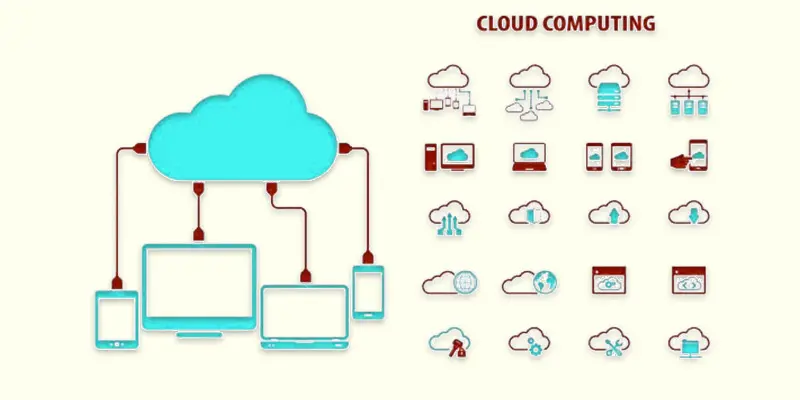
Cloud computing platforms are like online workspaces where you can store data, run apps, and access tools without needing a big, expensive computer. Instead of buying and managing your own servers, you use these platforms through the internet. They make life easier for businesses, schools, and even individuals by offering fast, flexible, and affordable services. For example, companies like Netflix use cloud platforms to stream movies to millions of users worldwide without storing huge files on their own computers.
A Cloud Computing Platform: What Is It?
A cloud computing platform is a service that enables online data storage, program execution, and processing power. Instead of installing programs on your own computer or keeping large servers, you rent these services from companies like Amazon, Microsoft, or Google.
Think of it like renting a fully equipped office. You don’t need to buy the furniture, internet connection, or electricity. You just pay for what you use and can expand or reduce as needed. This makes cloud platforms easy to use, cost-friendly, and flexible for both small and large businesses.

What are the Types of Cloud Computing Platforms?
Cloud computing platforms come in different types based on how they are managed and who can use them.
The Public Cloud
- Anyone can access and exchange services via the internet.
- Examples: Top cloud platforms include Azure, AWS, and Google Cloud.
- Best for: companies looking for scalable and reasonably priced solutions.
Private Cloud
- Services are used by only one company or organization.
- Offers more control and security.
- Example: VMware Private Cloud.
- Best for: Banks, government offices, and companies with strict data rules.
Hybrid Cloud
- Mix of public and private cloud services.
- Let’s businesses keep sensitive data in private clouds and run other tasks in public clouds.
- Best for: Companies that want flexibility.
Community Cloud
- Shared by a group of organizations with similar needs.
- Example: Healthcare institutions sharing a cloud for patient data.
- Best for: Industries with common regulations.
What are the Most Popular Cloud Computing Platforms?
Many companies offer cloud computing platforms with different features. Here are some of the most popular ones:
Web Services by Amazon (AWS)
the world’s biggest cloud provider. Offers over 200 services, including storage, databases, and AI tools. Used by Netflix, Airbnb, and many others.
Microsoft Azure
A strong competitor to AWS. Works well with Microsoft products like Office 365 and Windows Server. Used by businesses, schools, and governments.
Google Cloud Platform (GCP)
Known for its fast data processing and AI tools. Popular among companies that work with big data and machine learning.
IBM Cloud
Focuses on AI, security, and hybrid cloud solutions. Trusted by large businesses for secure workloads.
Oracle Cloud
Famous for database services and business applications. Used by companies that need strong database management.
Alibaba Cloud
The top cloud provider in Asia. Known for e-commerce and online retail solutions.
What are the Key Features of Cloud Platforms?
Cloud computing platforms come with features that make them powerful and easy to use. Here are the main ones:
Scalability
You can easily increase or decrease resources like storage or processing power based on your needs.
Security
Most platforms offer strong security features like data encryption, firewalls, and backup systems to protect information.
Cost-Effectiveness
Unlike buying and maintaining your own servers, you only pay for the services you utilize, saving money.
Global Access
With the internet, you may access your data and apps from any location in the world.
Reliability
Cloud providers offer high uptime, meaning your services are available almost all the time without interruptions.
Pay-as-You-Go Model
No need for big upfront investments—you can start small and grow when needed.
What are the Benefits of Using a Cloud Computing Platform?
Using a cloud computing platform offers many advantages for both individuals and businesses.
Saves Money
No need to purchase pricey gear or servers. Only what you use is paid for.
Easy to Scale
If your business grows, you can quickly add more storage, processing power, or services without delays.
Improves Collaboration
Teams can work together on the same files and applications from different locations in real time.
Increases Speed and Flexibility
You can launch applications or services in minutes instead of weeks.
Provides Disaster Recovery
Most platforms have backup systems, so your data stays safe even if something goes wrong.
Access from Anywhere
You can log in from your office, home, or even while traveling as long as you have an internet connection.
How to Choose the Right Cloud Platform?
Picking the best cloud computing platform depends on your needs, budget, and goals. Here are some points to help you decide:
Set Your Budget
Decide how much you can spend each month. Look for platforms that offer pay-as-you-go pricing.
Check the Services You Need
Do you need storage, databases, AI tools, or app hosting? Choose a platform that matches your needs.
Look at Security Features
Make sure the platform offers data encryption, backups, and other safety tools to protect your information.
Test Speed and Performance
A good platform should load fast and run smoothly, even during high demand.
See If It Fits With Your Current Tools
If you already use software like Microsoft Office or certain databases, pick a platform that works well with them.
Customer Support
Choose a provider that offers quick and helpful support in case you face problems.
What are Common Real-Life Use Cases You Should Know?
Online Storage and File Sharing
Cloud platforms allow users to store and access files from anywhere. Example: Google Drive or Dropbox lets students, professionals, and businesses save documents online and share them easily.
Streaming Services
Cloud computing powers streaming platforms that deliver content smoothly to millions of users. Example: Netflix and Spotify use cloud servers to stream videos and music without delays.
E-Commerce
Online stores rely on cloud platforms to handle high traffic, manage inventories, and process payments securely. Example: Amazon uses cloud servers to manage millions of products and customer orders globally.
Healthcare
Hospitals and clinics store patient records, schedule appointments, and analyze medical data using the cloud. Example: Telemedicine apps use cloud platforms to connect doctors and patients online.
Remote Work and Collaboration
Cloud platforms enable teams to work from anywhere using shared tools. Example: Microsoft Teams and Slack use cloud services for messaging, video calls, and document collaboration.
AI and Data Analysis
Businesses use cloud computing to run AI models and analyze huge amounts of data quickly. Example: Retail companies use cloud AI to predict customer preferences and improve sales strategies.
Gaming
Cloud gaming platforms let users play high-quality games without needing powerful local hardware. Example: Xbox Cloud Gaming or Google Stadia allows players to stream games directly from the cloud.
What is the Future of Cloud Computing Platforms?
Increased Adoption
Cloud computing will keep growing as more businesses move their operations online. Small businesses, startups, and even large enterprises will rely on cloud platforms for storage, computing, and software services. Example: A small shop using cloud-based inventory software instead of managing everything manually.
Edge Computing Integration
In order to minimise delays and increase speed, cloud platforms will collaborate more closely with edge computing, processing data close to its source. Example: Smart factories using cloud platforms to instantly analyze machine data for faster maintenance.
AI and Machine Learning
Cloud platforms will increasingly include AI tools to automate tasks, predict trends, and analyze data faster. Example: An e-commerce site using AI on cloud servers to recommend products to customers automatically.
Multi-Cloud and Hybrid Approaches
To increase flexibility and security, businesses may either employ numerous cloud providers (multi-cloud) or a hybrid cloud, which combines on-premises systems with cloud services. Example: A bank keeping sensitive customer data on local servers but running analytics on a cloud platform.
Better Security and Compliance
Cloud platforms will improve security measures and compliance with global regulations to protect sensitive data. Example: Healthcare apps storing patient records securely on cloud servers that meet strict privacy laws.
Serverless and Pay-as-You-Go Models
Businesses will adopt serverless computing and pay only for what they use, reducing costs and simplifying management. Example: A startup running its website on a cloud platform that charges only when the site is visited.
Sustainable Cloud Computing
Future cloud platforms will focus on energy efficiency and green computing to reduce environmental impact. Example: Data centers powered by solar energy or using AI to optimize electricity use.

Conclusion
Cloud computing platforms have transformed the way we store data, run applications, and collaborate. They offer flexibility, cost savings, and faster access to information. From healthcare to gaming, businesses and individuals rely on the cloud every day. With advancements in AI, edge computing, and security, the future of cloud platforms looks smarter, faster, and more efficient. Embracing cloud technology can help businesses stay competitive and ready for the digital world.
FAQS
Which is the best cloud platform?
The “best” depends on your needs. Popular choices are AWS for flexibility, Microsoft Azure for businesses, and Google Cloud for AI services.
Who has the largest cloud platform?
In terms of customers and services worldwide, Amazon Web Services (AWS) is now the biggest cloud platform.
What are the five main uses of cloud computing?
Online storage and backup
Software as a Service (SaaS)
Data analysis and AI
Web hosting and e-commerce
Remote work and collaboration
What drawbacks does cloud computing have?
Reliance on an internet connection, possible data security threats, and ongoing expenses are drawbacks. Some businesses may find these challenges limiting.
What distinguishes artificial intelligence from cloud computing?
Cloud computing is the platform to store and run applications online, while AI is a technology that allows machines to learn and make decisions. AI can run on cloud platforms for better performance.





- Be Respectful
- Stay Relevant
- Stay Positive
- True Feedback
- Encourage Discussion
- Avoid Spamming
- No Fake News
- Don't Copy-Paste
- No Personal Attacks
- Be Respectful
- Stay Relevant
- Stay Positive
- True Feedback
- Encourage Discussion
- Avoid Spamming
- No Fake News
- Don't Copy-Paste
- No Personal Attacks
