Direct To Film (DTF) Transfer Printer for Small Businesses
Published: 18 Mar 2025
Printing high-quality designs on clothes or other fabrics can feel like a challenge. Many users struggle with issues like prints fading after a few washes, limited color choices, or costly printing setups. Some printing methods, like screen printing, require multiple steps and special tools. Others, like heat transfer, may not last long or work on all fabrics.
This is where an impresora DTF (Direct-to-Film) printer steps in as a game-changer. It prints your design on a special film that is then transferred to the fabric. The result? Bright, durable, and smooth prints that stay fresh for a long time.
For small business owners, custom t-shirt sellers, or hobbyists, DTF printing offers an affordable and easy solution. You don’t need large machines or complex setups. Plus, it works on cotton, polyester, blends, and more. Whether you are starting a print-on-demand shop or want to design unique apparel, the best DTF printer can save time, cut costs, and deliver top-quality results.
Quick Overview – Top DTF Printers 2025
Key Features:
| Feature | Godora L1800 |
| Tech | Inkjet |
| Output | Color |
| Speed | N/A |
| Resolution | High |
| Special | White Ink Circulation |
| Best For | Small Biz And Beginners |
RocRow R1390 DTF Printing Machine
Key Features:
| Feature | RocRow R1390 |
| Tech | Inkjet |
| Output | CMYK+WW |
| Speed | 1.2 ppm |
| Resolution | 2880 dpi |
| Special | 3-in-1 Ink System |
| Best For | Pro Quality Prints |
Key Features:
| Feature | B transfer M1630 Pro |
| Tech | DTF Printing |
| Output | CMYK+2W |
| Speed | 15 ppm |
| Resolution | Industrial F1080 |
| Special | Auto Cutter, Holiday Mode |
| Best For | High-Speed Production |
Procolored L1800-JZ DTF Printer
Key Features:
| Feature | Procolored L1800-JZ |
| Tech | Inkjet |
| Output | Color |
| Speed | 1 ppm |
| Resolution | 1440 x 1440 dpi |
| Special | Auto Cleaning, Preheating |
| Best For | Easy Maintenance |
Comprehensive Overview – Best Direct To Film Printer
Best For Small Businesses
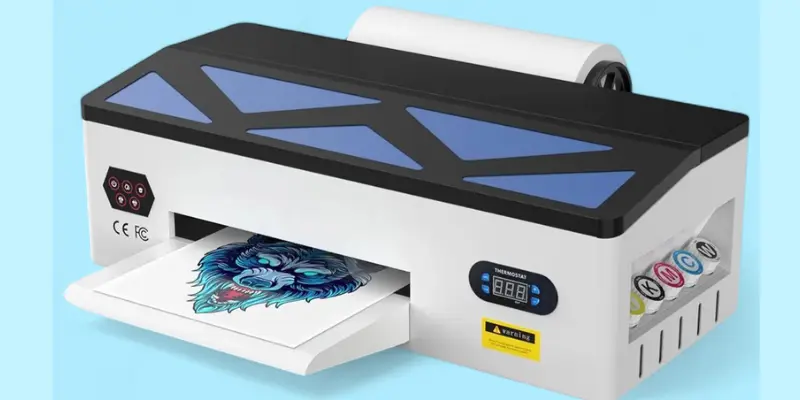
Godora L1800 A3 DTF Printer
The Godora L1800 A3 DTF Transfer Printer is designed for small businesses, print shops, and creative individuals who want high-quality fabric printing without complex setups. It uses advanced inkjet technology to produce bright, durable, and detailed prints on various materials. With an automatic cleaning system and white ink circulation, it ensures smooth performance and prevents clogs.
This direct-to-garment printer features an air suction system to keep films flat and wrinkle-free during printing, reducing the risk of errors. The rapid ink fixation technology helps bond colors securely to the transfer film for long-lasting results. From t-shirts and hoodies to bags and shoes, this printer can handle a wide range of customization projects.
Specifications Of Godora Printer
| Feature | Details |
| Printing Technology | Inkjet |
| Printer Output | Color |
| Connectivity | USB |
| Maximum Media Size | A3 |
| Print Media | Back print film |
| Included Components | Printer, Toner Cartridge |
| Key Technology | Air suction system, Rapid ink fixation, Efficient paper feed |
| Compatible Materials | Cotton, polyester, leather, t-shirts, jeans, hats, bags, pillows, shoes, socks, caps, hoodies, cushions, crafts, and more |
| Support | Remote technical support and guidance |
Key Features
- High-Quality Printing – Produces vibrant, sharp, and detailed prints with inkjet technology.
- Automatic Cleaning System – Keeps the printer running smoothly with minimal maintenance.
- White Ink Circulation & Ink Agitation – Prevents clogging and maintains consistent ink flow.
- Air Suction System – Ensures wrinkle-free printing and smooth media handling.
- Wide Compatibility – Works with cotton, polyester, leather, shoes, hats, and more.
- Efficient Paper Feed – Reduces jams and supports seamless printing.
- User-Friendly Design – Easy setup, minimal learning curve, and remote tech support.
Pros And Cons Of Godora L1800 A3 DTF Printer
Pros
- Automatic Cleaning System
- White Ink Circulation
- Wide Material Compatibility
Cons
- Maintenance of Ink System
Click here to buy!
Best For Beginners
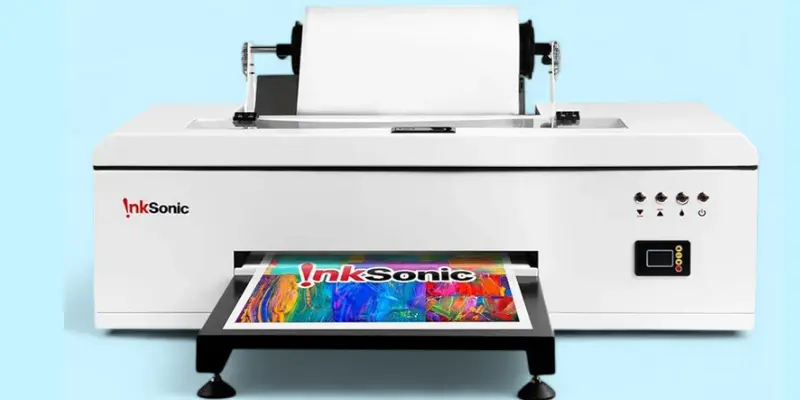
RocRow R1390 DTF Printing Machine
The RocRow R1390 DTF Printing Machine is built for professionals and small businesses that need high-quality, durable, and vibrant prints on a wide variety of materials. With its six-color CMYK+WW system and advanced RIP software, it delivers sharp, true-to-life images at an impressive 2880 dpi resolution. This makes it perfect for custom apparel, accessories, and promotional products.
Equipped with a 3-in-1 white ink system (circulation, mixing, and filtering), the printer prevents clogging and ensures consistent ink quality. The adjustable air suction system keeps transfer films wrinkle-free, while the printhead protection kit safeguards against damage during idle periods.
This complete bundle includes a curing oven, heat press, inks, transfer films, and maintenance supplies, providing everything you need to start printing right away. Whether for t-shirts, phone cases, hoodies, or posters, this printer offers premium quality and reliable performance.
Specifications Of RocRow Printer
Feature | Details |
| Color | White |
| Printing Technology | Inkjet |
| Printer Output | CMYK+WW (Six-Color System) |
| Connectivity | USB |
| Maximum Print Speed | 1.2 ppm (Color & Monochrome) |
| Product Dimensions | 13″D x 31.5″W x 7.5″H |
| Resolution | 2880 dpi |
| Print Media | DTF transfer film |
| Compatible Materials | Cotton, polyester, leather, denim, mesh, canvas, phone cases, posters, and more |
| Bundle Components | Printer, Curing Oven, Heat Press Machine, 2 Sets of Inks (6x250ml), 100m A3 Transfer Films, Maintenance Liquids, User Manual, Tutorial Video |
Key Features
- Professional Print Quality – 2880 dpi resolution with a six-color system for sharp, vibrant results.
- 3-in-1 White Ink System – Circulation, mixing, and filtering to prevent clogs and maintain smooth ink flow.
- Adjustable Air Suction – Secures transfer film to avoid wrinkles and ensure precise printing.
- Printhead Protection Kit – Keeps printheads safe during extended periods of non-use.
- Complete Printing Bundle – Includes curing oven, heat press, inks, transfer films, and maintenance tools.
- Versatile Printing – Works with cotton, polyester, leather, denim, mesh, and more.
Pros And Cons Of RocRow R1390 DTF Printer
Pros
- High-Resolution Printing
- Complete Printing Bundle
- Wide Material Compatibility
Cons
- Larger Setup Space
- Requires Maintenance
Click here to buy!
Best For Home Use
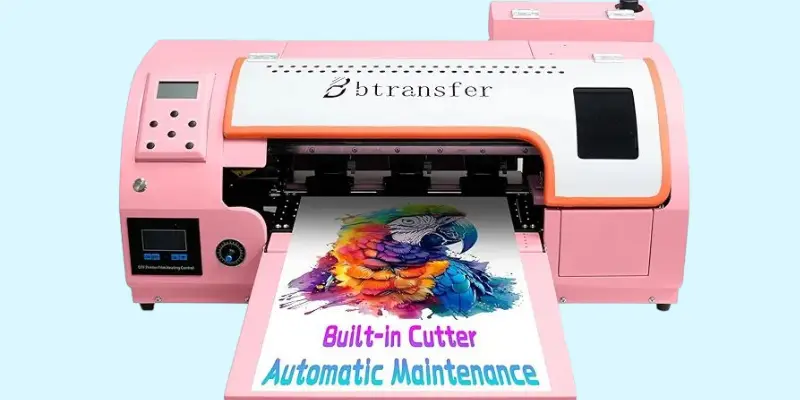
M1630 Pro DTF Printer
The transfer M1630 Pro DTF T-Shirt Printer is built for speed, efficiency, and professional-grade printing. Equipped with a high-precision Epson F1080 printhead, it offers up to 2x faster printing than popular models like the L1800 or R1390. Its six-color ink system (CMYK+2W) ensures rich, vibrant colors, smooth gradients, and sharp details, making it ideal for high-volume printing and professional use.
This printer comes as a ready-to-print bundle with an oven, laptop, software, cleaning solutions, and consumables for an instant setup. Smart features like the 90-day Holiday Mode keep printheads in top condition, while the 3-in-1 Stability System (head strike sensor, pre-heating, and suction platform) prevents errors and reduces waste by up to 80%.
Designed for businesses that need speed and precision, the M1630 Pro combines industrial performance with user-friendly operation, making it a powerful tool for growing print shops and creative entrepreneurs.
Specifications
| Feature | Details |
| Color | Pink |
| Printing Technology | DTF Printing |
| Printer Output | CMYK+WW |
| Connectivity | USB |
| Maximum Print Speed | 15 ppm (Color), 12 ppm (Monochrome) |
| Product Dimensions | 35″D x 14″W x 29.6″H |
| Print Head | High-Precision Epson F1080 (Industrial Grade) |
| Print Media | Roll Film with Zero Waste Cutting System |
| Bundle Components | DTF Heat Transfer Printer, Oven, Laptop, Software, Cleaning Solution, Full Consumables Set |
| Additional Technology | Triple-Protection System (Head Strike Sensor, Pre-Heating, Suction Platform) |
Key Features
- High-Precision Epson Printhead – Industrial-grade performance with 2x faster printing speed.
- Six-Color Ink System– Produces vibrant, smooth, and detailed prints.
- Ready-to-Print Bundle – Includes oven, laptop, software, cleaning solution, and consumables.
- Holiday Mode Maintenance – Keeps printheads moist and clog-free for 90 days of inactivity.
- Zero Film Waste – Built-in auto/manual cutter and roll film feed ensure precise usage.
3-in-1 Stability System – Prevents errors and reduces printing waste by 80%.
Pros And Cons Of M1630 Pro DTF Printer
Pros
- Ultra-Fast Printing
- Zero Film Waste System
- Free Software Updates
Cons
- Large Size – Requires more workspace
Click here to buy!
Best For Printing Shirts
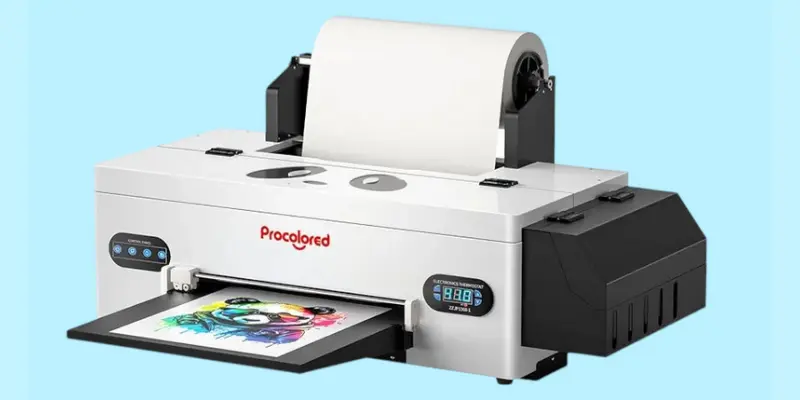
Procolored L1800-JZ DTF Printer
The Procolored L1800-JZ DTF Transfer Film is designed for users who want a smooth, efficient, and low-maintenance printing experience. Featuring a built-in cutter and upgraded roller feeder, it reduces film waste and minimizes jamming for seamless operation. With a printing resolution of 1440 x 1440 dpi, it delivers sharp, vibrant, and detailed prints on a wide range of fabrics.
Its Siphon White Ink Circulation System combines stirring, circulation, and filtration to prevent clogs and extend printhead life. The automatic cleaning feature ensures the printer remains in top condition, performing scheduled cleaning every 10 hours with minimal ink usage.
The preheating function with adjustable temperature keeps ink flowing smoothly, while the film adsorption and ink collection system ensure consistent results. Backed by a solid warranty and 24/7 support, this printer is ideal for small businesses, apparel makers, and creative professionals.
Specificarions
| Feature | Details |
| Color | White |
| Printing Technology | Inkjet |
| Printer Output | Color |
| Connectivity | USB |
| Maximum Print Speed | 1 ppm (Color & Monochrome) |
| Resolution | 1440 x 1440 dpi |
| Product Dimensions | 16.53″D x 34.25″W x 16.4″H |
| Printing System | Six-Color Printing for smooth gradients and vibrant colors |
| Software Support | Windows 7/10/11 |
Key Features
- Built-in Cutter and Upgraded Feeder – Reduces film waste and ensures smooth printing.
- High-Resolution Printing – 1440 x 1440 dpi for sharp, vibrant, and detailed images.
- Siphon White Ink Circulation – Prevents clogs and maintains printhead performance.
- Automatic Cleaning System – Cleans every 10 hours using minimal ink (1ml per day).
- Preheating and Film Adsorption – Maintains ink consistency and ensures wrinkle-free printing.
- Six-Color Printing System – Produces smooth gradients and accurate colors.
Pros And Cons Of Procolored L1800-JZ DTF Printer
Pros
- Automatic Cleaning
- Preheating & Film Adsorption
- Six-Colour Printing System
Cons
- Slower Print Speed
Click here to buy!
Buying Guide – How to Choose the Right Direct To Film Printer for Your Needs?
Choosing the right DTF Printing Technology is important because it affects print quality, speed, and durability. A good printer ensures clear images, faster production, and minimal maintenance issues, perfect for small businesses, apparel brands, and creative projects.
Key Factors
Printing Technology
DTF ink printers use inkjet systems or advanced DTF print heads. Advanced heads offer better speed and accuracy, making them ideal for high-volume work.
Print Quality and Resolution
Higher DPI (dots per inch) means sharper and more detailed prints. Look for at least 1440 x 1440 DPI for professional-quality results.
Print Speed
Fast print speed is key for bulk production, while slower models suit small-scale projects. Choose based on your daily printing volume and deadlines.
Ink System
A good ink system prevents clogs and ensures smooth ink flow. White ink circulation improves color accuracy and extends printhead life.
Size and Portability
Some printers are compact for home or small shop use, while others are large and industrial-grade. Choose based on your workspace and production needs.
Ease of Maintenance
Features like automatic cleaning save time and prevent damage. Software support also makes operation smoother for beginners.
Connectivity
Most printers use USB, but some offer wireless options for convenience. Reliable connectivity ensures stable performance and fewer interruptions.
Warranty And Support
Check if the warranty covers printheads, as they are the most delicate parts. Good customer support and service availability are essential for long-term use.
Who Should Buy Which Type?
Beginners and Small Business Owners
Entry-level DTF textile printers are perfect for new users. They are affordable, easy to operate, and require minimal maintenance.
Professional Printers Needing High-Speed Performance
For large-scale production, high-speed models with advanced print heads are ideal. They ensure faster output without compromising print quality.
Custom Apparel Creators Needing Precision Color
Designers who need vibrant, accurate colors should choose printers with high DPI and excellent
What Are The Benefits of DTF Printing for Startup Businesses
Low Initial Investment
DTF printing requires less setup cost compared to traditional methods like screen printing. Startups can begin with a compact printer and expand as orders grow.
Versatile Printing Options
It works on various fabrics like cotton, polyester, and blends. This flexibility helps new businesses serve a wider customer base.
High-Quality Prints with Bright Colors
The DTF printing machine produces sharp, vibrant designs. This makes products look premium, which is important for brand image.
No Need for Pre-Treatment
Unlike DTG printing, DTF not require fabric pre-treatment. This saves time and reduces production costs.
Small-Batch Friendly
Perfect for small runs or custom orders. Startups can test designs without large investments in bulk printing.
Bringing Your Designs to Life
DTF printing isn’t just about putting ink on fabric, it’s about delivering bright, long-lasting colors that make your designs stand out. Whether you run a small shop, customize apparel, or handle bulk orders, a good DTF printer ensures top-notch print quality with sharp details and vibrant hues.
With the right machine, you can achieve smooth gradients, deep blacks, and accurate enjoycolor matching that your customers will love. Add in features like white ink circulation, auto-cleaning, and durable printheads, and you’ve got a reliable setup for consistent results.
Choosing a DTF printer is an investment in quality, creativity, and long-term business growth. Ready to bring your designs to life with prints that truly pop?
Some links in this post are affiliate links. Buying through them supports my work, at no extra cost to you.
FAQS
What Type of Printer is Best for DTF Transfers?
A dedicated commercial DTF printer bundled with white ink circulation and high DPI resolution is best. It ensures smooth ink flow, sharp prints, and prevents clogs. Choose one that matches your production needs: a desktop for small batches or an industrial one for bulk orders.
How Expensive Are DTF Printers?
DTF ink printers can range from $2,000 to $15,000 or more, depending on size and features. Smaller desktop models are affordable for beginners, while industrial models cost more but handle bulk printing. Your budget and production needs will guide your choice.
Is DTF printing high quality?
Yes! DTF printing produces vibrant, durable, and high-quality prints that work on various fabrics. It offers excellent colour accuracy and stretchability.
Is a DTF printer worth the investment?
A DTF printer is worth it if you print on cotton-based fabrics and want high-detail designs. However, it’s costly and requires maintenance.
How does DTF printing work step by step?
First, print the design on a special DTF film. Then, apply adhesive powder and heat it. Finally, press the design onto the fabric using a heat press.
How do you use a DTF printer?
Load the DTF film, print the design, add adhesive powder, cure it with heat, and press it onto fabric using a heat press.
| I may earn a small commission when you buy through my links. This does not change the price for you and helps me continue blogging. |






- Be Respectful
- Stay Relevant
- Stay Positive
- True Feedback
- Encourage Discussion
- Avoid Spamming
- No Fake News
- Don't Copy-Paste
- No Personal Attacks
- Be Respectful
- Stay Relevant
- Stay Positive
- True Feedback
- Encourage Discussion
- Avoid Spamming
- No Fake News
- Don't Copy-Paste
- No Personal Attacks
