Edge Computing vs Cloud Computing | Simple Comparison Guide
Published: 30 Aug 2025
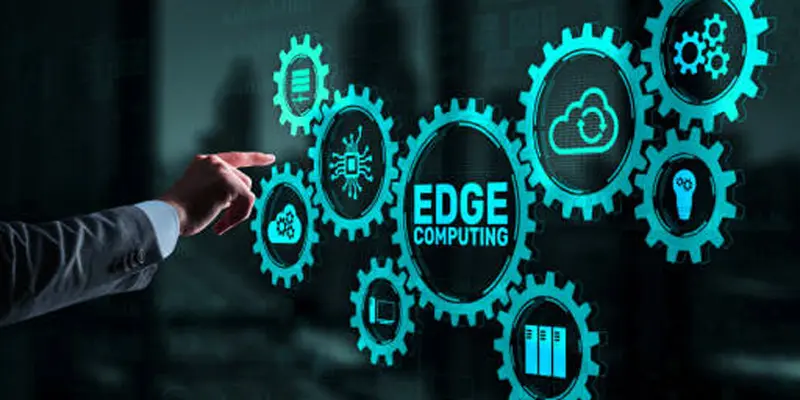
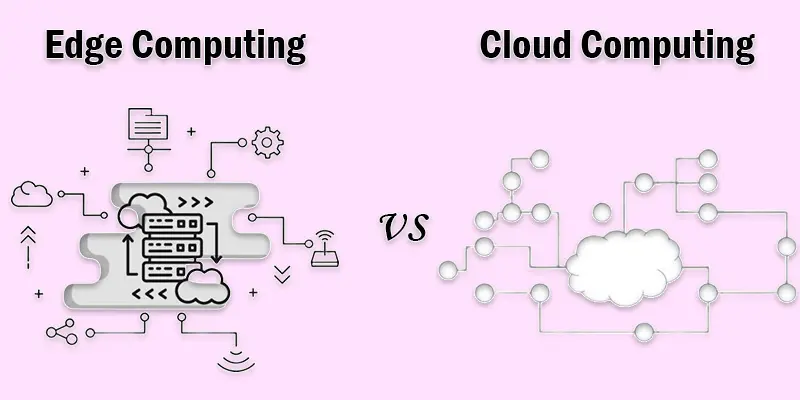
Data is everywhere around us, from streaming videos to smart devices in our homes. But have you ever wondered how this data is processed so quickly? This is where cloud computing and edge computing come in. Both play a key role in handling data, but in very different ways. Edge computing handles data near the device or local network, while cloud computing sends it to large, remote servers for storage and analysis. We’ll go over what they are, how they vary, and when to utilize them in this blog.
How Does Edge Computing Compare to Cloud Computing?
Though they function differently, cloud computing and edge computing are two methods for processing and storing data. Cloud computing started in the early 2000s and stores data in large, centralized servers over the internet. Its main purpose is to handle heavy tasks, store large amounts of data, and provide advanced analytics. It’s best for businesses that need scalability, centralized management, and remote access.
Edge computing became popular around the mid-2010s. It processes data near the devices that generate it, like sensors, cameras, or machines. Its main purpose is to provide real-time processing, reduce delays, and save bandwidth. It’s best suited for industries that need instant decisions, like IoT devices, healthcare, self-driving cars, and smart factories.
What is Cloud Computing?
Cloud computing is a way of storing and using data over the internet instead of keeping it only on your computer. In simple words, the “cloud” means remote servers that you can access online. These servers store files, run apps, and handle processing power for you.
For example, when you upload photos to Google Drive or watch movies on Netflix, you are using cloud computing. You don’t need heavy storage or powerful systems at home because the cloud does the hard work for you. It gives flexibility, saves cost, and allows you to access your data from anywhere with an internet connection.
What is Edge Computing?
Processing data closer to its source rather than transmitting it to a central cloud server is known as edge computing. In simple words, the “edge” means the edge of the network, like your local device or nearby gateway.
For example, a self-driving car cannot wait for data to travel to a cloud server and come back. It needs instant decisions, so the car processes data right on the spot. Similarly, smart cameras, fitness trackers, and IoT devices use edge computing to give real-time results.
What is the Difference Between Edge Computing and Cloud Computing?
| Computer Edges | Cloud Computing |
|---|---|
| Locally processed data | Data processed in data centers |
| Low latency | Higher latency |
| Works offline | Needs an internet connection |
| Real-time decisions | Delayed decisions |
| Limited storage | Massive storage |
| Handles small-scale data | Handles large-scale data |
| Reduces bandwidth usage | Higher bandwidth usage |
| Good for IoT devices | Good for centralized apps |
| High privacy control | Data sent to the cloud |
| Immediate response | Response depends on cloud speed |
| Hardware near the user/device | Hardware far from the user/device |
| Cost-effective for small tasks | Cost-effective for heavy tasks |
| Edge servers at the network edge | Centralized cloud servers |
| Quick local analytics | Advanced analytics in the cloud |
| Less scalable | Highly scalable |
| Works with unstable networks | Requires a stable network |
| Smaller computing power | High computing power |
| Energy efficient locally | Energy-intensive at scale |
| Ideal for time-sensitive apps | Ideal for storage & AI training |
| Updates at the device level | Updates are centralized in the cloud |
What are the Advantages of Cloud Computing?
Cloud computing offers many benefits that make it popular for businesses and everyday users:
Easy to Scale
- You can quickly increase or decrease storage and resources based on your needs.
Cost-Effective
- No need to buy expensive servers or storage devices. You only pay for what you use.
Accessible from Anywhere
- As long as you have the internet, you can access your data and apps from any device.
Collaboration Made Simple
- Multiple people can work on the same file or project at the same time (like Google Docs).
Powerful Data Analytics
- Cloud platforms can handle big data, making it easier for businesses to find insights and trends.
What are the Disadvantages of cloud computing?
Internet Dependency
- Cloud services need a stable internet connection. Without it, you can’t access your data or apps.
Ongoing Costs
- Using cloud services usually involves monthly or yearly fees, which can add up over time.
Limited Control
- Since data and servers are managed by providers, you have less control over hardware and software settings.
Security Risks
- Storing data on the cloud may expose it to hacking or breaches if proper security measures aren’t in place.
Potential Downtime
- Cloud providers can face outages or maintenance periods, which can temporarily stop access to your services.
What are the Advantages of Edge Computing?
Edge computing is becoming popular because it brings data processing closer to the user.
Faster Response (Low Latency)
- Since data is processed locally, results come instantly. Perfect for real-time tasks.
Works Without Constant Internet
- Devices can still function and process data even if the internet is slow or unavailable.
Better for IoT Devices
- Smart devices like fitness trackers, smart homes, and sensors rely on edge computing for quick responses.
Increased Security
- Sensitive data stays local instead of traveling across networks, reducing cyber risks.
Efficient Bandwidth Use
- Less data must be transferred to the cloud, saving money and internet traffic.
What are the Disadvantages of Edge Computing?
Limited Computing Power
- Edge devices usually have less processing ability than cloud servers, so they can’t handle very heavy tasks.
Higher Maintenance
- Many devices spread across locations need frequent updates and maintenance, which can be costly.
Security Risks
- Local data processing can be vulnerable to hacking or physical damage if devices aren’t secured properly.
Limited Storage
- Edge devices have less storage, so they can’t store huge amounts of data like cloud servers can.
Complex Management
- Managing multiple devices, software updates, and network connections is more complicated than using centralized cloud systems.
When to Use Cloud Computing?
You should use cloud computing when you need flexible, cost-effective, and scalable solutions for storing data, running apps, or managing IT services. It’s best for businesses and individuals who want to save money and access resources anytime, anywhere.
Need for Cost Savings
- If your business wants to avoid buying expensive servers or hardware.
- Cloud lets you pay only for what you use (like electricity, but for computers!).
Scalability Requirements
- When your website, app, or service may grow quickly.
- Cloud lets you easily add more storage or computing power without delays.
Remote Access Needs
- If your team works from multiple locations.
- Cloud services let you access files and apps from anywhere with an internet connection.
Disaster Recovery & Backup
- When you want safety against data loss due to accidents, hacking, or natural disasters.
- Cloud automatically backs up data and allows fast recovery.
Development & Testing
- When creating new apps or software.
- Cloud provides ready-to-use tools and virtual environments without buying physical machines.
High Computing Power
- For tasks like big data analysis, AI, or scientific simulations.
- Cloud gives temporary access to powerful servers you don’t need to own.
Variable Workloads
- If your computing needs change a lot (e.g., online shopping sites during festivals).
- Cloud adjusts resources automatically, so you don’t overpay.
When to Use Edge Computing?
You should use edge computing when data needs to be processed quickly and close to the source, like in IoT devices, smart cameras, or self-driving cars. It’s best for reducing delays and improving real-time performance.
Low Latency Needed
- When apps need super-fast responses (milliseconds).
- Example: Self-driving cars, online gaming, or industrial robots.
Limited Internet Connectivity
- When devices are in remote areas or unstable networks.
- Data is processed locally via edge computing as opposed to being sent to the cloud.
Real-Time Data Processing
- For tasks that need instant decisions.
- For instance, intelligent traffic signals adapt to the flow of traffic in real time.
Reduce Bandwidth Costs
- Sending all data to the cloud can be expensive.
- Edge computing processes data locally and only sends important info to the cloud.
IoT Devices
- When many sensors or devices generate massive data continuously.
- Edge computing handles data near the source, avoiding delays.
Privacy & Security Concerns
- Sensitive data can be processed locally without being sent over the internet.
- Example: Healthcare devices analyzing patient data on-site.
How Do Edge and Cloud Work Together?
Using edge and cloud together gives you the best of both worlds: fast local processing at the edge and powerful storage and analytics in the cloud. This combo is ideal for real-time apps that also need long-term data insights.
How They Work Together
- Edge: Processes data locally near the devices for speed and instant decisions.
- Cloud: Stores large amounts of data, runs heavy analytics, and manages backups.
- Together, Edge handles immediate tasks, Cloud handles long-term storage, learning, and analysis.
When to Use Both
- Smart Cities: Traffic sensors process data at the edge, while the cloud analyzes city-wide traffic patterns.
- Healthcare: Wearable devices check vital signs locally; cloud stores historical data and provides analytics.
- Industrial IoT: Machines detect issues instantly at the edge; cloud predicts maintenance trends over time.
Benefits of Using Both
- Speed: Immediate decisions at the edge.
- Efficiency: Only important data goes to the cloud.
- Cost Savings: Reduce bandwidth usage.
- Scalability: Cloud handles heavy tasks or future growth.
Conclusion
We’ve covered edge computing vs cloud computing in detail. From my experience, choosing the right option depends on your needs: use edge computing for fast, real-time tasks and cloud computing for storage, heavy processing, and analytics. In many cases, combining both gives the best results for speed and efficiency. I personally recommend starting with the cloud for core operations and adding edge where immediate responses are critical. Try exploring both in your projects and see how they can make your systems smarter and faster.
FAQS
What is better than cloud computing?
It depends on your needs. For real-time tasks, edge computing is better, but for storage and heavy processing, cloud computing is best.
What is the difference between cloud storage and edge storage?
Cloud storage keeps data in central servers online. Edge storage keeps data closer to the devices for faster access.
Does AWS use edge computing?
Yes, AWS uses edge computing through services like AWS IoT and CloudFront. It processes data closer to users for speed.
Does AI use edge computing?
Yes, AI often uses edge computing for real-time decision-making. It helps AI devices respond faster without sending data to the cloud.
How does Tesla use edge computing?
Tesla uses edge computing in cars for self-driving features. The car processes sensor data locally to react instantly on the road.
Who is the leader in edge computing?
Companies like AWS, Microsoft Azure, and Cisco are leaders in edge computing solutions.





- Be Respectful
- Stay Relevant
- Stay Positive
- True Feedback
- Encourage Discussion
- Avoid Spamming
- No Fake News
- Don't Copy-Paste
- No Personal Attacks
- Be Respectful
- Stay Relevant
- Stay Positive
- True Feedback
- Encourage Discussion
- Avoid Spamming
- No Fake News
- Don't Copy-Paste
- No Personal Attacks
