Essential Cloud Security Tips for Beginners
Published: 2 Feb 2026
Did you know that over 90% of businesses use cloud services, yet many still face security risks? You might be wondering, “Is my data really safe online?” Many people struggle with lost files, hacked accounts, or sensitive information being exposed, which can be stressful and costly.
That’s why knowing the right cloud security tips is so important. Whether you store photos, documents, or business data, simple steps can keep your information protected. Some tips are easy to follow, like using strong passwords and two-factor authentication, while others help prevent hackers from sneaking in unnoticed.
Even if you think cloud storage is secure by default, small mistakes can lead to big problems. By learning practical cloud security tips, you can enjoy online storage safely and confidently.
What are the Basics of Cloud Security?
Cloud security is all about keeping your data, files, and apps safe when they are stored online.
What is Cloud Security?
Cloud security is the practice of protecting your data, apps, and files stored online from hackers, theft, or loss. It makes sure your information stays safe and private while using cloud services. Example: If you save your photos on Google Drive, cloud security keeps them safe from anyone trying to access them without your permission.
Why Cloud Security is Important?
Cloud security is important because it protects your personal and business data from hackers and cyberattacks. Without it, sensitive information like passwords, documents, and photos can be stolen or lost.
It also helps prevent financial losses and privacy breaches. By keeping your cloud accounts secure, you can safely store and share files without worrying about unauthorized access.
What are the Common Cloud Security Threats?
Cloud data can face many dangers, and knowing the common security threats helps you protect your files and accounts.
- Malware and Viruses: Dangerous programs that can steal, corrupt, or harm your cloud files.
- Weak Passwords: Using easy or common passwords lets hackers get into your accounts quickly. Always choose strong, unique passwords.
- Phishing Attacks: Fake emails or messages trick you into giving login details.
- Unsecured Wi-Fi Networks: Public networks can let hackers intercept your cloud data.
- Insider Threats: People with access to your data (employees or friends) may misuse it.
- Data Loss: Accidental deletion or system failure can cause permanent loss of files.
- Account Hijacking: Hackers take over your cloud accounts to steal or misuse information.
What are the Best Tips to Keep Your Cloud Secure?
Using the right cloud security tips can help you protect your files, accounts, and personal data from hackers and accidents.
- Use Strong Passwords
- Enable Two-Factor Authentication (2FA)
- Keep Software and Apps Updated
- Backup Your Data Regularly
- Be Careful with Public Wi-Fi
- Monitor Your Cloud Activity
- Limit Sharing and Access
Use Strong Passwords
Using strong passwords is the first step to keeping your cloud accounts safe. Make your password long and include letters, numbers, and symbols. Avoid using easy words like “12345” or “password.” A strong password makes it much harder for hackers to access your files.
Enable Two-Factor Authentication (2FA)
Two-Factor Authentication (2FA) Protect your cloud account with an extra step. A password alone isn’t enough; a verification code on your phone or email is also required. It helps keep your files and personal data safe from hackers. Enabling 2FA is quick and makes your cloud much more secure.
Keep Software and Apps Updated
Regularly updating your apps and software helps keep your cloud data safe from hackers and security threats. Updates often fix security problems that hackers can exploit. Turn on automatic updates or check regularly for new versions. This helps your cloud accounts stay safe and run smoothly.
Backup Your Data Regularly
Backing up your data regularly keeps your important files safe in case of accidents or hacking. If something is lost or deleted, you can restore it easily. Use another cloud account or an external drive to save copies. Regular backups give you peace of mind and protect your information.
Be Careful with Public Wi-Fi
Public Wi-Fi can be risky because hackers can access your data. Avoid logging into cloud accounts on open networks. Use a VPN to encrypt your connection and stay safe. Being careful on public Wi-Fi helps protect your files and personal information.
Monitor Your Cloud Activity
Monitoring your cloud activity helps you spot any unusual or unauthorized access. Check your account’s login history and connected devices regularly. Look for unknown logins or changes to your files. Keeping an eye on activity helps you protect your data from hackers.
Limit Sharing and Access
Limiting sharing and access keeps your cloud files safe from unwanted users. Only give access to trusted people and set permissions like “view only” when possible. Too much sharing can lead to data leaks or misuse. Controlling access helps protect your personal and sensitive information.
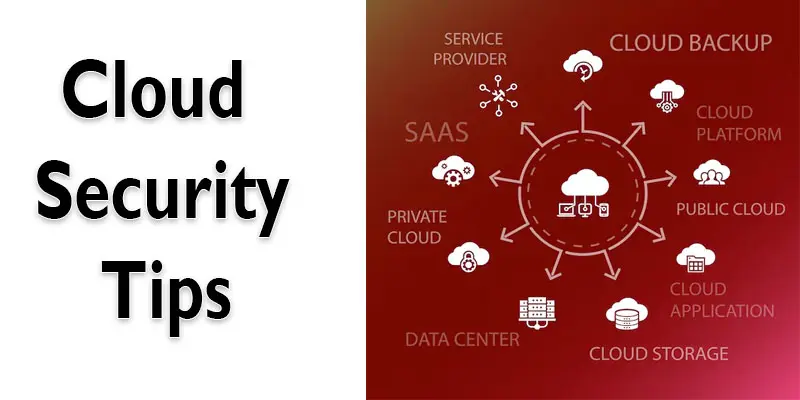
What are Advanced Cloud Security Practices for Extra Protection?
Advanced cloud security practices help protect your data, applications, and systems from evolving cyber threats in the cloud.
- Data Encryption Everywhere: Encrypt data at rest, in transit, and during processing to prevent unauthorized access.
- Multi-Factor Authentication (MFA): Require MFA for all cloud accounts to add an extra layer of login security.
- Identity and Access Management (IAM): Set clear access rules and roles to control who can see or use your cloud data.
- Regular Security Audits: Continuously check cloud systems for vulnerabilities and compliance gaps.
- Endpoint Security: Protect devices that access the cloud with antivirus, firewalls, and secure configurations.
- Secure APIs: Monitor and protect APIs to prevent data leaks and unauthorized access.
- Intrusion Detection and Prevention: Use tools to detect and block suspicious activities in real time.
- Backup and Disaster Recovery: Keep copies of your data and check your recovery plan often to avoid losing important files.
- Zero Trust Architecture: Never trust users or devices by default; verify all access continuously.
- Security Monitoring and Logging: Track all actions and generate alerts for unusual behaviour.
- Patch Management: Keep all cloud software and services up to date with security patches.
- Cloud Security Training: Educate employees on security best practices and phishing awareness.
Final Thought
The above points highlight the importance of following strong Cloud Security tips to protect your data. I recommend regularly updating your passwords and using multi-factor authentication to stay safe in the cloud. Begin using these tips now to protect your digital files and stay safe from online threats.
FAQS
You can improve cloud security by using strong passwords, enabling multi-factor authentication, and keeping your software and systems updated. Regularly check for unusual activity and follow security best practices.
Protect cloud security by encrypting sensitive data, controlling who can access your cloud, and using secure cloud providers. Always back up important files.
Cloud security means keeping data, apps, and accounts safe in the cloud. Use firewalls, encryption, strong passwords, and monitor access regularly.
Cloud security can seem tricky at first, but learning step by step makes it easier. Following simple practices like strong passwords and updates helps a lot.
You need skills in networking, cloud platforms, risk management, and basic coding. Knowledge of security tools and data protection is also important.
Coding is helpful but not always required. Knowing basic scripts or automation can make managing cloud security easier.




- Be Respectful
- Stay Relevant
- Stay Positive
- True Feedback
- Encourage Discussion
- Avoid Spamming
- No Fake News
- Don't Copy-Paste
- No Personal Attacks
- Be Respectful
- Stay Relevant
- Stay Positive
- True Feedback
- Encourage Discussion
- Avoid Spamming
- No Fake News
- Don't Copy-Paste
- No Personal Attacks
