Best Portable Printer 2026 – Travel Friendly
Published: 31 Oct 2025
If you love keeping things organized and beautiful, a top rated portable printer might become your favorite gadget. These Bluetooth printers are made for people who like things simple yet stylish. They bring the ease of printing without the limits of a desk or bulky machine. Whether you’re in a car, hotel room, or sitting by the window at home, you can print what you need within minutes. That kind of freedom feels empowering; it’s like carrying your own little print studio wherever you go.
What I love most about the best portable printers is how they blend convenience, creativity, and class. You can print photos from your phone, share documents instantly, or even surprise a friend with a quick photo keepsake. It’s a small touch, but it adds pride to your work and elegance to your lifestyle.
In today’s fast-moving world, a travel printer isn’t just about printing; it’s about staying connected, efficient, and expressive no matter where you are. It’s comfort in your hands, beauty in your prints, and confidence in every page you create.
Table of Contents
Quick Overview Of the Best Portable Printer
HP OfficeJet 250 Portable Printer
Key Features:
| Best For | Business professionals needing print, scan, and copy on the go |
| Print Size | Up to Letter (8.5×11″) |
| Connectivity | Wi-Fi, USB |
| Key Feature | All-in-one portability with fast-charging battery |
Key Features:
| Best For | Travelers and remote workers who need quick document printing. |
| Print Size | Up to Letter (8.5×11″) |
| Connectivity | Wi-Fi, USB |
| Key Feature | Compact design with long battery life |
Key Features:
| Best For | Creative users who print both photos and documents. |
| Print Size | Up to 8.5×11″ |
| Connectivity | USB, Wireless |
| Key Feature | Direct 5-color ink system for vibrant borderless prints |
Key Features:
| Best For | Photo lovers and scrapbookers |
| Print Size | Upto 2×3″ |
| Connectivity | Bluetooth |
| Key Feature | Dye-sublimation prints with sticky backs |
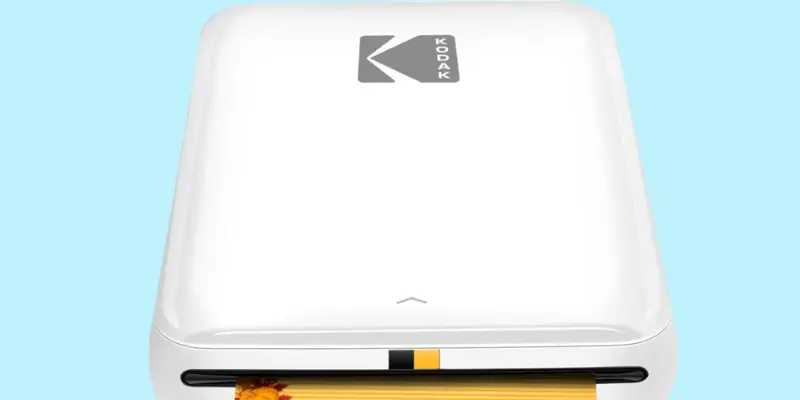
KODAK Step Instant Bluetooth Printer
Key Features:
| Best For | Social media users and memory keepers |
| Print Size | Upto 2×3″ |
| Connectivity | Bluetooth, NFC |
| Key Feature | Zink zero-ink printing with editing app |
Key Features:
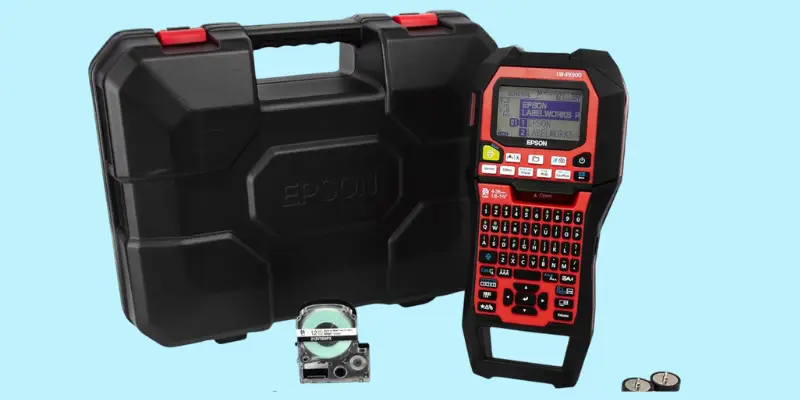
| Best For | Industrial and professional labelling. |
| Print Size | Up to 1.5″(36mm) |
| Connectivity | USB |
| Key Feature | Works with all Epson PX tapes; rugged industrial build |
| Affiliate Disclosure: As an Amazon Associate, I earn from qualifying purchases. |
Comprehensive Overview Of Best Portable Printer 2025
Best Wireless Portable Printer And Scanner
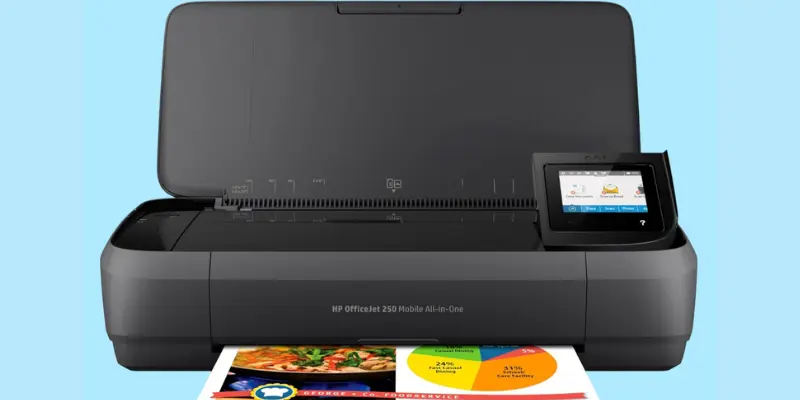
HP OfficeJet 250 Wireless Mobile Printer
If you love gadgets that make life easier, you’ll fall in love with the HP OfficeJet 250 Printer. It’s sleek, compact printer, and feels like something every modern traveler or remote worker should own. I personally love how quiet yet powerful it is; it prints, scans, and copies without taking up much space or making a fuss.
What really makes this top-rated travel printer special is its built-in battery. You can print even when there’s no power outlet nearby, on the road, at a café, or during client meetings. For someone who likes working from anywhere, that’s pure freedom. And the setup? Super simple! Connect it through Wi-Fi, Bluetooth, or USB, and you’re ready to print from your laptop or phone in seconds.
I also appreciate the print quality of this smartphone printer. The text looks sharp, and photos come out bright and clear. It’s fast enough to handle business reports but gentle enough to print beautiful pictures. Plus, it’s designed with a sturdy, elegant body that feels premium, perfect for people who like tech that looks as good as it performs.
If I had to sum up a battery-operated printer, the HP OfficeJet 250 is like your personal mini office on the go. Reliable, stylish, and practical, it’s one of those devices you’ll be proud to carry around and even prouder to use every day.
Specifications Of HP OfficeJet 250 Wireless Printer
| Feature | Details |
|---|---|
| Printer Type | Portable All-in-One (Print, Scan, Copy) |
| Best For | Traveling professionals, students, and remote workers |
| Functions | Printing, Scanning, Copying |
| Max Print Size / Format | Letter, Legal, Executive, Envelopes, and Photo sizes (up to 8×10 in) |
| Print Resolution | Up to 4800 x 1200 optimized dpi |
| Print Speed (PPM) | Black: Up to 20 ppm • Color: Up to 19 ppm |
| Connectivity Options | Wi-Fi, Bluetooth, USB, Cloud Print |
| Ink System Type | Original HP 62 Ink Cartridges (Standard or High-Yield) |
| Supported Media Types | Plain paper, photo paper, envelopes, cards |
| Color Output | Color and Monochrome |
| Display / Control | 2.65-inch Color Touchscreen |
| Paper Handling | 10-sheet input tray |
| Mobile App Compatibility | HP Smart App (Print, Scan, Copy via smartphone) |
| Refill Cost | Moderate — supports high-yield cartridges for longer use |
| Noise Level | Quiet operation, ideal for shared spaces |
| Ease of Setup | Simple wireless setup with HP Auto Wireless Connect |
| Special Features | Cloud Print, Energy Star Certified, Fast-Charging Battery, Compact Design |
| Build Quality / Design | Durable, sleek black finish with travel-friendly size (6.5 lbs) |
| Power Efficiency | Energy Star Certified + Fast Charge (90 minutes full charge) |
| Ideal User | Mobile professionals, freelancers, small business owners |
Pros And Cons Of HP OfficeJet 250 Wireless Mobile Printer
Pros
- Lightweight and compact, easy to carry in a backpack or car.
- Prints anywhere, even without a power outlet.
- Fast charging, Fully charges in about 90 minutes, great for travel.
- All-in-one design: Prints, scans, and copies in one sleek device.
Cons
- Small paper tray: Holds fewer sheets than a standard desktop printer.
- Ink refills can be pricey: Original HP cartridges cost more than third-party options.
You’ll fall in love with the HP OfficeJet 250 mini printer because it truly feels like a little office that travels with you. It’s compact but powerful, quietly doing everything, printing, scanning, and copying, without needing a desk or cables. There’s a certain pride in watching it handle your work so smoothly wherever you are.
What makes this best portable printer special is how thoughtful and reliable it feels. The fast-charging battery keeps you moving, and the sharp prints always look clean and professional. Whether you’re printing documents on the road or photos from your phone, it gives a sense of control, comfort, and confidence. It’s a battery-operated printer, one of those devices that just fits your life. simple, stylish, and always ready.
Click here to buy!
| Check out our other collection of printers: DTF Printers, Screen Printing Machine and Sublimation Printers. |
Best Portable Printer For Travel
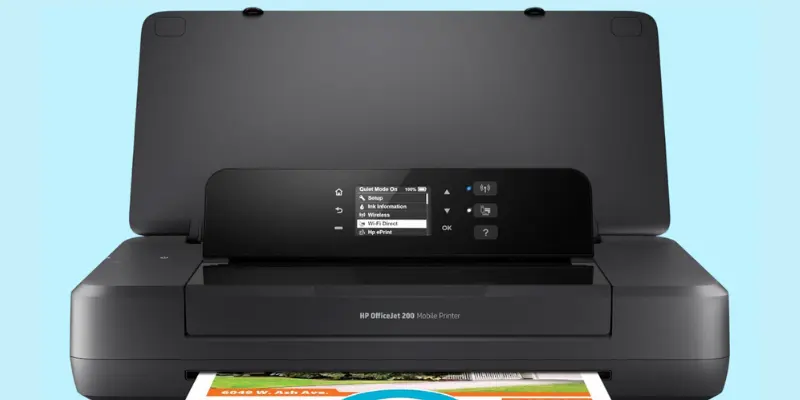
HP OfficeJet 200 Wireless Mobile Printer
There’s something comforting about having the freedom to print anywhere, anytime, and the HP OfficeJet 200 gives you exactly that. It’s small enough to fit in your bag but strong enough to handle your everyday printing needs. I love how it feels like carrying a tiny office with me, always ready when I need it.
The setup is so simple that you’ll smile the first time you connect your phone and see your document come to life on paper. This wireless printer built-in rechargeable battery is a blessing, no searching for outlets or worrying about cords. You can print from your car, a café, or even a park bench, and that kind of freedom feels amazing.
What makes this battery-operated printer truly special is its beautiful balance of power and peace. It’s quiet, fast, and prints sharp, clean pages every time. The sleek black design looks elegant too, a little piece of tech you’ll be proud to show off.
Whether you’re a student, traveler, or someone who loves staying organized, this hand-held HP OfficeJet 200 printer brings comfort and happiness to your daily work. It’s more than just a Bluetooth printer; it’s your reliable companion that helps you stay creative, productive, and worry-free wherever life takes you.
Specifications Of HP OfficeJet 200 Wireless Mobile Printer
| Feature | Details |
|---|---|
| Printer Type | Hand held Single-Function Inkjet Printer |
| Best For | Students, travelers, and business professionals on the go |
| Functions | Printing only |
| Max Print Size / Format | Letter, Legal, Executive, Envelopes, and Photos (up to 8×10 in) |
| Print Resolution | Up to 4800 x 1200 optimized dpi |
| Print Speed (PPM) | Black: Up to 10 ppm • Color: Up to 7 ppm |
| Connectivity Options | USB, Wi-Fi, HP Auto Wireless Connect |
| Ink System Type | Original HP 62 Ink Cartridges (Standard or High-Yield) |
| Supported Media Types | Plain paper, photo paper, cards, envelopes |
| Color Output | Color and Monochrome |
| Display / Control | Mono Graphic Display |
| Paper Handling | 50-sheet input tray |
| Mobile App Compatibility | HP Smart App (Print directly from smartphone or tablet) |
| Refill Cost | Moderate — supports optional high-yield cartridges for longer use |
| Noise Level | Quiet and smooth printing |
| Ease of Setup | Simple wireless setup with HP Auto Wireless Connect |
| Special Features | Fast-Charging Battery, Works with Alexa, Energy Star Certified |
| Build Quality / Design | Compact, durable, and lightweight (4.9 lbs) |
| Power Efficiency | Energy Star Certified + Fast Charge (90 minutes full charge) |
| Ideal User | Remote workers, for car tarveler, students, and small business users |
Pros And Cons Of HP OfficeJet 200 Wireless Mobile Printer
Pros
- Built-in battery: Print anywhere without needing a power outlet.
- Wireless printing: Easily connects through Wi-Fi or USB.
- Great print quality: Text looks sharp and photos come out bright.
- Quiet operation: Runs smoothly without loud printing sounds.
- Mobile app support: Print straight from your phone using the HP Smart App.
Cons
- Single function: Prints only, no scanning or copying options.
- Not for heavy use: Best for light to moderate daily printing.
The HP OfficeJet 200 mini printer is the kind of gadget that quietly becomes your favorite. You’ll love it for its calm reliability, no wires, no stress, just quick, easy printing whenever you need it. It’s light enough to carry anywhere, and it always feels like it’s there to help you stay organized and creative.
There’s something satisfying about watching a clear, crisp page come out right when you need it most. Whether it’s a last-minute report or a memory from your phone, this best portable printer prints with ease and elegance. The rechargeable battery gives you freedom, and the sleek design adds a touch of pride to every use. It’s a small printer that brings big happiness.
Click here to explore more!
Best Portable Printer For Laptops
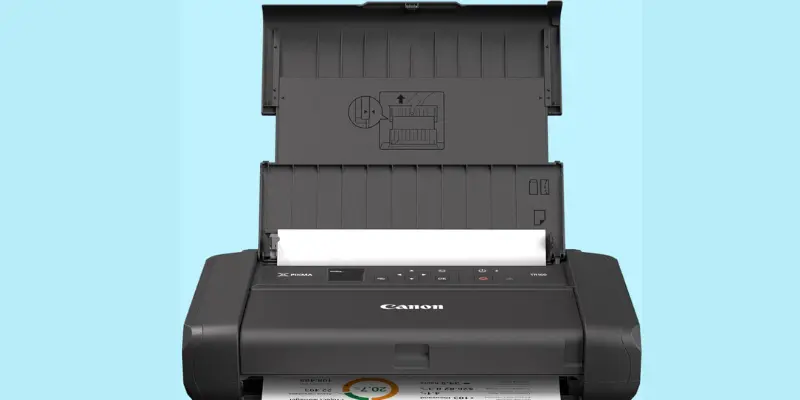
Canon PIXMA TR160 Wireless Portable Printer
The Canon PIXMA TR160 is one of those gadgets that instantly makes life easier and a little happier. The first time I used it, I couldn’t help but smile at how smooth and quiet it was. It’s compact enough to slip into a bag, yet powerful enough to handle real work on the go. Whether you’re traveling, working remotely, or studying from your favorite café, this little printer fits right into your rhythm.
What I truly love about this wireless smartphone printer is how easy and comforting it feels to use. The 1.44″ color display makes everything simple, from setup to printing your favorite photos or documents. And that 50-sheet paper tray means you can print more without constantly reloading. It’s small details like these that make everyday printing feel effortless and joyful.
The wireless connectivity adds a touch of freedom in this small portable printer; no messy cords, just quick printing from your phone, tablet, or laptop. This best portable printer’s print quality is stunning too, with crisp text and vibrant colors that bring your work or memories to life. It’s one of those devices that quietly becomes part of your routine, giving you both pride and comfort every time you use an on-the-go printer.
Specifications Of Canon PIXMA TR160 Wireless Portable Printer
| Feature | Details |
|---|---|
| Printer Type | Portable Inkjet Printer |
| Best For | Travelers, students, and mobile professionals |
| Functions | Printing only |
| Max Print Size | Up to 8.5″ x 11″ (Letter size), borderless printing supported |
| Print Resolution | Up to 4800 x 1200 dpi |
| Print Speed (PPM) | Black: Up to 9 ppm • Color: Up to 5.5 ppm |
| Connectivity Options | USB, Wi-Fi, Wireless Direct, Canon PRINT App, Apple AirPrint, Mopria |
| Ink System Type | 5-Color Hybrid Ink System |
| Supported Media Types | Plain paper, photo paper, envelopes, and cards |
| Color Output | Color and Monochrome |
| Display / Control | 1.44″ Monochrome OLED Display |
| Paper Handling | 50-sheet paper tray |
| Mobile App Compatibility | Canon PRINT App, Apple AirPrint, Mopria Print Service |
| Refill Cost | Moderate — 5-color cartridges last well for regular use |
| Noise Level | Quiet and smooth operation |
| Ease of Setup | Simple wireless or direct connection setup |
| Special Features | Lightweight design, Borderless printing, Energy Star Certified |
| Build Quality / Design | Sleek, compact, and travel-friendly (4.5 lbs) |
| Power Efficiency | Energy Star Certified |
| Ideal User | On-the-go professionals, students, and creative users |
Pros And Cons Of Canon PIXMA TR160 Wireless Portable Printer
Pros
- Lightweight and portable: So easy to carry, it slips right into a backpack or tote.
- Beautiful print quality: Text looks sharp, and photos come out rich and colorful.
- 5-color hybrid ink system: Produces deeper blacks and brighter colors, perfect for creative work.
- Wireless freedom: Print from your phone, tablet, or laptop — even without a Wi-Fi router.
- Borderless printing: Great for photo lovers who enjoy clean, full-edge prints.
Cons
- Single function: Prints only, no built-in scanning or copying features.
- No automatic duplex printing: Manual double-sided printing only.
The on-the-go printer Canon PIXMA TR160 wins hearts with its mix of beauty, simplicity, and freedom. You’ll love how light and quiet it is, just pick it up, place it anywhere, and start printing. It’s perfect for those who value creativity and mobility.
Every page looks full of life, thanks to its five-color ink system that captures deep blacks and vivid tones. The 1.44″ OLED display makes it easy to use, while the wireless printing feels effortless. Whether you’re printing mobile photos from a café or documents during a trip, this best portable printer adds a calm joy to your day. It’s more than a small portable printer; it’s a little piece of comfort that travels with you.
Click here to buy!
Best Portable Color Printer
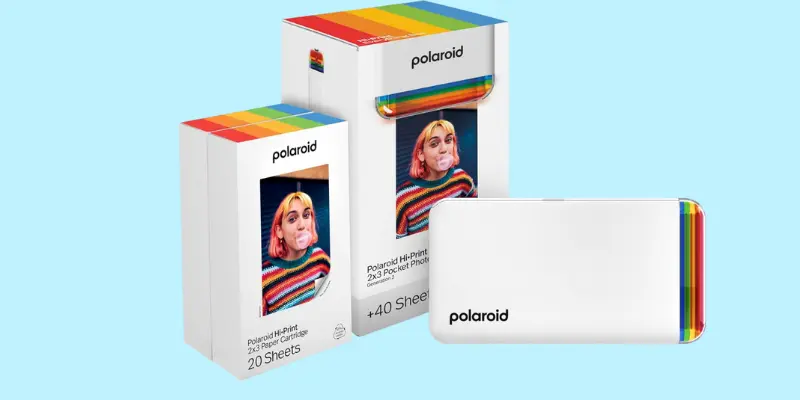
Polaroid Hi-Print 2nd Generation Pocket Printer
Meet the Polaroid Hi-Print (2nd Generation), your little pocket printer that turns everyday moments into beautiful, colorful keepsakes. This tiny, white pocket printer connects to your phone through Bluetooth, letting you print your favorite photos instantly, anytime, anywhere.
Using smart dye-sublimation technology, it creates smooth, rich, and long-lasting prints on 2×3″ sticky-backed photo paper, perfect for scrapbooks, walls, or phone cases. It’s compact enough to slip into your bag and simple enough to use in seconds.
Specifications Of Polaroid Hi-Print Pocket Printer
| Feature | Details |
|---|---|
| Printer Type | Portable Image Printer |
| Best For | Instant photo printing on the go |
| Functions | Print only |
| Max Print Size / Format | 2×3 inch (business card size) |
| Print Resolution | High-quality dye-sublimation output |
| Print Speed (PPM) | Approx. 1 print per 50 seconds |
| Connectivity Options | Bluetooth |
| Ink System Type | Dye-sublimation cartridge |
| Supported Media Types | Polaroid Hi-Print sticky-backed paper |
| Color Output | Full color |
| Display / Control | Controlled via mobile app |
| Paper Handling | 1 sheet at a time (cartridge-fed) |
| Mobile App Compatibility | Polaroid Hi-Print App (iOS & Android) |
| Refill Cost | Cheap with combined paper + cartridge packs |
| Noise Level | Quiet operation |
| Ease of Setup | Simple Bluetooth pairing and app setup |
| Special Features | Custom photo editing with filters, frames, and stickers |
| Build Quality / Design | Compact, stylish white finish |
| Power Efficiency | Rechargeable battery; cable-powered option |
| Ideal User | Travelers in vehicles, scrapbookers, and anyone who loves printing memories instantly |
Pros And Cons Of Polaroid Hi-Print Pocket Printer
Pros
- Prints look bright and colorful for a tiny printer.
- Lightweight and easy to carry anywhere.
- Simple Bluetooth setup with fun editing options.
- Sticker-backed prints, great for journals and scrapbooks.
Cons
- Only prints small 2×3” photos.
- Occasional app or cartridge issues.
You’ll fall in love with the Polaroid Hi-Print Bluetooth Printer because it makes memories come alive in seconds. There’s something special about holding a tiny, colorful photo you just printed from your phone, it feels personal and joyful. Its pocket size, fun editing app, and easy Bluetooth connection make it perfect for anyone who loves creativity on the go.
Whether you’re traveling, journaling, or just capturing little happy moments, this mini pocket printer turns them into treasures you can keep forever.
Click here to explore more!
Best Affordable Portable Printer For iPhone
KODAK Step Instant Smartphone Photo Printer
If you’re someone who loves turning digital moments into something real, the KODAK Step Instant Printer will win your heart instantly. It’s small, sleek, and ready to print your favorite memories straight from your phone, no cables, no waiting, just pure joy.
This cheap little printer uses Zink (Zero Ink) technology, meaning you’ll never deal with messy cartridges. The photos come out in bright, smudge-proof colors with sticky backs, perfect for scrapbooks, journals, or your wall. You can even use the KODAK Step App to add filters, frames, and fun captions before printing.
It’s more than a budget friendly compact printer, it’s your pocket-sized happiness machine. Whether you’re at a party, traveling, or relaxing at home, you’ll love how easy and satisfying it feels to hold your printed memories right in your hand.
Specifications Of KODAK Step Instant Smartphone Photo Printer
| Feature | Details |
|---|---|
| Printer Type | Portable Instant Photo Printer |
| Best For | Printing 2×3” photos instantly from smartphones |
| Functions | Instant photo printing |
| Max Print Size / Format | 2×3 inch (Sticky-Back Photos) |
| Print Resolution | High-quality Zink print resolution |
| Print Speed (PPM) | 1 ppm (color & monochrome) |
| Connectivity Options | Bluetooth, NFC |
| Ink System Type | Zink (Zero Ink) Technology |
| Supported Media Types | Zink Sticky-Back Photo Paper |
| Color Output | Full Color |
| Display / Control | Controlled via KODAK App |
| Paper Handling | 2×3” photo sheets |
| Mobile App Compatibility | KODAK Step App (iOS & Android) |
| Refill Cost | Low (Zink paper only, no ink cartridges) |
| Noise Level | Very quiet |
| Ease of Setup | Quick setup via Bluetooth or NFC |
| Special Features | Zero Ink, Compact, Lightweight, Custom Editing App |
| Build Quality / Design | Sleek, Portable, and Durable |
| Power Efficiency | Rechargeable Battery (prints up to 25 photos per charge) |
| Ideal User | Travelers, scrapbookers, social media lovers, and creative crafters |
Pros And Cons Of KODAK Step Instant Smartphone Photo Printer
Pros
- Compact and super easy to carry anywhere.
- Prints come out smudge-proof and sticky-backed.
- No ink or toner needed, uses Zink technology.
- Fun editing app with filters, borders, and stickers.
- Connects quickly via Bluetooth or NFC.
Cons
- Print colors may vary slightly from digital images.
- Slower print speed compared to larger printers.
You’ll love the KODAK Step Instant Printer because it makes printing photos feel fun, personal, and a little magical. Imagine taking a selfie, adding cute filters, and holding that memory in your hand just seconds later, it’s pure joy! Its pocket size and wireless design make it easy to carry anywhere, while the zero-ink prints are colorful, smudge-free, and ready to stick anywhere you like.
Whether you’re decorating your journal, creating gifts, or printing moments with friends, this tiny printer will fill your days with creativity and happy memories.
Click here to buy!
Best Portable Printers For Businesses
LABELWORKS Epson Industrial Label Maker Kit
If you’re someone who loves things neat, labeled, and easy to find, the Epson LW-PX900PCD will easily become your favorite tool. It’s not just a label maker, it’s a smart, hardworking companion that brings order to your workspace, tools, or cables in the most satisfying way.
What I love most is how fast and precise it is. Whether you’re organizing wires in a workshop or labeling office files, the print quality stays sharp and professional. It handles all Epson PX tape types, so you can create durable labels for any environment, from indoor projects to tough industrial use.
The complete kit comes ready with accessories, AC adapter, batteries, and tape, making it super convenient right out of the box. This is a lightweight printer sturdy, portable, and fits comfortably in your hand, perfect for both fieldwork and office organization.
Specifications Of LABELWORKS Epson Industrial Label Maker Kit
| Feature | Details |
|---|---|
| Printer Type | Industrial Label Maker |
| Best For | Professional labeling in workshops, data centers, and offices |
| Functions | Label printing with advanced customization |
| Max Print Size / Format | Up to 1.5” (36mm) wide labels |
| Print Resolution | High-resolution industrial-grade printing |
| Print Speed (PPM) | Up to 35 mm/sec |
| Connectivity Options | USB |
| Ink System Type | Ribbon/Tape-based printing |
| Supported Media Types | Heat shrink tubing, magnetic, vinyl, polyester, and PX tapes |
| Color Output | Single-color (monochrome) |
| Display / Control | Large print preview screen |
| Paper Handling | Supports various PX tape widths |
| Mobile App Compatibility | Label Editor software (PC connection) |
| Refill Cost | Moderate (Epson PX tapes) |
| Noise Level | Low |
| Ease of Setup | Plug-and-play via USB, simple operation |
| Special Features | Print preview, rechargeable battery, magnetic attachment, full kit |
| Build Quality / Design | Rugged, portable, and industrial-grade design |
| Power Efficiency | Rechargeable lithium-ion battery |
| Ideal User | Electricians, technicians, office managers, and industrial professionals |
Pros And Cons Of LABELWORKS Epson Industrial Label Maker Kit
Pros
- Prints on all Epson PX tape types, including heat shrink and magnetic.
- Fast printing speed and high-quality output.
- Comes as a complete kit with battery, tape, and accessories.
- Large preview screen helps avoid print errors.
- Strong build quality with a rugged carrying case.
Cons
- Slightly bulkier than basic label makers.
- PX tape refills can be more expensive than standard labels.
You’ll love the Epson best portable printer because it turns labeling into something satisfying and effortless. There’s a real sense of pride when every wire, box, and tool has a clean, professional label, it just makes your space feel right. This little powerhouse handles everything from heat shrink to magnetic tapes, giving you total freedom to organize however you like.
It feels strong, reliable, and built for serious work, yet it’s still easy to carry and use anywhere. Whether you’re in the field, at the office, or setting up a workshop, this label maker makes every job look polished and professional. Once you start using it, you’ll wonder how you ever worked without it.
Click here to buy!
Buying Guide – How To Choose The Best Portable Printer?
When choosing a best portable printer, think about what you’ll use it for,photos, labels, or documents. Pick one that’s lightweight printer, easy to carry, and has good battery life. Make sure it connects easily through Bluetooth or Wi-Fi and offers affordable printing costs. Always choose a trusted brand with reliable quality and simple setup.
What Are The Things to Consider Before Buying A Travel Printer?
Before buying a travel printer, check its size, battery life, and wireless options. Make sure it’s lightweight, easy to set up, and fits your printing needs.
a. Printing Purpose
Start by knowing what you’ll use the compact printer for. If you mostly print photos, choose a photo printer with good color accuracy. For documents or labels, go for a husky printer designed for office or industrial use. Think about your routine—business trips, travel, or home crafting—and pick one that fits your lifestyle.
b. Print Quality And Resolution
Resolution determines how clear and detailed your prints look. A higher DPI (dots per inch) gives sharper text and vibrant images. Photo printers usually have higher resolution, while document copier focus more on speed and text clarity.
c. Portability And Weight
If you’re always on the move, size and weight matter. A portable, lightweight printer fits easily in a bag or backpack. It’s perfect for students, travelers, or field workers who need to print anywhere, anytime.
d. Connectivity Options
Modern portable printers come with Bluetooth, Wi-Fi, NFC, or USB connections. Bluetooth and Wi-Fi are ideal for wireless printing from smartphones, computer or laptops, while USB provides a steady, direct link for quick tasks.
e. Battery Life And Charging
A good portable copy printer should have long-lasting battery power. Look for models that offer fast charging or USB-C ports for quick boosts. This helps you stay productive even when you’re away from an outlet.
f. Print Speed
Print speed tells you how fast your copier can produce a page or photo. Faster copy printers are great for busy people, while slower ones are fine for casual printing. Always balance speed with print quality.
g. Ink System or Technology
Different printers use different printing technologies. Inkjet uses liquid ink for sharp details, Zink uses zero-ink paper for mess-free printing, Dye-Sub offers rich photo colors, and Thermal printers are ideal for labels and barcodes.
h. Supported Paper Sizes And Types
Some printers only handle small photo paper (like 2×3 inches), while others print full letter-size sheets. If you want flexibility, pick a model that supports multiple paper types and finishes.
i. App And Software Compatibility
Easy-to-use apps make a big difference. Look for printers that connect to mobile apps for quick editing, filters, text, and layout options before printing. It makes the whole process more creative and convenient.
j. Cost of Printing & Maintenance
Don’t just look at the printer price, check ink or paper costs too. Refillable ink systems and affordable paper packs can save you money. Also, choose printers with easy maintenance to avoid frequent repairs or downtime.
Whar Are The Special Features to Look For In the Best Portable Printer?
Look for best portable printers with battery power, wireless printing, and easy editing apps. A durable build and clear display make printing smoother anywhere.
Battery-Powered or USB Charging
Choose a portable printer that offers true mobility. If it has a built-in rechargeable printer or USB-C/USB-A charging, you can print on the go — no outlet needed.
Built-in Display Screens
A small screen on the printer lets you preview or adjust settings without your phone or laptop. That added control means fewer mistakes and smoother printing.
Editing Apps and Wireless Printing
Printers that connect via Wi-Fi, Bluetooth, or NFC and link to easy-to-use mobile apps make life simpler. You can edit photos, add filters, or layout labels directly from your phone before printing.
Durability and Material Quality
Since this is a device you carry around, build quality matters. Look for sturdy materials, protective casings, and reliable assemblies, especially if you’ll use it while travelling or on job sites.
Tips for First-Time Buyers
If you’re buying a best portable printer for the first time, start by checking whether it connects easily with your smartphone or laptop. Always choose a model that includes a warranty and reliable customer support for peace of mind. Think about where you’ll use it most, at home, in your car, or while traveling, so you pick one that truly fits your lifestyle.
When choosing a top portable printer, go for one that fits your lifestyle, not just the specs on paper. Think about how and where you’ll use it, whether it’s printing work documents on the road or capturing memories from your phone. A good portable printer isn’t just a gadget; it’s a way to bring your favorite moments to life instantly, wherever you are.
Final Thought
In the end, the best portable printer is the one that makes your life easier and more creative — whether you’re printing reports on a business trip or turning digital photos into real keepsakes. Each printer we discussed has its own charm, from lightweight printer designs to smart mobile apps. Choose the one that matches your needs, budget, and lifestyle. Remember, a portable printer isn’t just about convenience — it’s about capturing and sharing life’s moments anytime, anywhere.
FAQs
Which is the best portable printer to buy?
The best portable printer depends on your needs. If you want an all-in-one option for documents, the HP OfficeJet 250 is a great pick. For quick photo printing, the Canon PIXMA TR160 and KODAK Step are also popular choices. Look for one that’s easy to carry, has wireless options, and fits your daily use.
Which is the best portable photo printer?
If you love printing photos on the go, the Polaroid Hi-Print and KODAK Step Printer are top favorites. They’re small, easy to connect via Bluetooth, and print high-quality, colorful photos within seconds. Both also come with editing apps so you can add fun filters and text before printing.
What are the advantages of a portable printer?
Portable printers make life simple and flexible. You can print anywhere, at home, in the car, or even during travel, without needing a big setup. They save time, offer wireless convenience, and are perfect for professionals, students, and creative users alike.
What is the smallest portable laser printer?
The HP LaserJet M110we is one of the smallest portable laser printers available today. It’s compact printer, easy to move, and perfect for printing fast, sharp text documents. While it’s not as light as inkjet mini printers, it offers professional-quality results in a travel-friendly size.
What is the No. 1 printer for home use?
For most homes, the HP OfficeJet 250 stands out for its reliability and versatility. It prints, scans, and copies with ease, making it great for everyday use. Its wireless setup and rechargeable battery make it a favorite among home users who want both performance and convenience.
What are the disadvantages of portable printers?
Portable printers can be a bit slower than regular printers, and their print sizes are usually smaller. Some models also need frequent paper or ink refills if you print a lot. However, their ease of use and flexibility often make up for these small downsides.




- Be Respectful
- Stay Relevant
- Stay Positive
- True Feedback
- Encourage Discussion
- Avoid Spamming
- No Fake News
- Don't Copy-Paste
- No Personal Attacks
- Be Respectful
- Stay Relevant
- Stay Positive
- True Feedback
- Encourage Discussion
- Avoid Spamming
- No Fake News
- Don't Copy-Paste
- No Personal Attacks
