Key Parts of a Laser Printer You Should Know About
Published: 6 Oct 2025
Laser printers are made up of many smart parts that work together to print clear and fast pages. The parts of a laser printer include the drum, toner, and fuser, which handle printing with speed and precision. These parts turn digital text into real paper prints in seconds.
Ever wondered what really happens inside your printer when you hit print? Many people confuse the parts of a laser printer with those of an inkjet printer. Knowing the right parts helps you understand why laser printers are faster and more reliable.
If your prints come out faded or your pages jam often, the reason might be hidden inside your printer’s parts. Learning about the parts of a laser printer helps you fix small issues without stress. It’s simple once you know what each part does and how it keeps your printer running smoothly.
What are the Main Components of a Laser Printer?
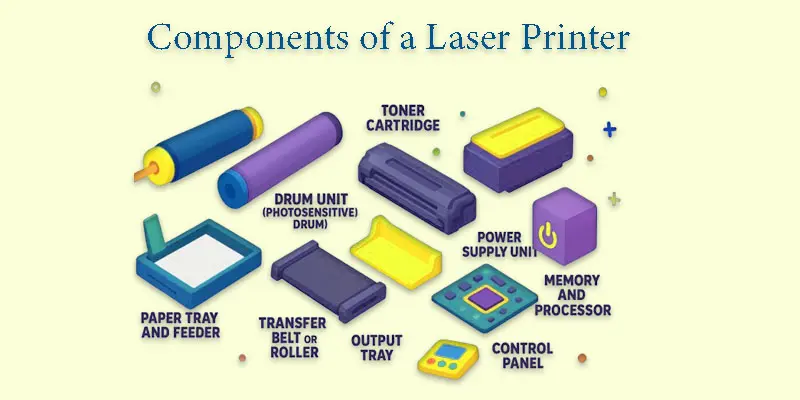
A laser printer has several key parts that work together to produce clean, sharp, and fast prints.
- Laser Unit
- Drum Unit (Photosensitive Drum)
- Toner Cartridge
- Fuser Unit
- Paper Tray and Feeder
- Transfer Belt or Roller
- Output Tray
Laser Unit
A laser unit is the main part that creates the image or text to be printed. It uses a small laser beam to draw the design onto the drum inside the printer. This laser light tells the printer where to place the toner. You can think of it like a tiny flashlight that sketches your page before printing. It helps make prints sharp and clear every time.
Drum Unit (Photosensitive Drum)
A drum unit, also called a photosensitive drum, is the part that carries the image before it’s printed on paper. The laser beam shines on the drum to form the design or text. Then, toner sticks to these areas on the drum. When paper passes through, the drum transfers the toner onto it. It’s like a reusable board that writes and erases for every print.
Toner Cartridge
A toner cartridge holds the fine powder called toner that is used to create prints. This powder sticks to the drum and then gets melted onto the paper. It works like the ink in an inkjet printer, but in dry form. When the toner runs low, prints may look faded or light. Replacing the cartridge brings back clear and dark prints.
Fuser Unit
The component that seals the toner onto the paper using pressure and heat is called a fuser unit. It makes sure the text and images don’t smudge or rub off. You can think of it like an iron that melts the toner to create a permanent print. It usually gets very hot during printing, so it should not be touched. The fuser helps give your pages a clean and lasting finish.
Paper Tray and Feeder
A paper tray and feeder hold and guide the paper inside the printer. The tray stores the paper neatly, while the feeder pulls one sheet at a time for printing. This helps prevent paper jams and keeps the printing smooth. You can think of it like a queue where papers wait for their turn. Keeping the tray clean and aligned ensures better print quality.
Transfer Belt or Roller
A transfer belt or roller moves the toner image from the drum onto the paper. It acts like a moving belt that carries the design carefully through the printer. This part makes sure the toner is placed in the right spot on the paper. If it gets dirty, prints may look blurry or have lines. Keeping it clean helps produce sharp and even prints.
Output Tray
An output tray is the place where the printed paper comes out after printing. It holds the finished pages neatly to prevent them from falling or getting mixed up. You can think of it as the printer’s “collection area” for your documents. It keeps your pages in order, especially when printing many copies. A clean and clear output tray makes handling prints easier.
What are the Supporting Parts Inside a Laser Printer?
Besides the main components, a laser printer also has supporting parts that help it run smoothly and efficiently.
- Power Supply Unit
- Memory and Processor
- Control Panel
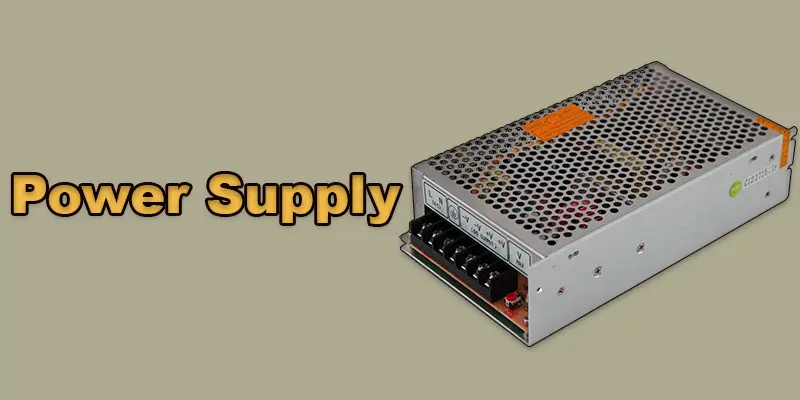
Power Supply Unit
A power supply unit provides electricity to all parts of the laser printer. It helps the printer start, run, and complete printing tasks smoothly. Without it, no part of the printer can work. You can think of it like the heart that pumps power instead of blood. Always unplug the printer before cleaning or checking this part for safety.
Control Panel
A control panel is the part of the printer where you give commands and manage settings. It usually has buttons, lights, or a small screen to control printing tasks. You can use it to start, stop, or check the printer’s status. It works like a remote control that helps you talk to your printer. A simple and clear control panel makes printing easier for everyone.
Memory and Processor
The memory and processor in a laser printer act like its brain. The processor reads the print command and decides how to print the data. The memory stores this information while the printer works. Together, they make printing faster and more efficient. Without them, the printer would be slow and unable to handle large or detailed files.
How Do the Parts of a Laser Printer Work Together?
When you press the print button, the laser unit starts by drawing the text or image on the drum. The drum then picks up the toner in the exact pattern created by the laser.
Next, the paper moves through the printer, and the transfer belt or roller passes the toner from the drum onto the paper. The fuser unit melts the toner, making it stick permanently.
Finally, the printed page comes out in the output tray. The memory and processor manage the data flow, while the control panel and power supply keep everything running smoothly. All parts work together to deliver fast and clear prints.
What are the Common Issues Related to Printer Parts?
Sometimes laser printers face problems, and knowing the common issues related to printer parts can help you fix them quickly.
- Faded or light prints → usually a toner or drum problem.
- Paper jams → often caused by the paper tray, feeder, or rollers.
- Streaks or lines on pages → dirty drum or fuser unit.
- Smudged prints → fuser unit not heating properly.
- Printer not turning on → power supply issue.
- Slow printing → memory or processor problem.
- Error messages → control panel or sensor issues.
- Uneven or blotchy prints → worn-out drum or toner cartridge.
Final Thought
Understanding the components of a laser printer helps you maintain your device and prevent common issues. I personally recommend checking each component regularly, especially the toner and drum, to ensure smooth printing. If you want your printer to work efficiently for years, take the time to learn about its key parts today.
FAQS
A laser printer has a toner cartridge, drum, fuser, rollers, and paper tray. These parts work together to produce sharp and fast prints.
Indeed, for huge quantities of black-and-white printing, laser printers are superior and faster. For high-quality colour photographs, inkjets work better.
It depends on the model and toner capacity, but most laser printers can print 1,000 to 5,000 pages before needing a toner replacement.
After opening the printer and taking out the old toner cartridge, carefully shake the new one, put it in correctly, and shut the printer off.
An electrostatic image is produced on a drum by a laser. Heat is required to fuse the toner onto the paper after it adheres to the image.
Yes, but make sure the transfer paper is compatible with laser printers, as some are only for inkjet printers.
Duplex printing saves time and paper by automatically printing on both sides of the page.
A good laser printer usually lasts 5 to 10 years, depending on usage and maintenance.
For home use, a compact monochrome laser printer with wireless printing and low running costs is best.






- Be Respectful
- Stay Relevant
- Stay Positive
- True Feedback
- Encourage Discussion
- Avoid Spamming
- No Fake News
- Don't Copy-Paste
- No Personal Attacks
- Be Respectful
- Stay Relevant
- Stay Positive
- True Feedback
- Encourage Discussion
- Avoid Spamming
- No Fake News
- Don't Copy-Paste
- No Personal Attacks
