Advantages and Disadvantages of a Wireless Keyboard
Published: 21 Feb 2026
Do you feel tired of messy wires on your desk? Do cables limit how you sit or work? Many people face this problem every day. That’s why wireless keyboards are becoming more popular. They look clean. They give you more space. But are they really the best choice for you?
When people search for Wireless Keyboard Advantages and Disadvantages, they usually feel confused. Some love the freedom and portability. Others worry about battery life, connection issues, or typing delay. It can be hard to decide without clear facts.
In this guide, you will learn the real pros and cons of a wireless keyboard. We will break everything down in simple words. You will understand the benefits, the drawbacks, and who should buy one. By the end, you will know exactly whether a wireless keyboard fits your gaming, work, or daily typing needs. Let’s make your decision easy and smart.
| Keyboard Tester Online Test your keyboard performance for free. |
What are the Advantages of a Wireless Keyboard?
Wireless keyboards offer the convenience of a clutter-free workspace and greater mobility, making them ideal for both home and office use. Here are the key benefits:
- Increased Mobility
- Space-Saving
- Clutter-Free Setup
- Flexibility in Placement
- No Cable Wear and Tear
- Enhanced Aesthetics
- Easy to Connect with Multiple Devices
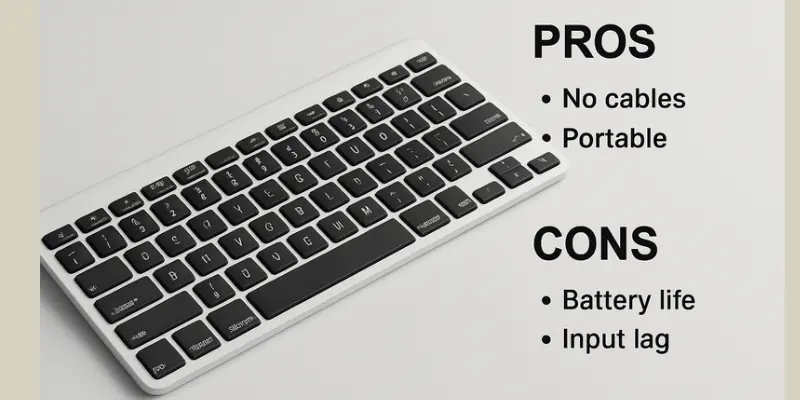
Increased Mobility
Increased mobility is one of the key advantages of wireless keyboards, as they allow users to work from various distances and locations without being restricted by cords. This flexibility enhances productivity and comfort.
Space-Saving
Wireless keyboards contribute to a cleaner and more organized workspace by eliminating the need for cords, allowing for a more minimalist and space-saving setup. This design helps keep your desk tidy and enhances overall efficiency.
Clutter-Free Setup
A wireless keyboard helps create a clutter-free setup by eliminating tangled wires, allowing for a more streamlined workspace. This can lead to increased focus and a more aesthetically pleasing environment.
Flexibility in Placement
A wireless keyboard offers flexibility in placement, allowing you to position it comfortably at any distance or angle from your device. This enhances ergonomics and makes it easier to use in various settings, from a desk to the couch.
No Cable Wear and Tear
With a wireless keyboard, you don’t have to worry about cable wear and tear. Without cords to break, it ensures longer-lasting use and a cleaner workspace. This also reduces the risk of accidental damage from pulling.
Enhanced Aesthetics
A wireless keyboard enhances the overall aesthetics of your workspace by eliminating visible cables, creating a cleaner and more organized look. It adds a modern touch to any desk setup, making it visually appealing and professional.
Easy to Connect with Multiple Devices
Wireless keyboards offer the convenience of connecting easily to multiple devices, such as laptops, tablets, and smartphones, without the hassle of tangled cables. With just a few clicks, you can switch between devices, improving productivity and multitasking.

What are the Disadvantages of a Wireless Keyboard?
While wireless keyboards offer great convenience, they also come with certain disadvantages, such as the need for batteries and potential connectivity issues. Here are the key drawbacks:
- Battery Dependency
- Connectivity Issues
- Signal Interference
- Higher Cost
- Limited Battery Life
- Potential Lag
- Requires Additional Setup
Battery Dependency
Since batteries are usually used to power wireless keyboards, you’ll need to monitor battery life and possibly replace or recharge batteries. When compared to wired gadgets, which get their power directly from the device they are linked to, this could be a drawback.
Connectivity Issues
Wireless keyboards can sometimes face connectivity challenges, such as signal interference or delays, particularly in places with a high concentration of wireless devices. This can result in annoying typing lags or failed connections, which hinder your workflow.
Signal Interference
Signal interference is a common issue with wireless keyboards, where other devices like routers, microwaves, or Bluetooth gadgets can disrupt the keyboard’s connection, causing delays or unresponsiveness.
Higher Cost
Wireless keyboards cost more than cable keyboards because of their advanced technology and convenience. The added cost might not be justified for some users, especially those on a budget.
| But we have for you the best cheap keyboards. |
Limited Battery Life
Battery life in wireless keyboards requires batteries to operate, and their battery life can be limited. Frequent battery replacements or charging may be necessary, which can be inconvenient for users.
Potential Lag
Wireless keyboards can sometimes experience a slight delay or lag in response time, especially with low-quality connections or a distance from the device. This can affect typing speed and accuracy.
Requires Additional Setup
Wireless keyboards often require extra setup steps, such as pairing with your device via Bluetooth or using a USB receiver. This can be time-consuming and may require troubleshooting.

Are Wireless Keyboards Good for Gaming?
Many gamers ask this question. The answer depends on how you play. For casual games or light use, they work fine. But if you play fast-paced or competitive games, most gamers still prefer wired keyboards.
- Wireless keyboard performance may not match wired models when speed and accuracy matter.
- Some users experience input delay in wireless devices, especially with older or low-quality models.
- Wireless keyboard lag issues and signal interference can cause short interruptions during gameplay.
- In the Bluetooth vs USB keyboards comparison:
- USB dongle connections are usually more stable.
- Bluetooth keyboard setup can sometimes slow down or disconnect.
- Battery-powered keyboards need regular charging or battery replacement, which can interrupt your game.
- For smoother, lag-free play, wired keyboards are still the better choice.
What is the Real Difference Between Wired and Wireless Keyboards?
If you’re comparing keyboards for daily use, this wired vs wireless keyboard comparison will help you decide based on speed, comfort, and setup style. Here is a quick comparison.
| Wired Keyboard | Wireless Keyboard |
|---|---|
| USB cable | Bluetooth or USB dongle |
| Instant, no delay | May have a slight lag |
| Plug and play | May need pairing (Bluetooth setup) |
| Not portable | Lightweight and portable |
| Wires can clutter | Clean and clutter-free workspace |
| No batteries needed | Needs power – battery-powered keyboards |
| Gaming, heavy typing | Travel, flexible use, office work |
| None (if cable is fine) | Signal interference, input delay |
| Very stable | Good with quality brand |
| Usually more affordable | Often costs more |
Final Thoughts
Wireless keyboards offer a range of benefits that enhance productivity, comfort, and flexibility in the modern workspace. Wireless computer keyboards provide a versatile solution for those looking to streamline their workspace, enhance their typing experience, and boost efficiency. If you prefer a clutter-free workspace and like to move around, wireless might be better.
FAQs
What’s Better: Wired or Wireless Keyboard?
It depends on your needs and usage.
Wired Keyboards:
Offer a faster response time.
No need to worry about charging.
Best for gaming or heavy typing.
Wireless Keyboards:
Provide a clutter-free workspace.
Allow flexible setup and easy movement.
Great for minimal desks and travel.
Is it better to have a wireless keyboard or not?
It depends on how you use your computer. A wireless keyboard is better if you want a clean desk and like to work from different spots. But if you need a fast response and no delays, like in gaming, a wired one is better. Choose based on what fits your routine best.
What is the difference between a normal keyboard and a wireless keyboard?
A normal keyboard (wired) connects using a cable, while a wireless one connects without any wires. Wired keyboards are faster and don’t need batteries. Wireless keyboards give more flexibility but may need charging or batteries. The choice depends on whether you value speed or convenience more.
How do wireless keyboards connect?
Wireless keyboards connect using either Bluetooth or a small USB receiver (dongle). Bluetooth connects directly to your device, while the dongle plugs into a USB port. Once connected, the keyboard sends signals wirelessly. Setup is usually quick and easy for both options.
What Are the Advantages and Disadvantages of Using a Wireless Keyboard?
Advantages:
A wireless keyboard gives you more freedom. You can type from anywhere within range, and your desk stays clean without cables. It’s great for travel, remote work, or using with tablets and smart TVs.
Disadvantages:
Wireless keyboards need batteries or charging, which can be a hassle. They may also lag slightly or disconnect due to signal interference. For tasks that need fast typing or gaming, wired keyboards are usually more reliable.






- Be Respectful
- Stay Relevant
- Stay Positive
- True Feedback
- Encourage Discussion
- Avoid Spamming
- No Fake News
- Don't Copy-Paste
- No Personal Attacks
- Be Respectful
- Stay Relevant
- Stay Positive
- True Feedback
- Encourage Discussion
- Avoid Spamming
- No Fake News
- Don't Copy-Paste
- No Personal Attacks
