Components of Input Devices | Computer Input Unit
Published: 12 Feb 2024
Have you ever wondered how your computer understands what you type, click, or speak? Every day, we use keyboards, mice, scanners, and microphones, but most people do not know how these devices actually work inside. This lack of understanding can make it hard to choose the right device, fix simple issues, or improve system performance.
Many users feel confused when their input devices stop working or respond slowly. They often do not know which part is causing the problem. The components of input devices play a key role in turning your actions into digital signals that a computer can understand. In this article, you will learn each important part in a simple and clear way. We will break down how sensors, buttons, circuits, and connectors work together.
You will also see how these components improve speed, accuracy, and user experience. By the end, you will clearly understand how input devices function and how to make better choices when using or buying them. These basics will help students, beginners, and professionals improve their digital understanding and everyday tech use with confidence.
What are the Components of Input Devices?
Some common computer input components include the keyboard for typing, the mouse for clicking and selecting, the microphone for recording sound, and the scanner for copying documents into the computer. These devices make it easy to interact with and control the computer.
- Keyboard
- Mouse
- Touchpad
- Touchscreen
- Stylus
- Microphone
- Webcam
- Barcode Scanner
- Controller for Games
- Graphics Tablets
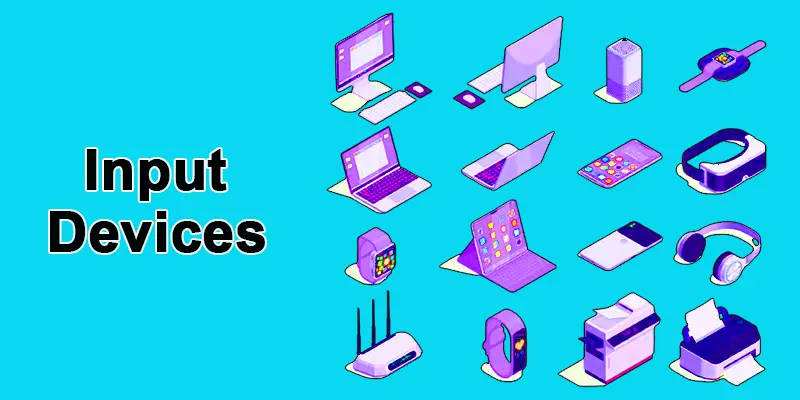
Keyboard
A keyboard is a typical input device that computers use to process commands and enter text. It is one of the main input methods for computers. The keyboard’s keys for letters, numbers, symbols, and functions let users enter text, commands, and shortcuts.
Mouse
One kind of pointing device that allows users to move the pointer. It usually consists of buttons and a scroll wheel to engage with software applications, navigate graphical user interfaces, and select items.
Touchpad
A touchpad is a touch-sensitive surface found on laptops. It substitutes for a mouse and detects finger movements and gestures, allowing users to navigate and interact with the computer’s interface.
Touchscreen
Some computers, especially tablets, smartphones, laptops, all-in-one computers, kiosks, ATMs, and information displays, allow users to interact directly with the screen by touching it. Touchscreen displays allow direct and intuitive manipulation of on-screen objects, unlike classic displays, which require input devices like a keyboard or mouse.
Stylus
A stylus is a handheld tool for inputting commands, drawing, writing, or selecting items on a touchscreen device, such as a tablet, smartphone, or touchscreen-enabled computer. It typically resembles a pen or pencil in shape and size, with a pointed tip that interacts with the touchscreen surface. Styluses are commonly used by artists, designers, note-takers, and individuals who prefer handwriting or drawing on digital devices.

Microphone
A microphone is a device that uses electrical impulses to translate sound waves into recordings or transmissions of sound. It includes a transducer element, which transforms sound energy into electrical signals. These signals are then captured for voice commands, speech recognition, and audio recording, allowing the sounds to be recorded, amplified, and sent to other devices.
Webcam
An input device that captures video for video calls, conferencing, and image streams live or recorded video footage to the computer. It facilitates video conferencing, online chatting, and recording for various purposes.
Barcode Scanner
An input device that reads barcodes for inventory management and retail transactions. A scanner converts physical documents, images, or objects into digital formats that can be stored, edited, or manipulated on the computer. It captures images or text using optical sensors and translates them into digital data.

Controller for Games
A gaming controller is a device for interacting with computers or video games. It is an input device used for playing video games, and it has buttons, joysticks, triggers for interaction, analog sticks, and sometimes motion-sensing capabilities. It allows players to control the actions of characters or objects within the game world.
Graphics Tablets
Artists, designers, and illustrators use graphics tablets, sometimes called pen tablets, digitizing tablets, or drawing tablets, as input devices to produce digital artwork directly on a computer. With a stylus or digital pen on a flat, pressure-sensitive surface, users of graphics tablets can draw, paint, and alter digital images, in contrast to traditional drawing instruments like pencils and paper.
Final Thoughts
Input devices are essential parts of computer hardware that help us interact with systems. In this article, we explored the components of input devices like sensors, buttons, circuits, and connectors. These parts work together to improve speed, accuracy, and control. Understanding them helps you choose better devices and solve basic issues. Keep learning about computer input devices and improve your digital skills today. Stay curious and keep practicing with technology for better results.
FAQs
Is the mouse an input device?
Yes, the mouse is an input device.
What is the input unit of a computer?
These units of a computer are typically composed of various input devices.
Names of input devices in a computer?
Names of input devices in a computer include keyboards, mouse, scanners, joysticks, and webcams.
20 instances of input devices, please.
20 different types of devices include MIDI computer keyboards, card readers, touchscreens, simple scanners, joysticks, digital cameras in computers, microphones, fingerprint scanners, graphics tablets, barcode scanners, webcams, game controllers, trackballs, and light and digital pens.
What does the term “input device” mean?
An input device is a hardware component that lets people communicate with computers by entering commands or data.
Which types of devices are used as input?
Among these devices are a mouse, barcode scanners, webcams, microphones, and a stylus.




- Be Respectful
- Stay Relevant
- Stay Positive
- True Feedback
- Encourage Discussion
- Avoid Spamming
- No Fake News
- Don't Copy-Paste
- No Personal Attacks
- Be Respectful
- Stay Relevant
- Stay Positive
- True Feedback
- Encourage Discussion
- Avoid Spamming
- No Fake News
- Don't Copy-Paste
- No Personal Attacks
