Uses of Computer in Business Application
Published: 18 Feb 2024
Have you ever thought about how modern businesses run so fast and smoothly today? From small shops to large companies, everything depends on technology. But many people still struggle to understand how digital tools actually support daily work. This confusion can make it hard to see how businesses grow, manage tasks, and stay competitive in a fast world.
This is where Computer use in the business world becomes very important. Computers help companies handle data, manage accounts, communicate with customers, and run daily operations without delays. In simple words, computers make business work faster, easier, and more organized.
For example, businesses use computers for billing, online marketing, inventory tracking, and customer service. Without them, tasks would take more time and more effort. In this guide, you will learn how computers improve productivity, reduce errors, and support smart decision-making in business. It will also help you understand how digital systems shape the modern workplace and why every business today depends on computer technology for success and growth.
What are the Uses of Computer in Business Applications?
Computer use in business areas for several reasons and purposes, such as:
- Data Storage
- Interaction
- Mechanization
- Online Marketing
- Money Handling
- Making Decisions
- Relationship Management for Customers (CRM)
- Inventory Control
- Work from Home
- Security
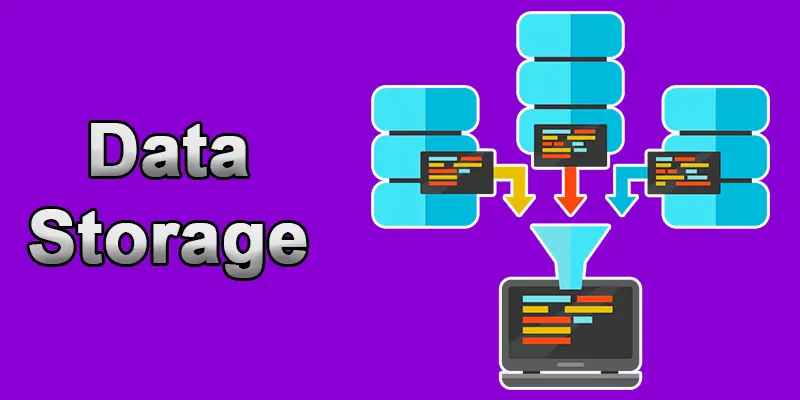
Data Storage
Data storage means saving digital information so it can be used later. It involves using tools and technology to keep data safe and accessible. Everyone needs data storage to manage large amounts of data, like documents, photos, videos, databases, applications, customer information, financial records, inventory details, etc.
Interaction
Communication is sharing concepts, ideas, messages, and information with individuals or groups through various media and methods. It is important in social, professional, personal, and cultural contexts and is necessary for human communication.
Mechanization
Computers can automate repetitive tasks like payroll processing, inventory management, and customer service. Automation involves using computers, software, sensors, and other technologies to control and monitor tasks, reducing the need for manual labour and increasing efficiency, accuracy, and productivity.
Online Marketing
Online marketing, also known as digital marketing, includes various techniques and approaches to connecting with target audiences, increasing traffic, producing leads, and eventually completing marketing goals. Businesses use computers to create websites, run social media campaigns, and analyze marketing data.
Money Handling
Financial management is efficiently planning, organizing, managing, and monitoring an organization’s financial resources to achieve its goals. It includes choosing how to allocate resources, using funds, and managing them to maximize shareholder wealth and optimize the organization’s financial performance.

Making Decisions
Computers offer resources for forecasting and data analysis and help in decision-making. It comprises assessing the available options, accounting for relevant data, calculating the risks and consequences, and choosing the most appropriate solution or course of action based on criteria or objectives.
Relationship Management for Customers (CRM)
Businesses use customer relationship management, or CRM, as a strategy, methodology, and technical tool. It tracks and evaluates interactions with existing and potential customers at each customer lifecycle stage. CRM software helps businesses manage leads, monitor customer interactions, and increase customer satisfaction.
Inventory Control
Inventory control, or inventory management, involves computers tracking inventory levels, reordering products, and optimizing supply chain management. It manages inventory levels, storage, and transportation inside a company or organization.
Work from Home
Working remotely means working away from the main office or a regular setup. Employees who work remotely can carry out their tasks from coffee shops, coworking spaces, homes, or any other place with an internet connection. Computers enable employees to work remotely, increasing flexibility and productivity.
Security
Security is the term used to describe the procedures to safeguard people, property, data, and other resources against dangers. Computers help businesses protect sensitive data through encryption, firewalls, and security software.

Final Thoughts
Computers play a key role in today’s business world. They help in managing data, improving communication, handling finances, and speeding up daily tasks. Understanding Computer use in the business world shows how digital tools increase productivity and reduce errors. Businesses now depend on computers for growth, efficiency, and better customer service. Start using digital tools wisely to improve your work and stay competitive. The more you learn about computer technology, the better your future in the business world will be.
FAQs
How often do you use a computer?
I am a computer programmer, so I constantly run on a computer to help you with any questions or tasks.
When did businesses start using computers?
Businesses started using computers in the 1950s and 1960s when mainframe computers became commercially available.
Are there images of computers used in business?
You can find images of computers in various business settings by searching online or browsing stock photo websites.
Why should computers be used in business?
Computers should be used in business to improve productivity, efficiency, communication, decision-making, and overall performance.
Which computer business is the best?
The best computer business for a specific company will depend on its individual needs, budget, and requirements. Researching and comparing different options before making a decision is recommended.
How are computers and the Internet used in business?
Computers and the internet are used in business for online communication, research, marketing, e-commerce, cloud storage, remote work, data analysis, customer service, and staying connected with employees and clients.





- Be Respectful
- Stay Relevant
- Stay Positive
- True Feedback
- Encourage Discussion
- Avoid Spamming
- No Fake News
- Don't Copy-Paste
- No Personal Attacks
- Be Respectful
- Stay Relevant
- Stay Positive
- True Feedback
- Encourage Discussion
- Avoid Spamming
- No Fake News
- Don't Copy-Paste
- No Personal Attacks
