RAM vs ROM | What’s the Difference and Why It Matters?
Published: 22 Jan 2025
Have you ever turned on your computer and wondered why some memory disappears while other data stays saved even after a shutdown? Many students and beginners feel confused when learning how computer memory works. The terms RAM and ROM often sound similar, but they perform completely different roles inside your device.
This confusion can make it hard to understand how computers actually store and use data, especially when studying or troubleshooting simple issues. If you are struggling to understand the Differences Between RAM and ROM, you are not alone. In this guide, you will get a clear and simple explanation of both types of memory. You will learn how RAM helps your computer run fast by storing temporary data, while ROM keeps permanent instructions needed to start your system.
We will break everything into easy points so you can remember it without stress. By the end, you will confidently understand how volatile and non-volatile memory work together to power your computer every day. Let’s make it easy to grasp so you can use this knowledge in exams, daily computer use, and basic tech understanding. You will finally see the clear Differences Between RAM and ROM without confusion.
What is RAM and ROM?
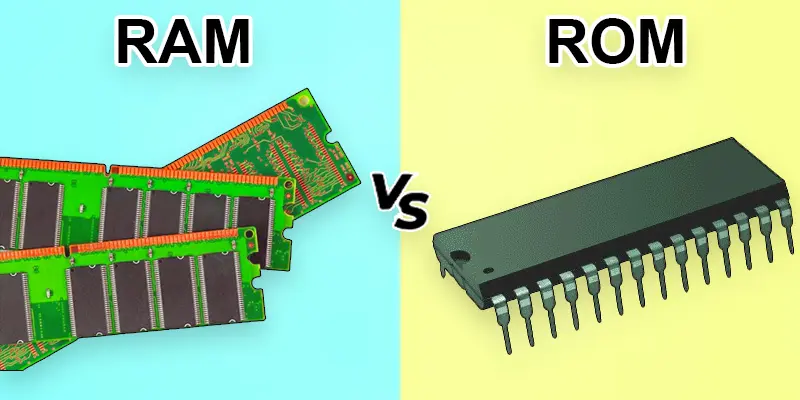
RAM (Random Access Memory) enhances your device’s performance by temporarily storing data needed for ongoing processes. On the other hand, ROM (Read-Only Memory) permanently stores critical data, like system boot instructions, which cannot be easily changed. Both are essential for a computer’s performance and functionality.
What is the Difference Between RAM and ROM Memory?
The main difference between RAM and ROM lies in their functions and purposes. RAM is a temporary memory that holds data for ongoing tasks, ensuring smooth performance. ROM, on the other hand, is permanent memory that stores essential instructions, such as the system’s boot process. Both serve crucial and distinct roles in a computer.
| RAM | ROM |
|---|---|
| RAM (Random Access Memory). | ROM (Read-Only Memory). |
| RAM serves as temporary storage for tasks that are currently in progress. | ROM stores crucial instructions that remain intact permanently. |
| Loading apps, games, or browser tabs. | Storing BIOS or firmware in devices. |
| DRAM, SRAM. | PROM, EPROM, EEPROM. |
| Improves performance by providing quick access to data. | Ensures the device has startup instructions. |
| Very fast; ensures smooth multitasking. | Slower compared to RAM. |
| Stores data temporarily; erased when the device turns off. | Stores data permanently, even without power. |
| Can be written, read, and rewritten repeatedly. | Mostly read-only; writing is restricted. |
| RAM is a volatile memory. | ROM is a non-volatile memory. |
| Memory slots are found in the system on the motherboard. | Embedded in the motherboard or chips. |
| Expensive per gigabyte. | Cheaper per unit of storage. |
| Larger sizes, ranging from GB to TB. | Smaller sizes, usually in MBs or KBs. |
| Directly impacts system speed and multitasking. | Indirect impact; supports basic functionality. |
| Yes, easily replaceable and upgradable. | No, typically fixed on the device. |
| CPUs for active tasks and processing. | Devices for storing startup data. |
| Needs constant power to retain data. | Independent of power to store data. |
| Directly affects what users experience (e.g., lag). | Works in the background, unnoticed by users. |
| Found in PCs, laptops, and gaming consoles. | Found in smart TVs, printers, and phones. |
| Crucial for running applications efficiently. | Essential for booting and basic operations. |
| Companies like Corsair and Kingston. | Used by Intel, AMD, and Samsung. |
| Adding more RAM can significantly improve performance. | ROM chips are like the device’s “long-term memory. |
Which one is more important RAM or ROM in Computer?
Both RAM and ROM play vital roles in your device, but each serves a unique purpose that makes them equally important.
- Both RAM and ROM are important because they do different jobs in a computer.
- RAM handles temporary tasks like running apps, opening files, and multitasking.
- ROM stores permanent instructions like the system’s startup program (BIOS).
- Without RAM, your device would be too slow to run apps smoothly.
- Without ROM, your device wouldn’t even know how to start.
- RAM = short-term memory (fast and temporary).
- ROM = long-term memory (permanent and secure).
- They work together to make your device functional.
What are the Tips for Beginners to Understand RAM and ROM Easily?
If your device feels slow, check the RAM first. Adding more RAM can speed up multitasking and improve performance. Remember, RAM is where active tasks happen.
ROM, on the other hand, is fixed and stores essential system files. You don’t need to upgrade the ROM, but keeping your firmware updated is a good practice.
Final Thoughts
Understanding the Differences Between RAM and ROM helps you know how your computer works. RAM gives fast, temporary memory for running programs, while ROM stores permanent instructions needed at startup. Both are important for smooth performance. Knowing these basics improves your computer literacy and helps in exams and troubleshooting. Keep learning simple computer memory topics to build a strong foundation. Stay curious and keep exploring how technology works around you every day.
FAQs
How is RAM different from ROM?
RAM is temporary, fast memory used for active tasks, while ROM is permanent storage for essential data like boot instructions.
Differences between static ram and dynamic ram?
Static RAM (SRAM) is faster and more reliable but costs more and uses more power, as it doesn’t need to be refreshed. Dynamic RAM (DRAM) is slower and needs periodic refreshing but is cheaper and consumes less power.
Why can’t ROM replace RAM?
ROM cannot handle the fast, dynamic data required for active tasks, as it’s read-only and slower than RAM.
Can you upgrade RAM? How about ROM?
Yes, RAM can be upgraded, but ROM is usually fixed and cannot be upgraded easily.
What happens if RAM is full?
When RAM is full, the system slows down, and it may start using storage (like a hard drive) for additional memory, reducing performance.






- Be Respectful
- Stay Relevant
- Stay Positive
- True Feedback
- Encourage Discussion
- Avoid Spamming
- No Fake News
- Don't Copy-Paste
- No Personal Attacks
- Be Respectful
- Stay Relevant
- Stay Positive
- True Feedback
- Encourage Discussion
- Avoid Spamming
- No Fake News
- Don't Copy-Paste
- No Personal Attacks
