Computer Virus Types for Beginners Guide
Published: 8 Jul 2026
Have you ever noticed your computer suddenly becoming slow for no clear reason? Or files opening strangely, or apps crashing again and again? Many users face this problem and feel confused. The real cause is often hidden inside your system: a computer virus. A computer virus is a harmful program that spreads inside your device without permission. It can damage files, steal data, or even stop your system from working properly.
The scary part is that many users do not even know when their system gets infected. This is why learning about the types of computer virus is very important. Every virus works in a different way. Some attack your files, some target your system startup, and some hide quietly to avoid detection. Because of this variety, users often struggle to understand what is happening inside their computers.
But don’t worry. You are not alone in this.In this guide, you will understand the key types of computer viruses in a simple and easy-to-follow way. You will also understand how they spread, what damage they cause, and how you can protect your device from them. So, if you want to keep your computer safe, fast, and secure, keep reading. This guide will make everything easy to understand, even if you are a beginner.
What is a Computer Virus?
A computer virus is a harmful program that spreads inside your device without permission. It can damage files, slow down your system, or steal important data. Most viruses enter your computer through unsafe downloads, email attachments, or fake websites. For example, you may download free software from an unknown site.
After installing it, your computer starts working slowly or shows strange errors. This can be a sign of a virus infection. A computer virus can also copy itself and spread to other files. It works quietly, so users often do not notice it early. That is why antivirus protection and safe browsing are very important for computer security and data safety.
What are the Types of Computer Virus?
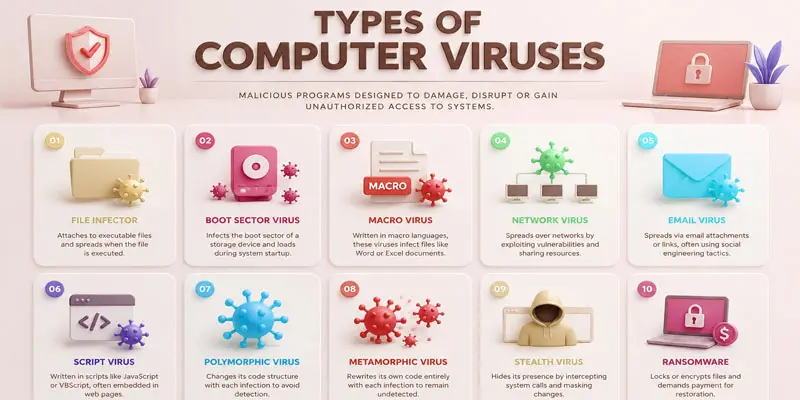
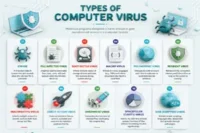
Computer viruses come in many forms, and each type affects your system in a different way, so understanding the types of computer viruses helps you stay safe and protect your data easily. Here are the types of computer virus:
- File Infector Virus
- Boot Sector Virus
- Macro Virus
- Polymorphic Virus
- Resident Virus
- Multipartite Virus
- Direct Action Virus
- Overwrite Virus
- Spacefiller (Cavity) Virus
- Web Scripting Virus
Boot Sector Virus
A Boot Sector Virus attacks the main part of your computer that starts the system. It loads when you turn on your device. This virus can stop your computer from starting properly. For example, your screen may freeze during startup. It is important to avoid unknown USB drives and use antivirus protection.
Macro Virus
A Macro Virus attacks files made in programs like Word and Excel. It spreads through documents, especially email attachments. When you open an infected file, the virus can run automatically. For example, a normal-looking document may harm your computer after opening. Always scan files before downloading or opening them.
Polymorphic Virus
A Polymorphic Virus is a smart type of virus that keeps changing its form. It changes its code every time it spreads, so antivirus programs find it hard to detect. This virus can hide inside files and work silently. For example, it may look different every time it infects a system. Using updated antivirus software helps protect your computer.
Resident Virus
A Resident Virus stays hidden in your computer’s memory even after you close the infected program. It can activate itself whenever you open files or applications. This virus slowly affects your system performance over time. For example, your computer may become slow or behave strangely without warning. Regular scanning helps detect and remove it.
Multipartite Virus
A multipartite virus can infect a computer through multiple methods or attack paths at the same time. It spreads through both files and the system boot area. This makes it harder to remove completely. For example, even if you clean files, it may still come back during startup. Using strong antivirus software and system scans helps protect your device.
File Infector Virus
A File Infector Virus attaches itself to program files on your computer. It spreads when you open or run an infected file. This virus can damage important software and make programs stop working properly. For example, if you download a bad application, it may infect other files too. It is important to use antivirus software to stay safe.
Direct Action Virus
A Direct Action Virus works quickly when you open an infected file. It does not stay in memory for long. Instead, it attacks files and spreads immediately. For example, if you run a bad program, it may infect other files in that folder. It is important to scan files before opening them.
Overwrite Virus
An Overwrite Virus directly attacks and destroys your files. It replaces the original data with its own harmful code. Once infected, the file cannot be recovered. For example, your document may open but show broken or empty content. Always keep backups and use antivirus protection to avoid this virus.
Spacefiller (Cavity) Virus
A Spacefiller or Cavity Virus hides inside empty parts of a file. It does not change the file size, so it is hard to notice. This virus works quietly without showing clear signs. For example, a normal program may get infected but still look fine. Using updated antivirus software helps detect and remove it.
Web Scripting Virus
A Web Scripting Virus attacks your computer through websites and browsers. It uses harmful scripts hidden in web pages. When you visit an infected site, it can run without your permission. For example, a fake pop-up or unsafe website may infect your system. Always browse safe websites and avoid clicking unknown links.
How Do Computer Viruses Spread?
Computer viruses spread in many simple but risky ways. They often enter your system when users are not careful online. Understanding these methods helps you stay safe.
- Email attachments: Viruses can hide in files sent through email. When you download or open them, the virus starts working. For example, a fake invoice file may infect your computer.
- Unsafe websites: Visiting unknown or harmful websites can trigger automatic downloads. These sites may install malware without your permission.
- Software downloads: Downloading free software from untrusted sources can bring viruses. For example, cracked apps often carry hidden threats.
- USB drives and external devices: Infected pen drives or hard disks can spread viruses when connected to your computer.
- Pop-up ads and fake links: Clicking on random ads or links can install harmful scripts in your system.
What are the Effects of Computer Viruses?
Computer viruses can cause many problems in your system. They affect performance, data, and security. Here are the main effects in simple points:
- Slow computer speed: Viruses use system resources and make your computer slow. For example, apps may take a long time to open.
- Data loss: Some viruses delete or corrupt important files. You may lose photos, documents, or work files.
- System crashes: Your computer may freeze or restart again and again without warning.
- Privacy risks: Viruses can steal personal data like passwords, emails, or banking details.
- Unwanted ads and pop-ups: Some infections show fake ads or redirect you to unsafe websites.
- Software damage: Programs may stop working properly or behave strangely after infection.
What are the Best Ways to Keep Your Computer Safe from Viruses?
Protecting your computer from viruses is simple if you follow safe habits. These steps help you keep your system secure and your data safe.
- Install antivirus software: Use trusted antivirus programs to detect and remove harmful files. Keep it updated for better protection.
- Avoid unknown links: Do not click on suspicious emails, messages, or pop-up ads. For example, fake “You won a prize” links can carry viruses.
- Download from trusted sources: Only install apps and software from official websites or trusted stores. Unsafe downloads often contain malware.
- Keep your system updated: Regular updates fix security problems in your operating system and apps.
- Use strong passwords: Create unique passwords for accounts to protect your personal data from hackers.
- Scan USB drives: Always check external devices before opening files. Infected USBs can spread viruses quickly.
- Enable firewall protection: A firewall blocks harmful traffic from entering your computer.
Final Thoughts
Understanding the types of computer virus helps you stay one step ahead of cyber threats. Each virus behaves differently, but all can harm your data and slow your system. With basic awareness and simple safety habits, you can protect your computer easily. Stay alert, use security tools, and always think before clicking unknown links. Your digital safety is in your hands. Keep learning, stay safe, and protect your device every day.
FAQs
The first computer virus was Creeper virus, created in the early 1970s. It spread on ARPANET systems. It showed a simple message, not damage, and helped experts understand early computer virus behavior and cybersecurity risks.
A zero-day virus is a new type of malware that attacks a system before security experts fix it. It spreads quickly because no antivirus protection exists yet, making it dangerous for computer security and data safety.
Thousands of new computer viruses are created every day by hackers. Security companies report over 300,000 new malware samples daily, which increases cybersecurity risks for users worldwide using the internet and digital devices.
Antivirus software can kill a computer virus by detecting and removing it from infected files. Regular system scans, updates, and safe browsing habits also help eliminate malware and protect your device from future attacks.
The first computer virus was discovered by Bob Thomas in 1971. He created the Creeper program to move between computers, helping researchers understand how viruses spread in early network systems.
The term “virus” was given by Fred Cohen in 1983. He used it to describe self-replicating programs that spread like biological viruses, changing how people understand computer security and malware threats.




- Be Respectful
- Stay Relevant
- Stay Positive
- True Feedback
- Encourage Discussion
- Avoid Spamming
- No Fake News
- Don't Copy-Paste
- No Personal Attacks
- Be Respectful
- Stay Relevant
- Stay Positive
- True Feedback
- Encourage Discussion
- Avoid Spamming
- No Fake News
- Don't Copy-Paste
- No Personal Attacks
