Purpose of a Laser Printer | Learn Why It Matters
Published: 8 Oct 2025
Did you know that laser printers are among the fastest and most accurate printing devices used today? They’re found everywhere from offices to schools because they deliver crisp, high-quality prints in seconds. Understanding the purpose of a laser printer and the laser printer’s working principle helps you see why this technology is so reliable.
Ever wondered why your laser printer gives perfect results while inkjet printers sometimes smudge? Many people use laser printers daily, but don’t know how they actually work. Knowing the purpose of a laser printer and its working principle clears this confusion and helps you use it the right way.
If you’ve faced slow printing, blurry pages, or frequent toner issues, you’re not alone. These problems often come from not understanding how your printer functions. Learning the purpose of a laser printer and laser printer working principle makes printing simpler, faster, and more efficient for everyone.
What Is the Purpose of a Laser Printer?
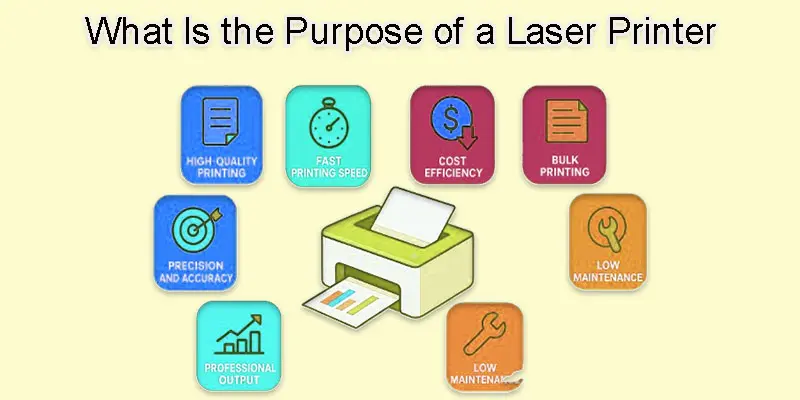
A laser printer’s goal is to use laser technology to swiftly and effectively produce crisp, high-quality prints.
- High-Quality Printing
- Fast Printing Speed
- Cost Efficiency
- Bulk Printing
- Professional Output
- Long-Lasting Performance
- Low Maintenance
- Precision and Accuracy
High-Quality Printing
Because laser printers use a fine laser beam to draw accurate images on a drum, they are able to generate high-quality printing. This process helps create sharp and clear text or graphics on paper. The toner powder sticks exactly where needed, giving smooth and detailed results. Even small letters or fine lines look neat. That’s why laser printers are perfect for professional and clean-looking prints.
Fast Printing Speed
Laser printers offer fast printing speed because they use a laser beam to print an entire page at once. Unlike inkjet printers that move back and forth, the laser process is quick and steady. The toner sticks to the paper in seconds, making the job faster. This helps you print many pages in less time. That’s why offices and schools prefer laser printers for bulk printing.
Cost Efficiency
Because laser printers use toner rather than ink, they are renowned for being cost-effective. More pages may be printed before the toner runs out because it lasts so much longer. These printers also need less maintenance, which saves money over time. Even though they cost more at first, they become cheaper in the long run. That’s why laser printers are a smart choice for regular and heavy printing needs.
Bulk Printing
Laser printers handle bulk printing easily because they are built for speed and power. They can print many pages in a short time without slowing down. The large paper trays and long-lasting toner help finish big tasks quickly. You don’t need to refill or wait often. This makes them perfect for offices, schools, and businesses that print daily.
Professional Output
Laser printers ensure professional output through their precise laser technology. The laser creates clean and sharp text that looks neat on every page. Toner powder gives a solid and smooth color without smudging. Each print looks clear and consistent, even for detailed images. For this reason, business reports, documents, and presentations are frequently printed using laser printers.
Long-Lasting Performance
Laser printers have long-lasting performance because they are made with strong and durable parts. The toner cartridges and drums last for thousands of pages before needing replacement. They are built to handle heavy use without wearing out quickly. With proper care and cleaning, they can work smoothly for many years. This makes them a reliable choice for long-term printing needs.
Low Maintenance
Laser printers require low maintenance because their parts last a long time and don’t need frequent replacements. The toner doesn’t dry out like ink, so it stays ready for use. They rarely face paper jams or messy spills. Regular cleaning and timely toner changes are usually enough. This makes them easy to manage and cost-effective for busy users.
Precision and Accuracy
Laser printers get their precision and accuracy from the fine laser beam that creates detailed images on the drum. This laser can draw tiny dots exactly where needed, giving clear and sharp prints. The toner sticks perfectly to those spots, avoiding smudges or blurry lines. Every page looks neat and balanced. That’s why laser printers are trusted for professional-quality documents and images.
Why Does Understanding the Working Principle of a Laser Printer Matter?
You can use a laser printer more effectively, resolve minor problems, and maintain its smooth operation for a longer period of time if you understand how it operates.
- Helps you know how your printer actually works.
- Makes it easier to fix small printing issues.
- Saves time during troubleshooting.
- Reduces the need for professional repair services.
- Helps you use toner and paper more efficiently.
- Improves print quality and performance.
- Prevents common printing mistakes.
- Extends the life of your printer.
- Helps you choose the right settings for better results.
- Makes cleaning and maintenance easier.
- Saves money on unnecessary repairs.
- Helps you identify when to replace toner or parts.
- Reduces downtime during heavy printing tasks.
- Builds confidence in handling printer problems.
- Keeps your printer running smoothly for longer.
- Helps you understand why print quality may drop.
- Makes you more aware of how to care for your printer.
- Improves productivity in offices or schools.
- Helps in comparing different printer models smartly.
- Encourages smarter and more responsible printer use.
What are the Common Problems and Simple Fixes in Laser Printers?
Laser printers can face a few common problems, but knowing simple fixes helps keep your printer working smoothly and saves time.
- Paper Jams: Remove stuck paper carefully and clean the rollers.
- Faded Prints: Check or replace the toner cartridge.
- Toner Smudges: Clean the drum and fuser unit.
- Ghosting (Faint Duplicate Images): Replace the drum or fuser.
- Slow Printing: Either clear the print queue or lower the print quality settings.
- Printer Not Responding: Check the cable or Wi-Fi connections and restart the printer.
- Lines or Spots on Paper: Clean the inside and drum area gently.
- Error Messages: Reset the printer or update the driver.
- Paper Not Feeding Properly: Fan the paper stack and check tray alignment.
- Overheating: Turn off the printer for a few minutes to cool down.
- Wrinkled Paper: Replace old or damp paper.
- Toner Not Fusing Properly: Check the fuser temperature or replace it.
- Noise During Printing: Remove debris or replace worn-out rollers.
- Color Mismatch (in color lasers): Calibrate the printer settings.
- Low Toner Warning (Even When Toner Exists): Shake the toner cartridge gently.
- Blank Pages: Ensure toner is installed correctly.
- Memory Full Error: Clear old print jobs or add more printer memory.
- Printer Offline: Reconnect it to the network or restart the router.
- Paper Curling: Store paper in a cool, dry place before use.
- Frequent Jamming: Clean rollers and avoid overloading the paper tray.
Final Thought
A laser printer’s goal is to consistently produce prints that are crisp, fast, and dependable. In my opinion, a laser printer is the best choice for anyone who needs professional-quality documents without spending too much on ink. If you print often, consider switching to a laser printer today and enjoy smooth, cost-effective printing every day.
FAQS
The optimum use case for a laser printer is for rapidly printing large amounts of text and documents. It is ideal for offices, schools, or companies that print frequently because it produces crisp, clear results.
Compact, user-friendly, and reasonably priced laser printers are the best for home use. Models like HP LaserJet or Brother HL series work well for small spaces and light printing needs.
Yes, color printing is possible with certain laser printers. They are excellent for charts, flyers, and colorful documents because they use color toner cartridges rather than only black.
Offices, print shops, schools, and other businesses frequently use laser printers. They are chosen for their fast speed, high quality, and ability to handle bulk printing.
There are mainly two types of laser printers: monochrome (black and white) and color. Each type serves different needs depending on what you want to print.
No, ink is not used by laser printers. Compared to standard ink cartridges, they use toner powder, which lasts longer and yields more pages.
Yes, you can print photos on a laser printer, but the quality isn’t as rich as an inkjet printer. It works fine for simple images or documents with pictures.
You should never touch the hot fuser unit or the drum inside the printer. Also, avoid using wet hands or spilling toner powder, as it can damage the printer.
A laser printer can print anywhere between 1,500 and 10,000 pages, depending on the toner size and printer model. High-capacity cartridges last even longer.
Using inkjet paper in a laser printer can result in jams, curling, or smudges. Laser printers use heat, so always use paper made for laser printing.





- Be Respectful
- Stay Relevant
- Stay Positive
- True Feedback
- Encourage Discussion
- Avoid Spamming
- No Fake News
- Don't Copy-Paste
- No Personal Attacks
- Be Respectful
- Stay Relevant
- Stay Positive
- True Feedback
- Encourage Discussion
- Avoid Spamming
- No Fake News
- Don't Copy-Paste
- No Personal Attacks
