Types of Computer Keyboard Layout | Choose the Best Layout for You
Published: 14 Apr 2024
Have you ever felt slow while typing, even when you know what to write? Or noticed that your fingers move on their own, yet the text still feels hard to type fast and correctly? Many people face this problem without realizing that the issue is not their skills, but their keyboard layout. Yes, the way keys are arranged can affect your typing speed, comfort, and accuracy.
A keyboard layout decides where letters, numbers, and symbols are placed. Different layouts like QWERTY, AZERTY, and DVORAK are designed for different needs. Choosing the right keyboard layout can make a big difference in your daily work. It can reduce typing mistakes, improve speed, and even prevent hand strain.
In this guide, you will learn what a keyboard layout is, its types, why it matters, and how it can improve your typing experience. We will also explore different types of layouts and help you understand which one suits you best. By the end, you will have clear knowledge to type faster, smarter, and more comfortably. Ready to improve your typing experience? Let’s get started.
| Try Our Free Mouse Tester Tool to check if it works properly. |
What Does ‘Keyboard Layout’ Mean in Simple Terms?
A keyboard layout is the specific arrangement of keys on a keyboard, including letters, numbers, symbols, and function keys. It determines where each key is placed and how you interact with your computer when typing. The most common keyboard format is called QWERTY.
What Is the QWERTY Keyboard Layout and Why Is It So Popular?
The QWERTY keyboard layout gets its name from the initial six characters on the top row of keys – Q, W, E, R, T, Y. It’s the regular keyboard layout used today on laptops, desktops, and even smartphones. It’s the best keyboard layout for typing.
QWERTY was first designed for old typewriters to stop the keys from jamming when people typed too fast. Even though we no longer use typewriters, this layout stayed popular because people got used to it, and now it’s the standard around the world, especially in the US.
What are the Different Types of Keyboard Layouts Used Around the World?
Why are the letters on your keyboard not in A-B-C order? It sounds strange, right? But there’s a smart reason behind this odd arrangement. This setup is called the keyboard layout, and it plays a big role in how easily you can type, work, or even play games.
There are different styles of keyboards. Each type of layout refers to the different arrangements of keys on a keyboard, each designed for specific languages or user preferences. Here are some common keyboard layout types:
- QWERTY
- Dvorak
- AZERTY
- QWERTZ
- Colemak
- Workman
- Neo
- Turkish F
- JCUKEN
- Maltron
- Bépo
- Programmer Dvorak
- Chinese Keyboard Layout
- Armenian Keyboard Layout
- Japanese Keyboard Layout
- Thai Keyboard Layout
- Korean Keyboard Layout
- Arabic Keyboard Layout
- Indian Keyboard Layout
- Hebrew Keyboard Layout
Dvorak
The Dvorak keyboard layout serves as a QWERTY alternative, designed to boost typing speed and efficiency by placing the most frequently used letters under the strongest fingers. It aims to reduce finger movement and improve comfort during typing.
AZERTY
The AZERTY keyboard layout is most commonly used in French-speaking nations and is similar to QWERTY, with some important variations such as changing the places of the A and Q and the Z and W. It is designed to accommodate the French language and its specific characters.
QWERTZ
The QWERTZ keyboard layout is widely used in German-speaking nations and is similar to QWERTY, with the exception of swapping the Y and Z keys. It is designed to better suit the German language and its specific character needs.
Colemak
The Colemak keyboard layout is designed as a more efficient alternative to QWERTY, offering a comfortable typing experience with minimal finger movement. It retains many common key placements while reducing strain and increasing typing speed.

Workman
The Workman keyboard layout is designed to minimize finger movement and optimize typing efficiency, offering a more balanced alternative to QWERTY and Dvorak. It focuses on placing the most frequently used keys under the strongest fingers for improved comfort and speed.
Neo
The Neo keyboard layout is designed for the German language, focusing on increasing typing speed and efficiency by optimizing the placement of frequently used characters. It aims to reduce finger movement and enhance overall comfort for German typists.
Turkish F
The Turkish F keyboard layout is specifically designed for the Turkish language, offering more efficient typing by placing frequently used Turkish characters in easy-to-reach positions. It aims to increase typing speed and reduce finger strain for Turkish speakers.
JCUKEN
The JCUKEN keyboard pattern is used primarily in Russia and other Cyrillic-speaking countries, designed to optimize typing in the Russian language. It arranges Cyrillic characters for easier access, aiming to improve typing speed and efficiency for Russian users.
Maltron
The Maltron keyboard layout is designed for ergonomic typing, featuring a unique curved design that reduces strain and promotes comfort. It places keys in a way that minimizes finger movement, making typing more efficient for some users.
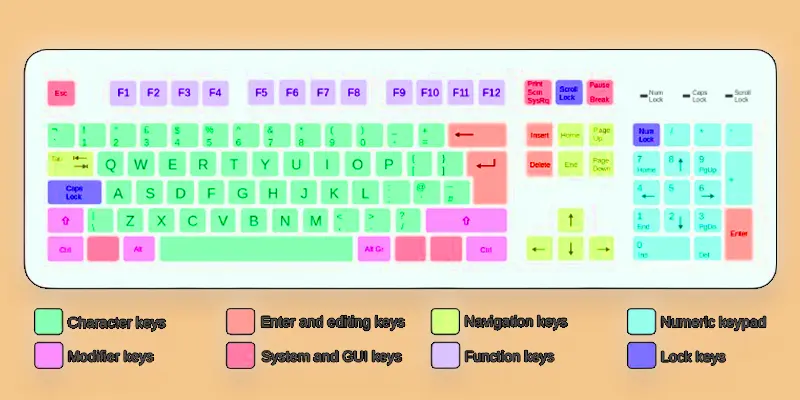
Bépo
The Bépo keyboard layout is optimized for the French language, offering more efficient typing by placing frequently used letters in easy-to-reach positions. It is designed to improve typing speed and comfort for French speakers.
Programmer Dvorak
The Programmer Dvorak keyboard layout is a variant of the Dvorak layout, specifically designed for programming. It optimizes the placement of symbols and frequently used programming characters for faster and more efficient coding.
Chinese Keyboard Layout
The Chinese PC keyboard layout is designed to input Chinese characters, often using Pinyin or other phonetic systems. It allows users to type characters efficiently by mapping them to specific keys or by selecting from a list of suggestions after typing the pinyin.
Armenian Keyboard Layout
The Armenian Keyboard Structure is designed for typing in the Armenian language, with characters arranged to suit the unique alphabet. It allows users to type efficiently in both Western and Eastern Armenian.
Thai Keyboard Layout
The Thai Keyboard Layout is designed for typing in the Thai language, featuring a combination of Thai characters and Latin letters. It allows users to easily switch between languages while typing.
Japanese Keyboard Layout
The Japanese keyboard letter layout is designed for typing in Japanese, featuring a mix of hiragana, katakana, and kanji characters alongside Latin letters. It enables users to easily switch between writing systems.
Korean Keyboard Layout
The Korean Keyboard Layout is designed for typing in the Korean language, with keys for both Hangul characters and the Roman alphabet. It allows efficient input of Korean syllables and easy switching between languages.
Arabic Keyboard Layout
The Arabic layout of the keyboard is designed for typing in the Arabic script, with keys for Arabic characters alongside Latin letters. It allows users to efficiently write in Arabic while supporting seamless switching between languages.
Indian Keyboard Layout
The Indian Keyboard Layout is designed for typing in multiple Indian languages, including Hindi and other regional scripts. It allows users to easily switch between languages and type efficiently using the Devanagari script.
Hebrew Keyboard Layout
The Hebrew Keyboard Layout is designed for typing in Hebrew, with keys for Hebrew characters alongside Latin letters. It enables efficient input of Hebrew text while allowing easy access to standard punctuation and symbols.
How to Switch Keyboard Layout in Windows or Mac?
Changing your keyboard layout is easy, whether you use Windows or Mac. On Windows, go to Settings → tap on Time & Language → tap on Language, then click your language and choose “Add a keyboard layout.” On Mac, open System Preferences → tap on Keyboard → go to Input Sources, then tap on the plus (+) button to add a new layout. You can quickly switch between layouts using a shortcut, like Shift + Alt (Windows) or Control + Space (Mac). Try a new layout for a week and see how it feels!
Final Thoughts
Understanding a keyboard layout is key to better typing speed, accuracy, and comfort. We explored different layouts like QWERTY, AZERTY, and DVORAK, and how each one affects your daily typing. Choosing the right layout can reduce errors and make your work easier. Now it’s your turn to take action. Try different layouts and see what works best for you. Practice regularly and improve your typing skills step by step. A good keyboard layout can truly change the way you work. Start today and type smarter, faster, and with more confidence. You’ve got this!
FAQs
What is the keyboard layout for Hindi typing?
The most commonly used keyboard layout for Hindi typing is the Inscript layout, which follows the traditional Hindi script.
Is there a keyboard with a Mac layout?
Yes, keyboards are available and designed explicitly with a Mac layout, including the placement of keys and shortcuts commonly used on Mac computers.
What is the difference between US and UK keyboard layouts?
The main difference between the US and UK keyboard layouts lies in the placement of certain characters and symbols, such as the “£” and “@” symbols, as well as the size and layout of certain keys.
What is the US keyboard layout?
The US keyboard layout is a standard keyboard layout commonly used in the United States. It features the QWERTY arrangement of keys along with specific keys for functions and symbols.
What is the 3 Keyboard Layout?
The three most common keyboard layouts are QWERTY, AZERTY, and DVORAK.
QWERTY is used mostly in the U.S. and many other countries. It’s the standard keyboard layout for computers
AZERTY is popular in France and Belgium.
DVORAK is made to help people type faster and with less effort.
What is a Keyboard Layout in computer?
A keyboard layout is the way keys are arranged on a computer keyboard. It includes letters, numbers, symbols, and function keys.
Different layouts are designed for different languages or typing styles. The most common one is called QWERTY.





- Be Respectful
- Stay Relevant
- Stay Positive
- True Feedback
- Encourage Discussion
- Avoid Spamming
- No Fake News
- Don't Copy-Paste
- No Personal Attacks
- Be Respectful
- Stay Relevant
- Stay Positive
- True Feedback
- Encourage Discussion
- Avoid Spamming
- No Fake News
- Don't Copy-Paste
- No Personal Attacks
